Apple Music
My recently purchased apple music from my iphone is not dowloaded in my apple music on my laptop for the past 3 months? How can I fix this?
MacBook Pro 13″
My recently purchased apple music from my iphone is not dowloaded in my apple music on my laptop for the past 3 months? How can I fix this?
MacBook Pro 13″
Hi mcardenas6,
Welcome to Apple Support Communities. To ensure that you can access your music from the iPhone to your Mac, we suggest making sure that Sync Library is turned on for both devices. This will help you to access your music content. Here's how:
How to turn on Sync Library on your Mac
1. Open the Apple Music app.
2. In the menu bar, choose Account and make sure that you're signed in with the same Apple ID that you use with your Apple Music subscription.
3. Choose File > Library > Organize Library. Then select Consolidate files.
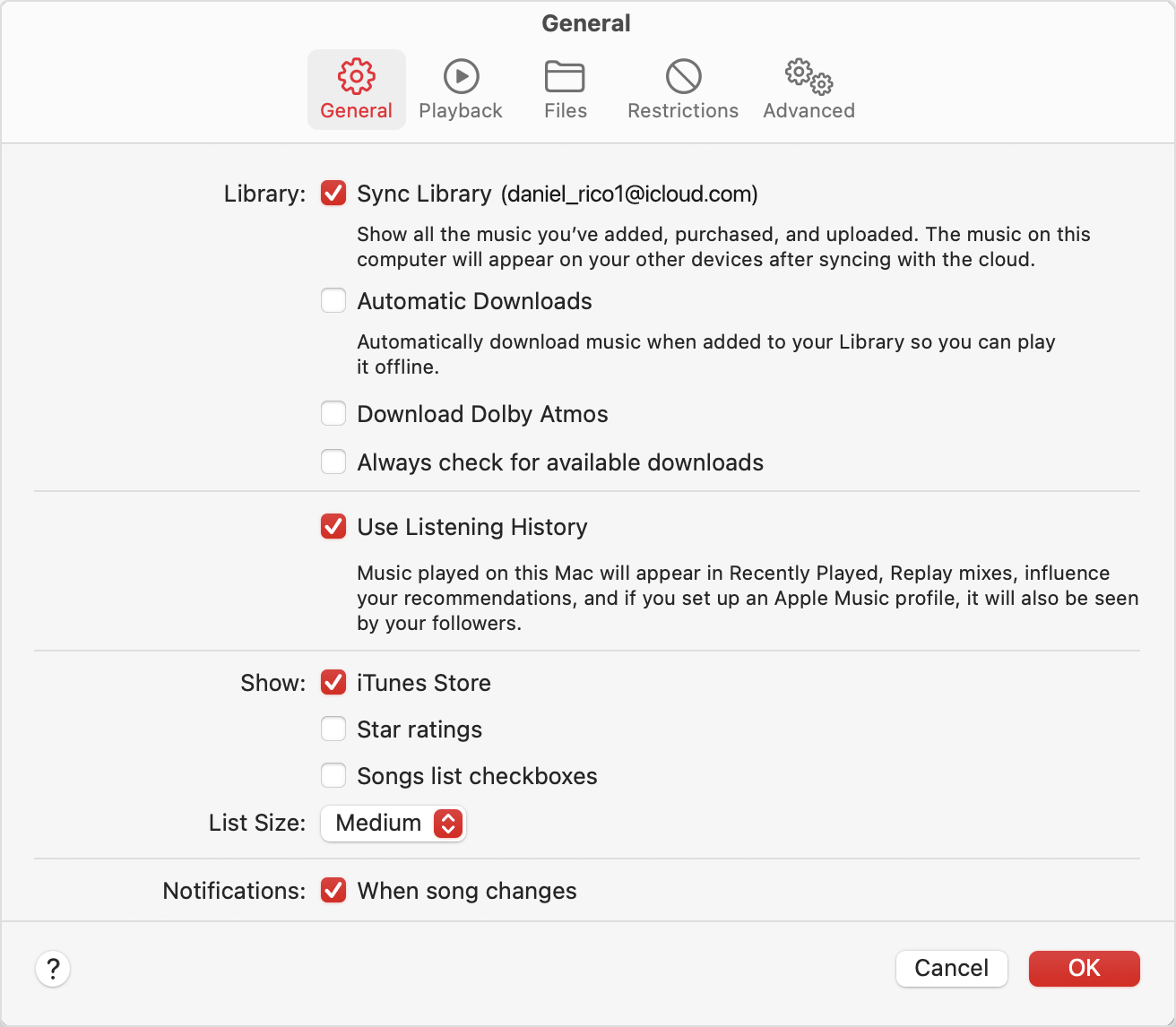
4. Choose Music > Settings or Music > Preferences.
5. Click the General tab.
6. Select Sync Library.
7. Click Ok.
8. Wait for your music library to sync. To check the status, go to the bottom of the sidebar and click Updating Cloud Library.
9. Turn on Sync Library on your other devices.
How to turn on Sync Library on your iPhone or iPad
1. Make sure that your iPhone or iPad is signed in with the same Apple ID that you use with your Apple Music subscription.
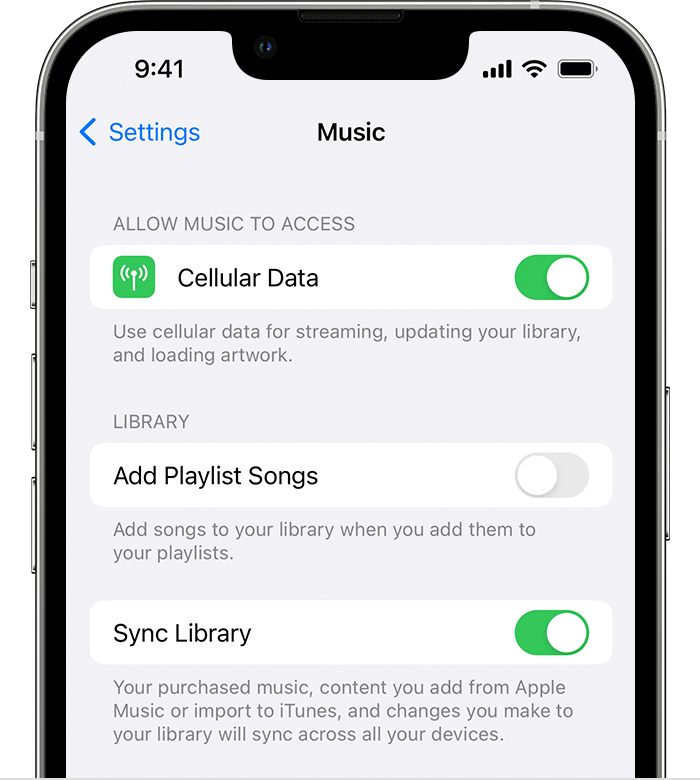
2. Go to Settings.
3. Tap Music.
4. Turn on Sync Library.
5. Turn on Sync Library on your other devices.
Following these steps can help and is outlined in this article: Use Sync Library to access your music library across your devices - Apple Support
Kind regards.
Hi mcardenas6,
Welcome to Apple Support Communities. To ensure that you can access your music from the iPhone to your Mac, we suggest making sure that Sync Library is turned on for both devices. This will help you to access your music content. Here's how:
How to turn on Sync Library on your Mac
1. Open the Apple Music app.
2. In the menu bar, choose Account and make sure that you're signed in with the same Apple ID that you use with your Apple Music subscription.
3. Choose File > Library > Organize Library. Then select Consolidate files.
4. Choose Music > Settings or Music > Preferences.
5. Click the General tab.
6. Select Sync Library.
7. Click Ok.
8. Wait for your music library to sync. To check the status, go to the bottom of the sidebar and click Updating Cloud Library.
9. Turn on Sync Library on your other devices.
How to turn on Sync Library on your iPhone or iPad
1. Make sure that your iPhone or iPad is signed in with the same Apple ID that you use with your Apple Music subscription.
2. Go to Settings.
3. Tap Music.
4. Turn on Sync Library.
5. Turn on Sync Library on your other devices.
Following these steps can help and is outlined in this article: Use Sync Library to access your music library across your devices - Apple Support
Kind regards.
Apple Music