Apple Watch not recording workouts on the Fitness app

The Fitness app is recording the steps, exercise minutes, and calories burned of my 4-mile "outdoor walk" but not recording them as a workout. I manually start these workouts and when I manually stop them I see they have been recording but after stopping there is no record of them. I have done EVERYTHING the apple websites have instructed me to do to no avail. This was working fine until 3 days ago and I didn't change anything on my phone or watch when it stopped. How can I fix this?

[Re-Titled by Moderator]

Apple Watch Series 2

Posted on Aug 8, 2023 10:54 AM

Reply

Similar questions

1 reply

Aug 9, 2023 10:24 AM in response to dal1351

Hi dal1351,


Thanks for posting in Apple Support Communities.


To ensure that your walks are counted as a workout be sure to start an Outdoor Walk in the Workout app. Make sure that both iPhone and Apple Watch are running the latest software versions for the most recent performance updates.


Also, calibrate Apple Watch for more accuracy.


Check your settings

To make sure that your Apple Watch can get the information it needs, check these settings on your iPhone:
1. On your iPhone, open the Settings app.
2. Tap Privacy & Security > Location Services. 
3. Make sure that Location Services is turned on.
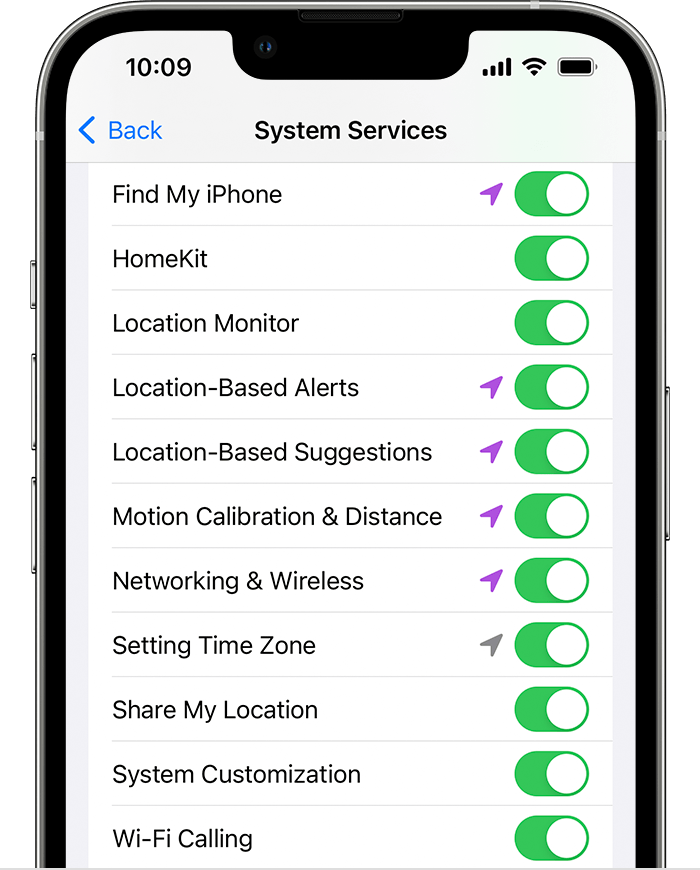
4. Scroll down, then tap System Services. 
5. Make sure that Motion Calibration & Distance is turned on.
6. System Services screen on iPhone.
7. Continue with the steps below.

Calibrate your Apple Watch for improved Workout and Activity accuracy - Apple Support


Regards.


This thread has been closed by the system or the community team. You may vote for any posts you find helpful, or search the Community for additional answers.

Apple Watch not recording workouts on the Fitness app

Welcome to Apple Support Community
A forum where Apple customers help each other with their products. Get started with your Apple Account.