iCloud Mail - Seeing the same iCloud E-Mail twice in the Mail application

I see my iCloud Account twince in the Mail Application. However, under Mail -> Settings -> Accounts. The account is only listed once.


I already tried to log completely off iCloud and I also tried to turn of Mail and then back on again. Did not work. Any other suggestions?


Thank you


MacBook Pro 14″

Posted on Aug 9, 2023 1:24 AM

Reply
Question marked as Top-ranking reply

Posted on Aug 9, 2023 2:44 AM

Have never seen this.


Does not mean it is impossible


Suggest the User start with Points 1 to 4 and then Test


Still having issues, move onto Steps 5 and 6 and Test Again


Still no resolve - move onto Step 7 and follow instructions therein 


1 - Restart in Safe Mode. This will perform a Disk Repair, clear cache files and only load Apple Software, extensions and fonts. The boot up will be slow and can take some time - Normal.


2 - Safe Mode will also eliminate Third Party Software, extensions and drivers from loading. It will only load the Minimum amount of Core Apple Processes to allow the the computer to function at a reduced Level of Performance 


3 - Does the issue present in this mode ?


4 - Sometimes a Safe Boot followed by a Normal Boot will just put things right.


5 - If not - there could be something in the main User Account playing up. To further isolate this - Set up users, guests, and groups on Mac. Then log out of the Main User account and log into the dummy account and test again if the issue persists.


6 - If the issue is present in the dummy account - then, this appears to be a System Wide issue on the computer.


7 - Download the Application Etrecheck directly from the Developer.


This is a Diagnostic Tool that makes no changes to the computer.


It makes a coherent and readable inventory of both the Hardware and Software used on the computer 


The application is free or paid from added features. 


The Report will Not Reveal Any Personal Information. 


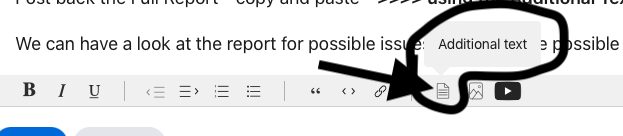
Post back the Full Report - copy and paste - >>>> using the Additional Text Icon ( 3rd Icon to last ) <<<<


Similar questions

20 replies
Question marked as Top-ranking reply

Aug 9, 2023 2:44 AM in response to iDreher

Have never seen this.


Does not mean it is impossible


Suggest the User start with Points 1 to 4 and then Test


Still having issues, move onto Steps 5 and 6 and Test Again


Still no resolve - move onto Step 7 and follow instructions therein 


1 - Restart in Safe Mode. This will perform a Disk Repair, clear cache files and only load Apple Software, extensions and fonts. The boot up will be slow and can take some time - Normal.


2 - Safe Mode will also eliminate Third Party Software, extensions and drivers from loading. It will only load the Minimum amount of Core Apple Processes to allow the the computer to function at a reduced Level of Performance 


3 - Does the issue present in this mode ?


4 - Sometimes a Safe Boot followed by a Normal Boot will just put things right.


5 - If not - there could be something in the main User Account playing up. To further isolate this - Set up users, guests, and groups on Mac. Then log out of the Main User account and log into the dummy account and test again if the issue persists.


6 - If the issue is present in the dummy account - then, this appears to be a System Wide issue on the computer.


7 - Download the Application Etrecheck directly from the Developer.


This is a Diagnostic Tool that makes no changes to the computer.


It makes a coherent and readable inventory of both the Hardware and Software used on the computer 


The application is free or paid from added features. 


The Report will Not Reveal Any Personal Information. 


Post back the Full Report - copy and paste - >>>> using the Additional Text Icon ( 3rd Icon to last ) <<<<


Aug 9, 2023 1:28 AM in response to iDreher

Writing an effective Apple Support Communities question


Saying the computer has the exact same problem but not providing any meaningful information is going to be pure guess work at best


After all we have not yet reached the levels of Mind Reading, but working on it.


Reliable , accurate, details / context will really help to pinpoint a possible solution.


We do not what to offer solutions you has already attempted.

Aug 9, 2023 1:46 AM in response to Owl-53

No, I see my (same) account twice in the application:


Under Settings, the account is only visible once:


I already tried to turn off iCloud Mail completely under System Settings -> my account -> iCloud -> iCloud Mail and I also tried to sign out completely of iCloud. However, when I log back in or turn iCloud Mail back on. The account appears again twice in the Mail application.

Aug 9, 2023 3:49 AM in response to iDreher

My apologizes and perhaps I misunderstood 😔


" On icloud.com the structure is the same, but its shown correct without any duplicate."


" Is it possible to completely reinstall the Mail application on macOS Ventura 13.5? "


No, not possible to reinstall only Mail application


I really do suggest possible answering the question about Migrated from another computer


Or use the 7 Step Trouble Shooting suggestion also mentioned earlier


Should none of the above be acceptable


Get Support Choose a product and we’ll find you the best solution.Start now and open an Apple Support Ticket as they are Apple Employees to deal will these types of issues 


This thread has been closed by the system or the community team. You may vote for any posts you find helpful, or search the Community for additional answers.

iCloud Mail - Seeing the same iCloud E-Mail twice in the Mail application

Welcome to Apple Support Community
A forum where Apple customers help each other with their products. Get started with your Apple Account.