G'day Bz4ddr,
We understand you're having issues with SMS from your iPad, and you've already checked out the resource titled If you can't send or receive messages on your iPhone or iPad.
Since this involves an iPad and SMS, you'll want to start by ensuring that you have set up Text Message Forwarding. Your iPad will need to have that enabled in order to send and receive SMS. Here's how to set it up: Forward SMS/MMS text messages from your iPhone to your Mac or iPad - Apple Support
"Automatically forward texts to your other devices
1) Make sure that you're signed in to iMessage with the same Apple ID on each device:
- iPhone or iPad: Check the Apple ID shown in Settings > Messages > Send & Receive.
- Mac: Open the Messages app, choose Messages > Settings (or Preferences), then click iMessage. Check the Apple ID shown.
2) On your iPhone, go to Settings > Messages > Text Message Forwarding.
If you don't see Text Message Forwarding, go to Settings > Messages. Turn off iMessage, then turn it back on. Tap Send & Receive, tap Use Your Apple ID for iMessage, then sign in with the same Apple ID used on your other devices.
3) Choose which devices can send and receive text messages from your iPhone: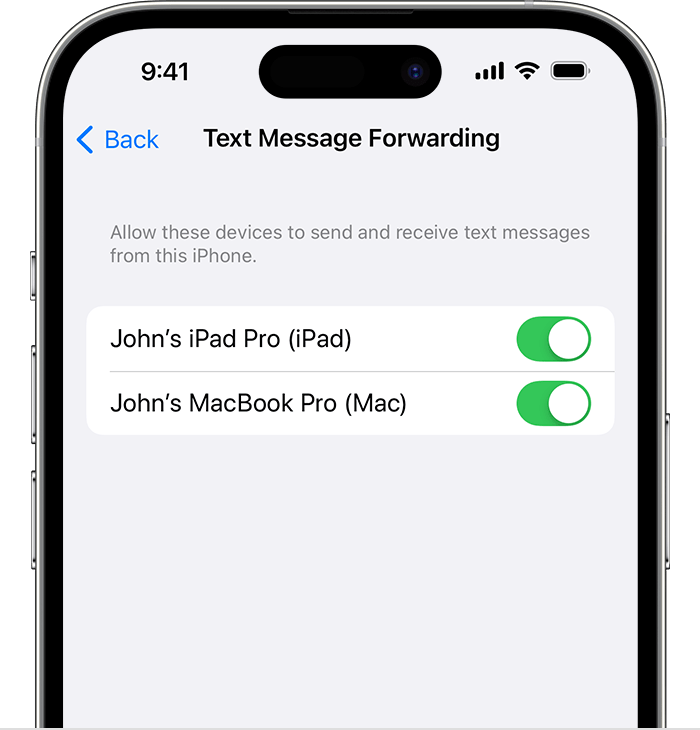
4) If you choose a device that isn't using two-factor authentication for your Apple ID, a verification code appears on each of your other devices: enter that code on your iPhone.
As long as your iPhone is turned on and connected to Wi-Fi or a cellular network, new SMS/MMS texts can be sent and received on the devices that you added."
Let us know if you need further assistance. Best wishes.


