Apple Music (iPhone ver specifically) just playing random songs after playing all songs in playlist.

I found a fairly old tip to fix this. spoiler alert: it doesn't work. there are no three lines, or infinity icon.


how do you put a stop to Music trying to sneakily download random music (that you probably didn't want to hear anyway) off the internet?

iPhone XR

Posted on Aug 11, 2023 2:32 PM

Reply
Question marked as Top-ranking reply

Posted on Aug 12, 2023 12:02 PM

Greetings Edward Devlin1,


It's a pleasure to assist you with Apple Music. By chance, do you have AutoPlay enabled? When this feature is enabled, similar songs will play automatically. Here's how to check:


"Let Autoplay pick what plays next

Autoplay takes the work out of choosing what to play next. Just play a song, then Autoplay finds similar songs and plays them afterward.

To see your Autoplay queue:

  1. Tap the song that's playing at the bottom of your screen.
  2. In the lower-right corner of your screen, tap Playing Next the Playing Next icon.
  3. Scroll down to Autoplay. 

To turn Autoplay on or off, tap the Autoplay button the Autoplay button icon in the upper-right corner of your screen. If you turn off Autoplay on one of your devices, then Autoplay is turned off on any device that's signed in with your Apple ID.
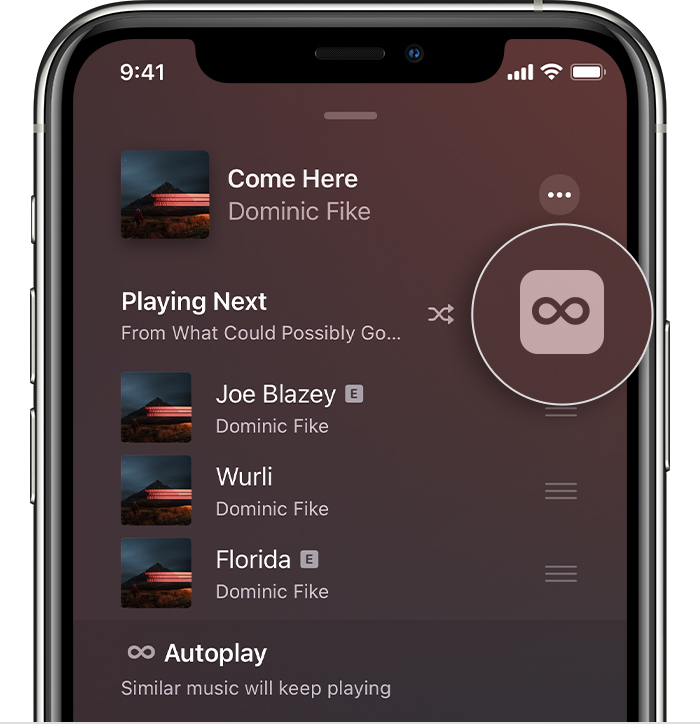
iPhone showing the Autoplay button on the Playing Next screen"


More details here: Add music to your queue to play next on your iPhone, iPad, iPod touch, or Android device


Take care.

1 reply
Question marked as Top-ranking reply

Aug 12, 2023 12:02 PM in response to Edward Devlin1

Greetings Edward Devlin1,


It's a pleasure to assist you with Apple Music. By chance, do you have AutoPlay enabled? When this feature is enabled, similar songs will play automatically. Here's how to check:


"Let Autoplay pick what plays next

Autoplay takes the work out of choosing what to play next. Just play a song, then Autoplay finds similar songs and plays them afterward.

To see your Autoplay queue:

  1. Tap the song that's playing at the bottom of your screen.
  2. In the lower-right corner of your screen, tap Playing Next the Playing Next icon.
  3. Scroll down to Autoplay. 

To turn Autoplay on or off, tap the Autoplay button the Autoplay button icon in the upper-right corner of your screen. If you turn off Autoplay on one of your devices, then Autoplay is turned off on any device that's signed in with your Apple ID.

iPhone showing the Autoplay button on the Playing Next screen"


More details here: Add music to your queue to play next on your iPhone, iPad, iPod touch, or Android device


Take care.

This thread has been closed by the system or the community team. You may vote for any posts you find helpful, or search the Community for additional answers.

Apple Music (iPhone ver specifically) just playing random songs after playing all songs in playlist.

Welcome to Apple Support Community
A forum where Apple customers help each other with their products. Get started with your Apple Account.