
Lost text messages
Upgraded my phone from iPhone XS to iPhone 13.
for some reason my text messages have not migrated onto my new phone. Also my app etc logins and passwords have not been transferred.
iPhone 13
Upgraded my phone from iPhone XS to iPhone 13.
for some reason my text messages have not migrated onto my new phone. Also my app etc logins and passwords have not been transferred.
iPhone 13
Hello DerekMackinlay,
Thank you for reaching out to Apple Support Communities.
If you restored from a backup it may take some time for everything to sync over. In the mean time let's check to see if iCloud for messages is enabled on all of your devices:
"Set up iCloud for Messages on your iPhone, iPad, or iPod touch
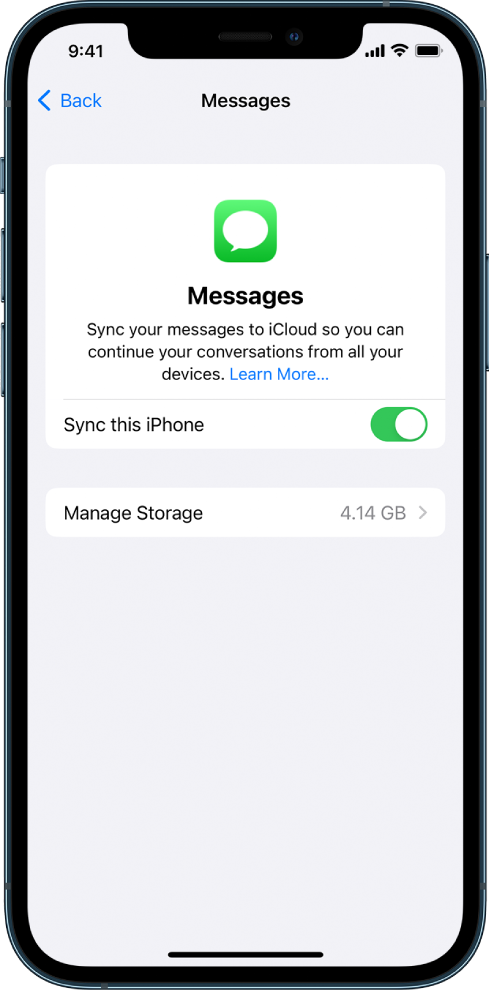
Any messages currently stored in iCloud are now accessible on your device, and any new messages you receive on your device will be stored in iCloud.
3.To make sure you can see your messages on all your devices, also check the following:
4.To see messages stored in iCloud, open the Messages app."
Additional details can be found here: Set up iCloud for Messages on all your devices
Let's also check this article to make sure iCloud Keychain is enabled: Set up iCloud Keychain
If the issue persists, can you provide a few more details? How did you transfer your data to your new device? How long has it been? Are you connected to a strong Wi-Fi network? Also, have other things transferred successfully?
Cheers!
Hello DerekMackinlay,
Thank you for reaching out to Apple Support Communities.
If you restored from a backup it may take some time for everything to sync over. In the mean time let's check to see if iCloud for messages is enabled on all of your devices:
"Set up iCloud for Messages on your iPhone, iPad, or iPod touch
Any messages currently stored in iCloud are now accessible on your device, and any new messages you receive on your device will be stored in iCloud.
3.To make sure you can see your messages on all your devices, also check the following:
4.To see messages stored in iCloud, open the Messages app."
Additional details can be found here: Set up iCloud for Messages on all your devices
Let's also check this article to make sure iCloud Keychain is enabled: Set up iCloud Keychain
If the issue persists, can you provide a few more details? How did you transfer your data to your new device? How long has it been? Are you connected to a strong Wi-Fi network? Also, have other things transferred successfully?
Cheers!
Lost text messages

