iCloud did not backup everything

My iCloud backed up completely before syncing to a new iPhone yet there are thousands of scattered pictures and videos that are missing. It doesn’t stop after a certain day I have pictures from July I can see but June is completely gone, most of April and some of may. There are plenty of pictures before those dates as well. Has anyone else seen this problem? My old phone I traded in and they erased immediately

iPhone 14 Pro Max, iOS 16

Posted on Aug 12, 2023 7:31 PM

Reply
Question marked as Top-ranking reply

Posted on Aug 13, 2023 2:45 PM

Hello Lmasotta7,


We were sorry to learn about your missing Photos. You mentioned that iCloud backed up before you set up your new iPhone, and we wanted to offer some assistance.


If you use iCloud Photos to manage the photos on your iPhone, they sync directly to iCloud. Content that is synced from iCloud is not part of the backup, but it should come back when you enable the same features on your new iPhone. While you're able to use your new iPhone pretty quickly after restoring your backup, but syncing content like iCloud Photos may take awhile to fully load. You might check to see if you have iCloud Photos enabled and if your photos and videos are still loading on your iPhone.


On your iPhone or iPad
1. Open the Photos app. 
2. In the Library tab, tap All Photos.
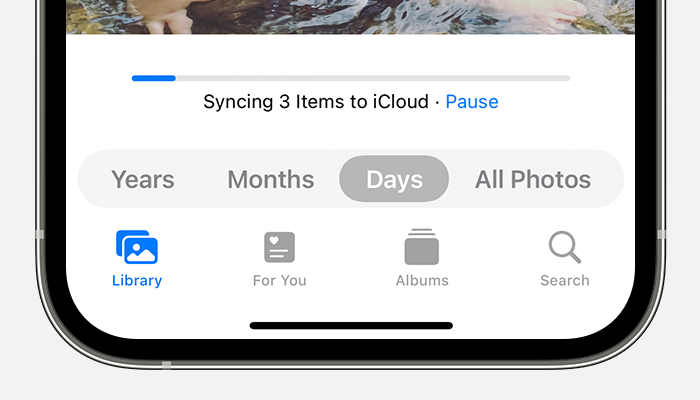
3. Scroll to the bottom to see the status bar. 
The status bar at the bottom of the Photos app shows that 3 items are syncing to iCloud.
If your iCloud Photos aren't syncing to your device - Apple Support


Regards.


Similar questions

2 replies
Question marked as Top-ranking reply

Aug 13, 2023 2:45 PM in response to Lmasotta7

Hello Lmasotta7,


We were sorry to learn about your missing Photos. You mentioned that iCloud backed up before you set up your new iPhone, and we wanted to offer some assistance.


If you use iCloud Photos to manage the photos on your iPhone, they sync directly to iCloud. Content that is synced from iCloud is not part of the backup, but it should come back when you enable the same features on your new iPhone. While you're able to use your new iPhone pretty quickly after restoring your backup, but syncing content like iCloud Photos may take awhile to fully load. You might check to see if you have iCloud Photos enabled and if your photos and videos are still loading on your iPhone.


On your iPhone or iPad
1. Open the Photos app. 
2. In the Library tab, tap All Photos.
3. Scroll to the bottom to see the status bar. 
The status bar at the bottom of the Photos app shows that 3 items are syncing to iCloud.
If your iCloud Photos aren't syncing to your device - Apple Support


Regards.


This thread has been closed by the system or the community team. You may vote for any posts you find helpful, or search the Community for additional answers.

iCloud did not backup everything

Welcome to Apple Support Community
A forum where Apple customers help each other with their products. Get started with your Apple Account.