Why Is The US Version Of Cashapp Showing Instead of the UK one?

My iPhone is showing the Us Version of Cashapp when I’m in the Uk and My Region is Set to the United Kingdom. how can I fix this?


im having this problem on an iPhone 13 Running iOS 16.5.1

iPhone 13, iOS 16

Posted on Aug 13, 2023 10:20 AM

Reply
Question marked as Top-ranking reply

Posted on Aug 14, 2023 12:32 PM

Hi VirtualityFlow,


Just to confirm, is the issue only with that specific application, or multiple apps? Let's make sure the correct region is selected for your Apple ID account, so we can make sure they're aren't any issues there.


This link outlines how to review and manage the country/region details for your Apple ID account, which may help: Change your Apple ID country or region


Use your iPhone or iPad to change your region

1. Open the Settings app. 
2. Tap your name, then tap Media & Purchases.
3. Tap View Account. You might be asked to sign in.
4. Tap Country/Region.
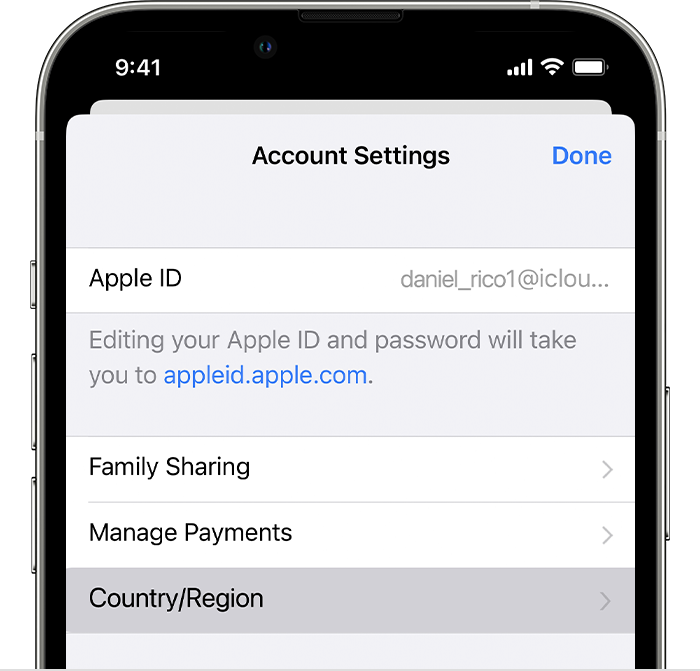
iPhone showing Country/Region in Account Settings.
5. Tap Change Country or Region.
6. Tap your new country or region, then review the Terms & Conditions.
7. Tap Agree in the upper-right corner, then tap Agree again to confirm.
8. Select a payment method and enter your new payment information and billing address, then tap Next. You must enter a valid payment method for your new country or region.*


Thanks!

3 replies
Question marked as Top-ranking reply

Aug 14, 2023 12:32 PM in response to VirtualityFlow

Hi VirtualityFlow,


Just to confirm, is the issue only with that specific application, or multiple apps? Let's make sure the correct region is selected for your Apple ID account, so we can make sure they're aren't any issues there.


This link outlines how to review and manage the country/region details for your Apple ID account, which may help: Change your Apple ID country or region


Use your iPhone or iPad to change your region

1. Open the Settings app. 
2. Tap your name, then tap Media & Purchases.
3. Tap View Account. You might be asked to sign in.
4. Tap Country/Region.
iPhone showing Country/Region in Account Settings.
5. Tap Change Country or Region.
6. Tap your new country or region, then review the Terms & Conditions.
7. Tap Agree in the upper-right corner, then tap Agree again to confirm.
8. Select a payment method and enter your new payment information and billing address, then tap Next. You must enter a valid payment method for your new country or region.*


Thanks!

This thread has been closed by the system or the community team. You may vote for any posts you find helpful, or search the Community for additional answers.

Why Is The US Version Of Cashapp Showing Instead of the UK one?

Welcome to Apple Support Community
A forum where Apple customers help each other with their products. Get started with your Apple Account.