will the low data mode limit to the data amount can use per month?

I have a family plan of 300GB data per month shared with my spouse and 2 kids. I want to set a limit to my youngest kid to control his data usage per month. It is crazy

iPhone XS, iOS 16

Posted on Aug 15, 2023 7:55 AM

Reply
Question marked as Top-ranking reply

Posted on Jun 13, 2024 10:30 AM

No, it does not limit the amount of data used. it does not set a hard cap on data use. It some background processes from using data. That may help, but it is not a true limit.


Contact your cellular carrier. They may have a way to put a hard cap on the amount of data any given line is permitted to use in the billing period.

4 replies
Question marked as Top-ranking reply

Jun 13, 2024 10:30 AM in response to chungyan

No, it does not limit the amount of data used. it does not set a hard cap on data use. It some background processes from using data. That may help, but it is not a true limit.


Contact your cellular carrier. They may have a way to put a hard cap on the amount of data any given line is permitted to use in the billing period.

Aug 15, 2023 8:19 AM in response to chungyan

What to expect in Low Data Mode


Different apps use different ways of reducing data usage in Low Data Mode. In general, here's what you can expect:

  • Apps might stop using network data when you're not actively using them.
  • Background App Refresh is turned off.
  • The quality of streaming content might be reduced.
  • Automatic downloads and backups are turned off.
  • Services such as iCloud Photos pause updates.


Built-in iOS apps and services adapt to Low Data Mode in the following ways:

  • App Store: Video autoplay, automatic updates and automatic downloads are turned off.
  • Music: Automatic downloads and high-quality streaming are turned off.
  • Podcasts: The frequency of feed updates is limited, and episodes are only downloaded on Wi-Fi.
  • News: Article pre-fetching is turned off.
  • iCloud: Updates are paused, and automatic backups and iCloud Photos updates are turned off.
  • FaceTime: Video bitrate is optimised for lower bandwidth.


How to turn on Low Data Mode

  1. Go to Settings and tap Mobile Data.
  2. Tap Mobile Data Options, then turn on Low Data Mode.


Use Low Data Mode on your iPhone and iPad - Apple Support

Jun 13, 2024 10:05 AM in response to chungyan

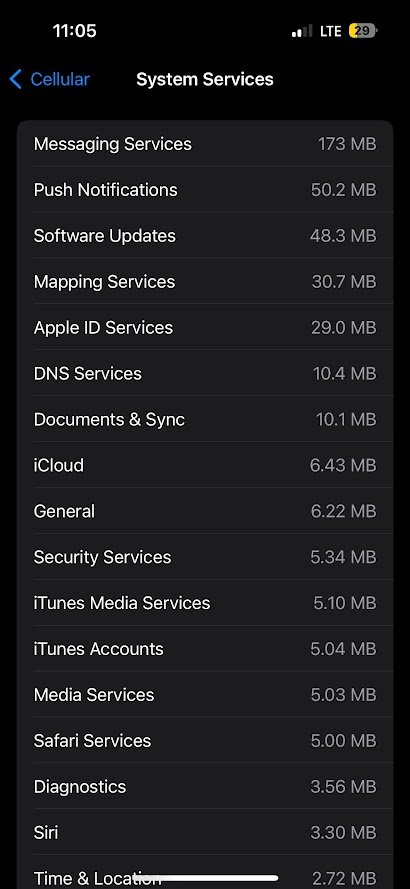
iOS desperately needs to give us more data limit controls. It's easy to test this when you've used Android on the same phone plan and user habits, the iphone always uses more data due to background activity. I'm assuming it's imessage being enabled as well, similar to RCS on Android using data and battery in the background.


That's a good experiment: disable imessage for a month and reset your phone statistics, it will show you how much data it uses with imessage off.


For example, this is screenshot of iphone 15pro after 3 months of use (Feb - May) on low data mode, background app refresh off, icloud off. See how it's still requesting system updates in the background. I basically turn off anything that can use battery and data in the background.


This thread has been closed by the system or the community team. You may vote for any posts you find helpful, or search the Community for additional answers.

will the low data mode limit to the data amount can use per month?

Welcome to Apple Support Community
A forum where Apple customers help each other with their products. Get started with your Apple Account.
