How to save in latest Motion

How to save a motion project without publishing to final cut pro? I am using latest version 5.6.5.


When I choose save or save as I get this window. I am just messing around with an animation and I do not want it published into final cut pro. How do I just save it so I can close motion and re-open that project file to continue to work on the animation?

MacBook Pro 14″, macOS 13.5

Posted on Aug 16, 2023 5:06 PM

Reply
Question marked as Top-ranking reply

Posted on Aug 16, 2023 6:16 PM

If you're developing an Effect, Title, Transition or Generator, you can't really because the Motion Project/FCP Template relies on specific information about those "states" and it is assumed you will eventually have a finished published template. An Effect has an "Effect Source"; Titles have a "Title Background"; Transitions have *two* "background sources"; Generators are simply compositions directly published to Final Cut as a template.


If you're just "messing around", sometimes it helps to start out with a plain Motion Project - also known as a "Composition".


At any given time, you can go to File > Convert Project To > ... and choose what type of template or project you want to convert to -- to save.
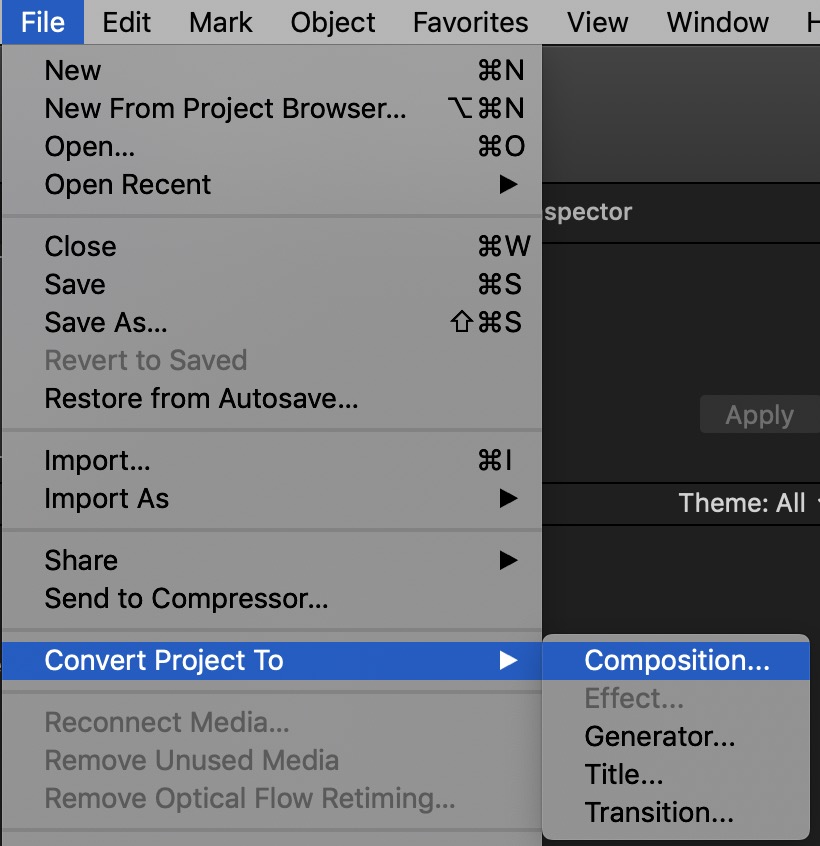


To answer your question now - with the project you're working on — Cancel out of that dialog. Convert Project To > Composition and Save it wherever you want to. Later you can use what you've been working on and apply it to any of the other template types to be published to Final Cut.


4 replies
Question marked as Top-ranking reply

Aug 16, 2023 6:16 PM in response to heroin_bob

If you're developing an Effect, Title, Transition or Generator, you can't really because the Motion Project/FCP Template relies on specific information about those "states" and it is assumed you will eventually have a finished published template. An Effect has an "Effect Source"; Titles have a "Title Background"; Transitions have *two* "background sources"; Generators are simply compositions directly published to Final Cut as a template.


If you're just "messing around", sometimes it helps to start out with a plain Motion Project - also known as a "Composition".


At any given time, you can go to File > Convert Project To > ... and choose what type of template or project you want to convert to -- to save.


To answer your question now - with the project you're working on — Cancel out of that dialog. Convert Project To > Composition and Save it wherever you want to. Later you can use what you've been working on and apply it to any of the other template types to be published to Final Cut.

Aug 16, 2023 6:13 PM in response to heroin_bob

Hi


In this case, the file format is a title template/.moti.

You need to convert from a title template to a motion project/.motn


In the edit menu, use the conversion options to convert the title template to a motion project so that you can save without publishing. Note that in this process, all the specific functions that distinguish a title template from a motion project will be removed.


This thread has been closed by the system or the community team. You may vote for any posts you find helpful, or search the Community for additional answers.

How to save in latest Motion

Welcome to Apple Support Community
A forum where Apple customers help each other with their products. Get started with your Apple Account.