Need to change my phone number for verification…have new phone and numb tried to subscribe to AppleTV+er
Am not able to change my cell phone number to receive the verification code as the number on file has been changed?
iPad Air 2, iPadOS 13
Am not able to change my cell phone number to receive the verification code as the number on file has been changed?
iPad Air 2, iPadOS 13
Hello Scanzio1,
If one of your trusted devices is with you, you should be able to receive a verification code there: Get a verification code and sign in with two-factor authentication - Apple Support
Use the code displayed on your trusted device
If you have a trusted device running iOS 9 and later, OS X El Capitan and later, iPadOS 13 and later, or watchOS 6 and later, the verification code is displayed automatically on your trusted devices.
1. Sign in with your Apple ID and password on a new device or browser.
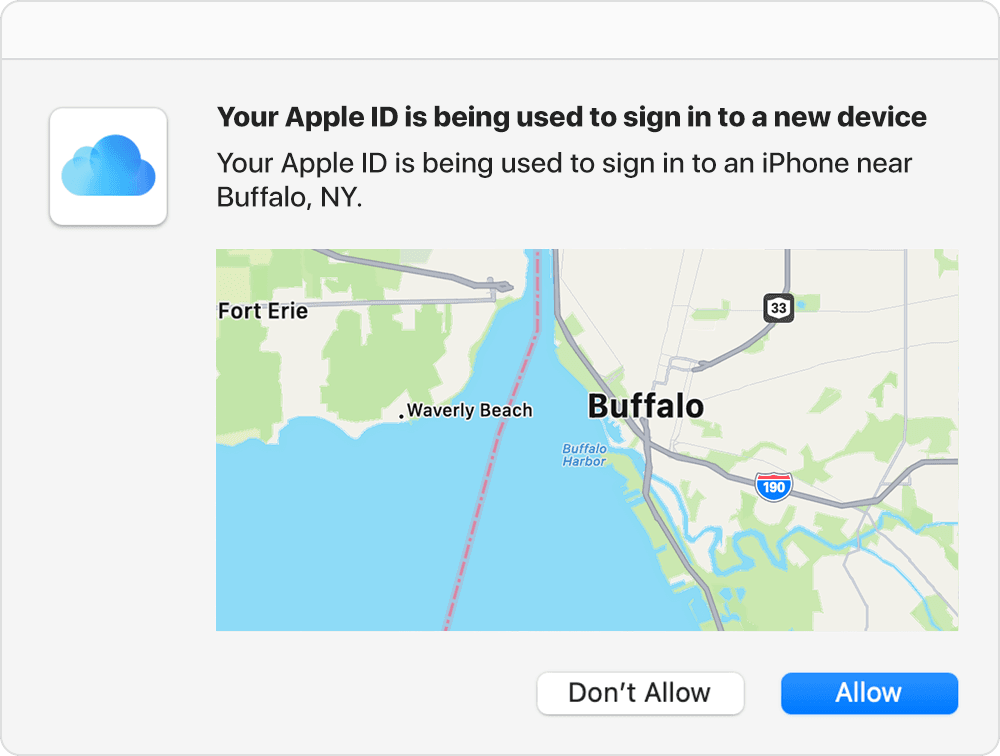
2. Look for a sign in notification on any of your trusted devices.
3. Tap Allow to receive your verification code.
4. Enter the verification code on your other device to complete sign in.
If you don't have access to another trusted device or phone number, you'll need to start account recovery since the requirement for two-factor authentication is a trusted device or phone number plus your password: How to use account recovery when you can’t reset your Apple ID password - Apple Support
Take care for now.
Hello Scanzio1,
If one of your trusted devices is with you, you should be able to receive a verification code there: Get a verification code and sign in with two-factor authentication - Apple Support
Use the code displayed on your trusted device
If you have a trusted device running iOS 9 and later, OS X El Capitan and later, iPadOS 13 and later, or watchOS 6 and later, the verification code is displayed automatically on your trusted devices.
1. Sign in with your Apple ID and password on a new device or browser.
2. Look for a sign in notification on any of your trusted devices.
3. Tap Allow to receive your verification code.
4. Enter the verification code on your other device to complete sign in.
If you don't have access to another trusted device or phone number, you'll need to start account recovery since the requirement for two-factor authentication is a trusted device or phone number plus your password: How to use account recovery when you can’t reset your Apple ID password - Apple Support
Take care for now.
Need to change my phone number for verification…have new phone and numb tried to subscribe to AppleTV+er