
Why does Voice Control keep interfering with podcasts on my iPod?
Why does Voice Control keep interfering with podcasts on my iPod?
[Re-Titled by Moderator]
iPod, iOS 9
Why does Voice Control keep interfering with podcasts on my iPod?
[Re-Titled by Moderator]
iPod, iOS 9
Hi HawaiianPrint789,
You can disable Voice Control in Settings > Accessibility > Voice Control and toggle it off.
You can also turn off specific commands for Voice Control if you'd like as outlined here: How to customize Voice Control commands on your iPhone, iPad, and iPod touch - Apple Support
"Turn a command on or off
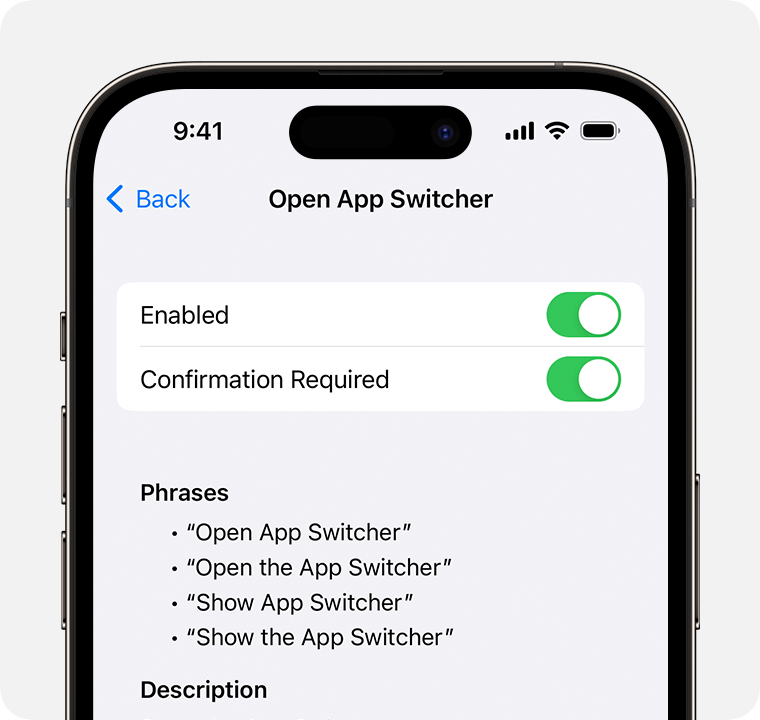 "
"
We hope this helps.
Take care!
Hi HawaiianPrint789,
You can disable Voice Control in Settings > Accessibility > Voice Control and toggle it off.
You can also turn off specific commands for Voice Control if you'd like as outlined here: How to customize Voice Control commands on your iPhone, iPad, and iPod touch - Apple Support
"Turn a command on or off
"
We hope this helps.
Take care!
Hi HawaiianPrint789,
You can disable Voice Control in Settings > Accessibility > Voice Control and toggle it off.
You can also turn off specific commands for Voice Control if you'd like as outlined here: How to customize Voice Control commands on your iPhone, iPad, and iPod touch - Apple Support
"Turn a command on or off
"
We hope this helps.
Take care!
Hello HawaiianPrint789,
Thank you for reaching out to Apple Support Communities.
These steps can help you adjust your settings for voice control:
"How to use Voice Control
When Voice Control is turned on, you can speak commands just like you would perform an action by touch. For example, to access Spotlight Search on the Home screen, say “Swipe down.” Or to access long-press menus for certain apps, say “Long press [app name].” Voice Control doesn’t change how your device responds to touch.
To see a list of available commands for different situations, say “Show me what to say.”
To view the full list of available commands, follow these steps:
Learn more about customizing the commands for Voice Control."
Additional details can be found here: Use Voice Control on your iPhone, iPad, or iPod touch
If the issue persists, can you provide in great detail how exactly voice control is interfering with podcasts? Also, which exact iPod and iOS version are you currently using?
Cheers!
Thanks, I just want to disable it. It pops up and gives a little “ding, ding” and stops the podcast I’m listening to.
Why does Voice Control keep interfering with podcasts on my iPod?


