Why can’t I access my family’s Apple Music family plan when I’m in the family sharing group and my device is up to date?

The family plan is paid for and I am in the family sharing group but it will not let me use the Apple Music subscription.

iPhone 12

Posted on Aug 21, 2023 9:44 AM

Reply
Question marked as Top-ranking reply

Posted on Aug 22, 2023 10:17 AM

Hello shiloh275,


It seems like you're unable to access your family's shared content, is that correct? What exactly happens when you try to access Apple Music with Family Sharing? Do you receive any errors?


The above details will help us plan how to proceed.


Please be sure to review all of the information outlined in the link you came from, which explains what to do if you can't access your family's shared content, and may be helpful: If you can't find your family's shared content

Check your Family Sharing settings

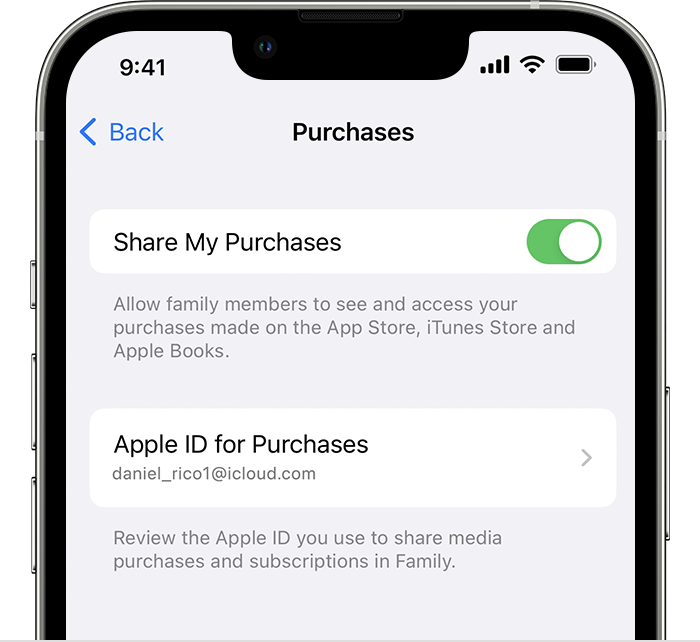
Make sure that you're using the same Apple ID for Family Sharing and Media & Purchases. And make sure that purchase sharing is turned on. Then ask your family members to check their settings too.

On your iPhone or iPad with iOS 16 or later

1. Go to Settings > Family.
2. Tap your name. 
3. Make a note of which Apple ID is listed.
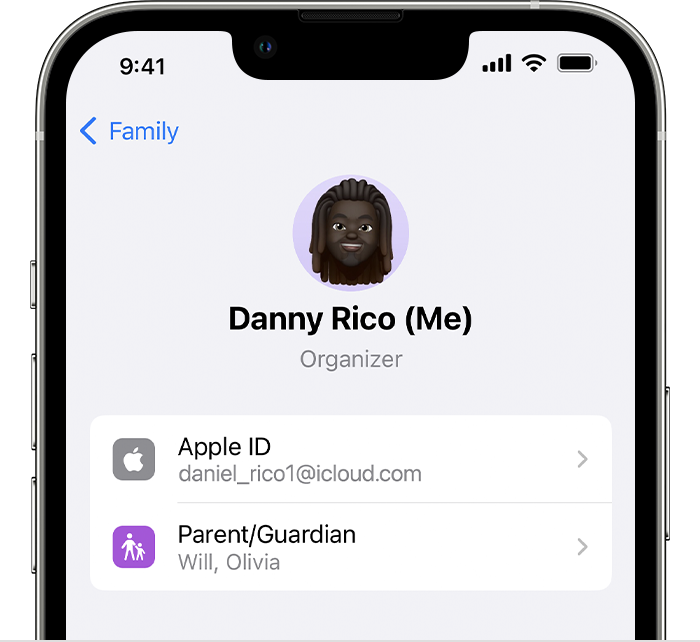
4. Tap Purchases. 
5. Tap Apple ID for Purchases and make sure that you're signed in with with the same Apple ID that you use for Family Sharing. If not, tap Share using secondary Apple ID and enter the Apple ID and password for that Apple ID. 

Thanks!

1 reply
Question marked as Top-ranking reply

Aug 22, 2023 10:17 AM in response to shiloh275

Hello shiloh275,


It seems like you're unable to access your family's shared content, is that correct? What exactly happens when you try to access Apple Music with Family Sharing? Do you receive any errors?


The above details will help us plan how to proceed.


Please be sure to review all of the information outlined in the link you came from, which explains what to do if you can't access your family's shared content, and may be helpful: If you can't find your family's shared content

Check your Family Sharing settings

Make sure that you're using the same Apple ID for Family Sharing and Media & Purchases. And make sure that purchase sharing is turned on. Then ask your family members to check their settings too.

On your iPhone or iPad with iOS 16 or later

1. Go to Settings > Family.
2. Tap your name. 
3. Make a note of which Apple ID is listed.
4. Tap Purchases. 
5. Tap Apple ID for Purchases and make sure that you're signed in with with the same Apple ID that you use for Family Sharing. If not, tap Share using secondary Apple ID and enter the Apple ID and password for that Apple ID. 


Thanks!

This thread has been closed by the system or the community team. You may vote for any posts you find helpful, or search the Community for additional answers.

Why can’t I access my family’s Apple Music family plan when I’m in the family sharing group and my device is up to date?

Welcome to Apple Support Community
A forum where Apple customers help each other with their products. Get started with your Apple Account.