Focus is no longer blocking Life360

I believe this has been happening since IOS update 16.6 but it has definitely been for the last couple of weeks.... all of a sudden Focus no longer successfully stops notifications from Life360. Has anyone else experienced this recent issue? Focus used to successfully "block" all notifications from any app not "green lighted" in the settings for Focus which obviously allow for selected apps to be allowed to "break through" Focus but now Life360 seems to also be able to break through even though it is not an allowed app.

Posted on Aug 21, 2023 1:17 PM

Reply
Question marked as Top-ranking reply

Posted on Aug 23, 2023 2:12 PM

I have this same issue too! I think this is happening because you and I both have the focus set to allow certain people and those people are also in our Life350 circle. That’s my hunch. After a recent Life360 notification I think when a notification occurs it shows as a notification about that specific person (with the profile picture) instead of just a general notification from the app. I think this happens for other apps too

11 replies
Question marked as Top-ranking reply

Aug 23, 2023 2:12 PM in response to Focusnolongerblockinglife360

I have this same issue too! I think this is happening because you and I both have the focus set to allow certain people and those people are also in our Life350 circle. That’s my hunch. After a recent Life360 notification I think when a notification occurs it shows as a notification about that specific person (with the profile picture) instead of just a general notification from the app. I think this happens for other apps too

Aug 22, 2023 11:55 AM in response to Focusnolongerblockinglife360

Hey Focusnolongerblockinglife360,


Did you create the Focus on your Apple Watch or are you mirroring your iPhone Focus? If you’re mirroring the Focus on your iPhone, make sure that Life360 icon doesn’t appear in the App section: Allow or silence notifications for a Focus on iPhone - Apple Support


If it’s there, remove it and see if Life360 can send notifications now.


Please let us know the results when you're able.


All the best.

Aug 22, 2023 2:23 PM in response to Ali_E1

Hi Ali_E1,


Unfortunately Life360 seems to be the problem here and that is a third party app. I did contact Apple support but we verified that Focus is working properly with every other app except this one (which it used to also work for) so I think this is a Life360 problem not an Apple problem. I put it out to this discussion group to see if anyone else had any ideas other than actual support.


Thanks!

Aug 22, 2023 2:04 PM in response to Focusnolongerblockinglife360

https://getsupport.apple.comHi Focusnolongerblockinglife360,


We certainly understand what it's like when technology doesn't work the way you exit it to work, and want you to get the best support possible. It sounds like you've already done the basic troubleshooting for Focus on both your iPhone and Apple Watch, so you may want to contact Apple Support for more advanced assistance.


You can connect from the Get Support portal in most countries.


Get Support not working for you? Find the best phone number to call from your country here: Contact Apple for support and service - Apple Support


Best Wishes.

Aug 22, 2023 10:58 AM in response to Focusnolongerblockinglife360

Hi Focusnolongerblockinglife360,


Thanks for posting in Apple Support Communities! Since you're getting notifications on your Apple Watch although the Focus is set, we suggest ensuring your Apple Watch's software is also updated to the latest version. Outdated software can cause things to misbehave.


  1. Make sure that your iPhone is updated to the latest version of iOS.
  2. Make sure that your Apple Watch is at least 50 percent charged.
  3. Make sure that your iPhone is connected to Wi-Fi.
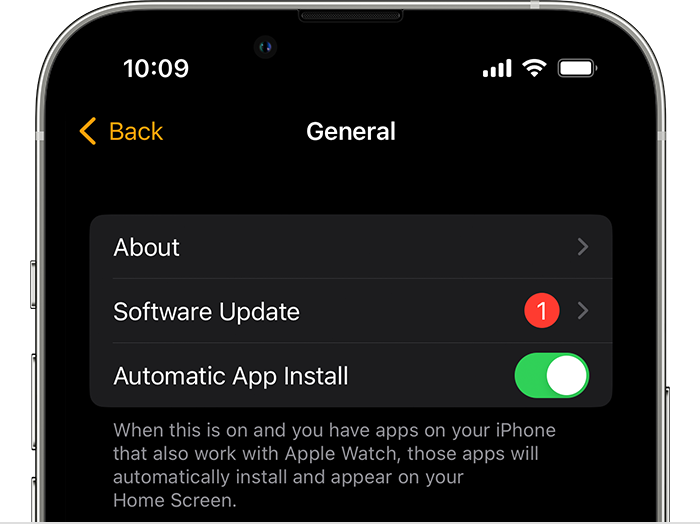
  4. On your iPhone, open the Apple Watch app, then tap the My Watch tab. 
  5. Tap General > Software Update.

6. Download the update. If asked for your iPhone passcode or Apple Watch passcode, enter it. 

7. Wait for the progress wheel to appear on your Apple Watch. It could take from several minutes to an hour for the update to complete. 


Find these steps in the article Update your Apple Watch.


Hope that helps!


Aug 22, 2023 1:50 PM in response to SnickZ.

Hi SnickZ,


I do mirror my iPhone for Focus and I do have apps that are allowed to "break through" Focus. Life360 is not and has never been one of these apps. If fact, after this started happening, I did put Life360 on the app list and took it off to see if this would make a difference but it did not.


Thanks for trying to help and if you have any other suggestions, I would love to try them. By the way, this used to work perfectly and only stopped working in the last month or two.


Aug 23, 2023 2:25 PM in response to flowerofwrath

That makes sense. Thanks for sharing. I obviously want to allow my kids to be able to break through the Do Not Disturb (so I have them as exceptions) but I do not want to be woken up at midnight to be told that their battery is low :-). I recently just turned off the notification feature on Life360 so it will not be sending me notifications anymore.


Thanks again!!

This thread has been closed by the system or the community team. You may vote for any posts you find helpful, or search the Community for additional answers.

Focus is no longer blocking Life360

Welcome to Apple Support Community
A forum where Apple customers help each other with their products. Get started with your Apple Account.