I need help logging into my old Apple ID accounts

I have an old account I can’t log into because I no longer have access to the number I have the iCloud and password but can’t access number and is actually 2 accounts

first one is


ma’am’s thing I have i clouds and passwords but can’t acces both of them because of the number I don’t have access to what can I do is there any one that on both accounts my number could be changed to my present number. If so please how can I proceed with the issue. Thank you


[Edited by Moderator]

iPhone XS Max

Posted on Aug 23, 2023 9:29 AM

Reply
Question marked as Top-ranking reply

Posted on Aug 24, 2023 10:08 AM

Greetings KayLeeZay97,


It appears that you're using two-factor authentication and are unable to receive a verification code. We understand that you no longer have access to the phone number that was associated with your accounts. Therefore, the other option would be to get a code from Settings, on your trusted device, as shown below:


"Get a code from Settings on your trusted device

If you can’t receive a verification code on your trusted devices automatically, you can get one from Settings, even if your device is offline.

From your iPhone, iPad, or iPod touch

If your device is online:

  1. Go to Settings > [your name].
  2. Tap Password & Security > Get Verification Code.
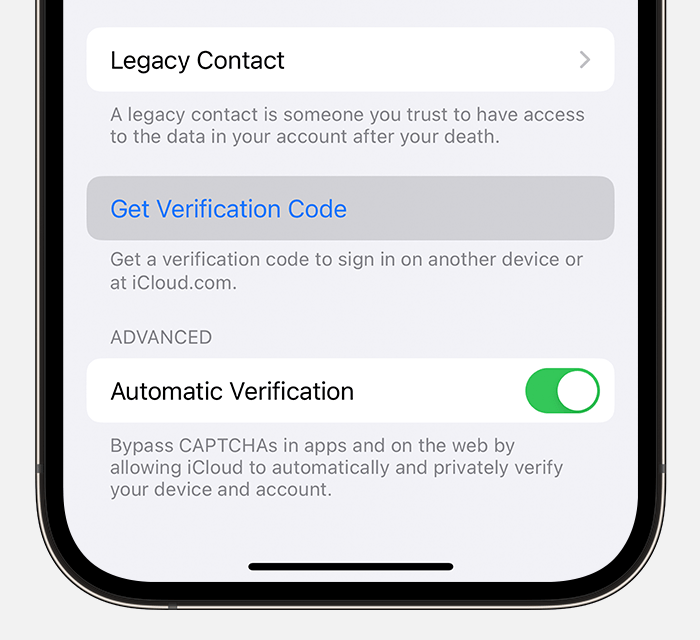
On iPhone, tap Get Verification Code


If your device is offline:

  1. Go to Settings > [your name].
  2. Tap Password & Security. 
  3. A message says "Account Details Unavailable." Tap Get Verification Code.


From your Mac

  1. Go to Apple menu  > System Settings (or System Preferences), then click your name (or Apple ID).
  2. Click Password & Security > Get a Verification Code.
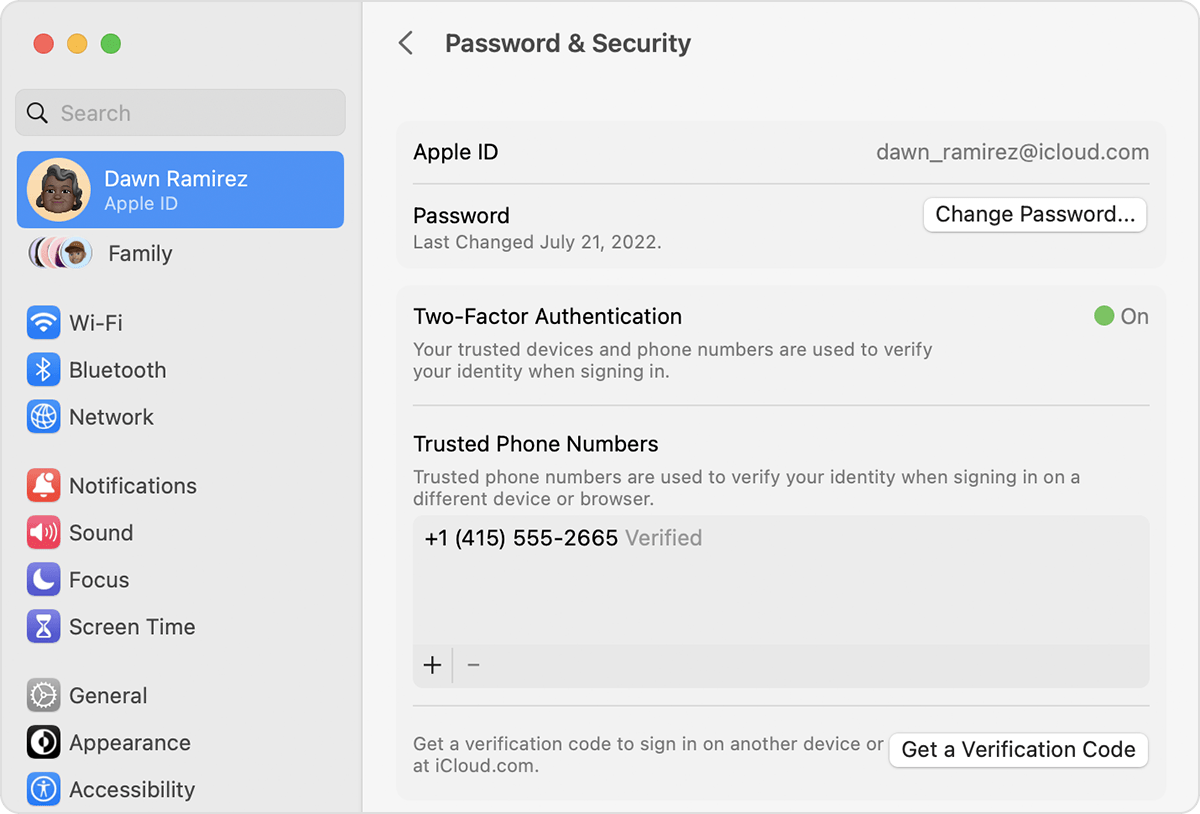
On Mac, open settings to get a verification code


If you still can't sign in

If you can’t sign in, reset your password, or receive verification codes, you can request account recovery to regain access to your account. Account recovery might take a few days or longer, depending on the specific account information you can provide to verify your identity."


More details here: Get a verification code and sign in with two-factor authentication


Take care.

1 reply
Question marked as Top-ranking reply

Aug 24, 2023 10:08 AM in response to KayLeeZay97

Greetings KayLeeZay97,


It appears that you're using two-factor authentication and are unable to receive a verification code. We understand that you no longer have access to the phone number that was associated with your accounts. Therefore, the other option would be to get a code from Settings, on your trusted device, as shown below:


"Get a code from Settings on your trusted device

If you can’t receive a verification code on your trusted devices automatically, you can get one from Settings, even if your device is offline.

From your iPhone, iPad, or iPod touch

If your device is online:

  1. Go to Settings > [your name].
  2. Tap Password & Security > Get Verification Code.

On iPhone, tap Get Verification Code


If your device is offline:

  1. Go to Settings > [your name].
  2. Tap Password & Security. 
  3. A message says "Account Details Unavailable." Tap Get Verification Code.


From your Mac

  1. Go to Apple menu  > System Settings (or System Preferences), then click your name (or Apple ID).
  2. Click Password & Security > Get a Verification Code.

On Mac, open settings to get a verification code


If you still can't sign in

If you can’t sign in, reset your password, or receive verification codes, you can request account recovery to regain access to your account. Account recovery might take a few days or longer, depending on the specific account information you can provide to verify your identity."


More details here: Get a verification code and sign in with two-factor authentication


Take care.

This thread has been closed by the system or the community team. You may vote for any posts you find helpful, or search the Community for additional answers.

I need help logging into my old Apple ID accounts

Welcome to Apple Support Community
A forum where Apple customers help each other with their products. Get started with your Apple Account.