none of my devices are receiving text message notifications

For my MacBook, watch, and iPhone are not alerting me that I received a text messages, but I would show on older notifications. My other apps are sending notification such as Whatsapp and Snapchat but not iMessages. Ive checked on the notification setting and they are on, my do not disturb and my focus are off, and I even reset my iPhone setting that someone had recommended from another post. Any other recommendation I can try. Thank you

iPhone XR, iOS 16

Posted on Aug 23, 2023 1:48 PM

Reply
1 reply

Aug 24, 2023 12:15 PM in response to dheila

Hi dheila,


It sounds like you're not receiving notifications from the Messages app. To start as your notes on this post state you're running iOS 16, be sure the latest version. The steps here can help you update if needed: Update your iPhone or iPad


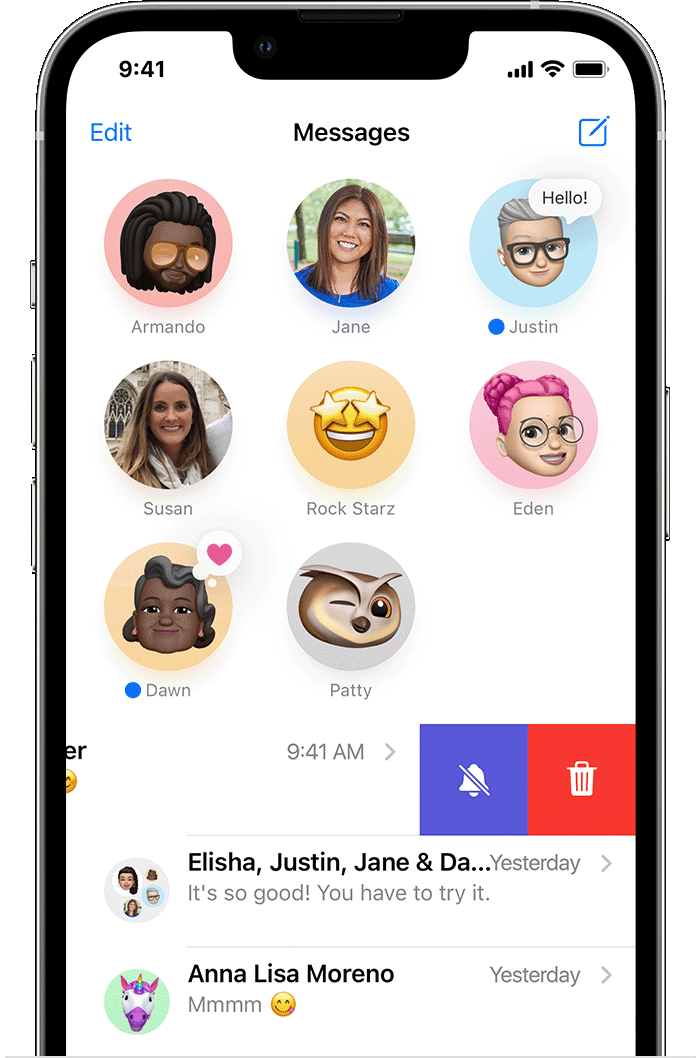
If fully updated, check your messages to see if any conversations are muted. The steps below found in the article here can assist: Use Messages on your iPhone or iPad


"Turn on Hide Alerts


iPhone showing how to turn on Hide Alerts by swiping left over a message.

  1. Open Messages.
  2. Swipe left over the conversation that you want to mute.
  3. Tap the Alerts button .

When Hide Alerts is on, the Alerts button  appears next to the conversation. This stops notifications only for that conversation, not your device. You’ll still receive all other messages and see notifications for them on your Lock Screen."


You can also check your Screen Time settings and restrictions with the article here: Use Screen Time on your iPhone, iPad, or iPod touch - Apple Support


If the issue continues, reach out to Apple Support directly to further assist. Get Support


Best.


This thread has been closed by the system or the community team. You may vote for any posts you find helpful, or search the Community for additional answers.

none of my devices are receiving text message notifications

Welcome to Apple Support Community
A forum where Apple customers help each other with their products. Get started with your Apple Account.