How to know when family stopped sharing and started sharing locations with me

So if a family stops sharing location with me I get a time sensitive notification but before I can check back on it , it disappeared and they share their current location but not turn on location sharing. Then days later with no discussion I turn my location off to them just to make it a point of being unable to see there’s. Now they think they have turned there off and back on and try to get me to believe they were sharing with me for the days they weren’t. But I want them to see that they definitely were not sharing with me for days. How do I find this information?

Posted on Aug 24, 2023 6:53 PM

Reply
5 replies

Aug 25, 2023 2:07 PM in response to U81Ridged2

Hi U81Ridged2,


You started from a good article: Share your location with your family


As mentioned in the article you started from you can: "Get notifications about a family member's location

If you want to know when a friend or family member has arrived at or left a location, or if they aren't at a particular place during a specific time window, you can set up recurring notifications."


You can check more details on both devices with the steps below from this article: Find people and share your location with Find My


"Get notified when a friend arrives at, leaves, or isn't at a location


  1. Open the Find My app and select the People tab.
  2. Select the person that you want to share notifications with.
  3. Scroll down and under Notifications, tap Add.
  4. Tap Notify Me to get notified of a friend's location change.* Tap Notify Friend to notify a friend of your location change. 
  5. Under When, select Arrives, Leaves, or Is Not At. If you're sharing your location change, select I Arrive or I Leave. 
  6. Under Location, tap to select your current location, or tap New Location to select a different location. 
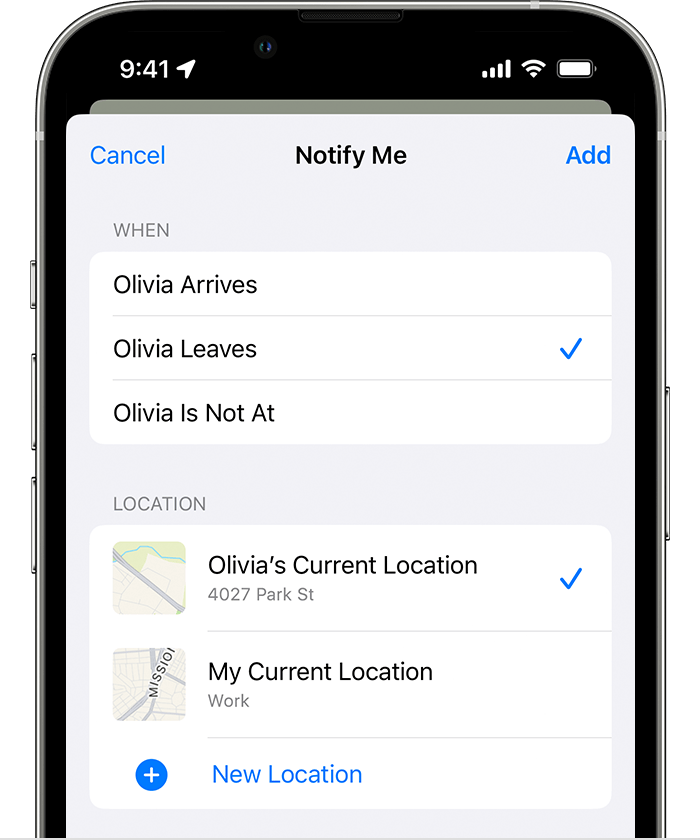
Create a location-based notification for a friend on iPhone7. Under Frequency, select Only Once or Every Time.


* Your friend will be notified when you set a location-based notification. For recurring location-based notifications, your friend has to accept the invitation."


If needed there are also steps for stopping the notifications. See the section "Stop sharing your location" in the same article shared above. Should there be a different issue, provide more information or detail about what's occurring and we'll take it from there.


Cheers.

Aug 26, 2023 1:52 PM in response to OrigamiFan1

The issue that I have is that they turned off location sharing and sent current location shortly after but didn’t share location beyond that point however they are claiming that they did. I am looking for a timeline for them to see that they are not actively sharing location whether it be on there account or mine just to make it clear that they were not allowing me to know there location

Feb 24, 2024 3:10 AM in response to U81Ridged2

Is my phones and I was supposed to be sharing location and because she has a tendency to wander off and OD like 20 times and she’s in she being in charge of crimes right now and if this is the case I am not he went back to it I’m not gonna allow her to use my phone because I’m retired firefighter work trades and I save the life five times and I’m not gonna have my name associated with her. She still doing bad things. What do I do about that?

This thread has been closed by the system or the community team. You may vote for any posts you find helpful, or search the Community for additional answers.

How to know when family stopped sharing and started sharing locations with me

Welcome to Apple Support Community
A forum where Apple customers help each other with their products. Get started with your Apple Account.
