i would like to wipe my phone cause i forgot my passcode

forgot my passcode but the phone does give me erase opt

iPhone 7, iOS 15

Posted on Aug 25, 2023 11:05 AM

Reply
Question marked as Top-ranking reply

Posted on Aug 25, 2023 11:10 AM

Do you see the iPhone Unavailable screen, as shown below?
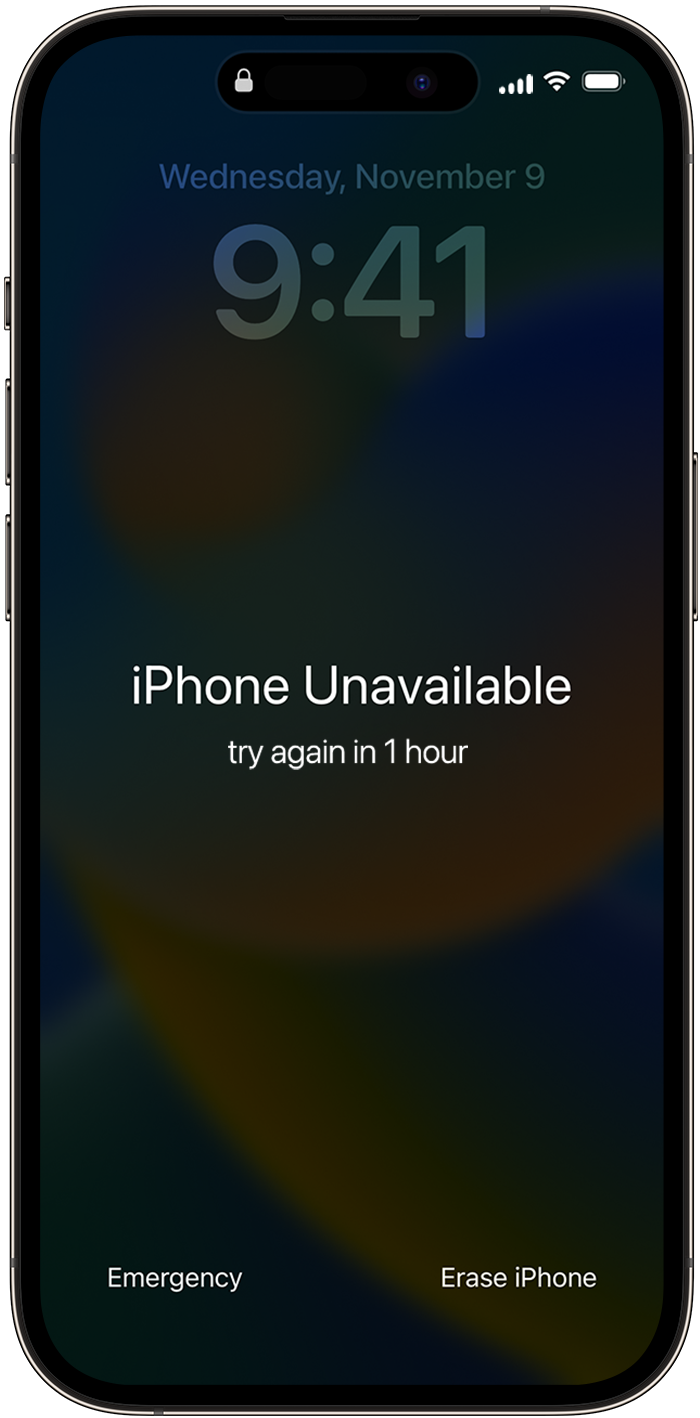


If so, follow the steps described in the If you see an iPhone or iPad unavailable message or Security Lockout screen - Apple Support article:

  1. Tap Erase iPhone, then tap Erase iPhone again to confirm.
  2. Enter your Apple ID password to sign out of your Apple ID on your device.
  3. Tap Erase iPhone to permanently delete all of your data and settings.
  4. When your device restarts, follow the onscreen instructions to set up your device again, restore your data and settings from a backup, and set a new passcode.


If you can't follow these steps, you can use a computer to reset your device. Let us know how it goes!

1 reply
Question marked as Top-ranking reply

Aug 25, 2023 11:10 AM in response to cadels28

Do you see the iPhone Unavailable screen, as shown below?


If so, follow the steps described in the If you see an iPhone or iPad unavailable message or Security Lockout screen - Apple Support article:

  1. Tap Erase iPhone, then tap Erase iPhone again to confirm.
  2. Enter your Apple ID password to sign out of your Apple ID on your device.
  3. Tap Erase iPhone to permanently delete all of your data and settings.
  4. When your device restarts, follow the onscreen instructions to set up your device again, restore your data and settings from a backup, and set a new passcode.


If you can't follow these steps, you can use a computer to reset your device. Let us know how it goes!

This thread has been closed by the system or the community team. You may vote for any posts you find helpful, or search the Community for additional answers.

i would like to wipe my phone cause i forgot my passcode

Welcome to Apple Support Community
A forum where Apple customers help each other with their products. Get started with your Apple Account.