Hi knighty44,
It sounds like you're looking for help clearing space on your iPhone for photos. While you have already mentioned you deleted a lot of content, test a normal restart of your device to see if the storage reflects the removal as expected. Restart your iPhone - Apple Support
If you still see the storage is the same, you may need to make additional room. If you use iCloud you can check both the allocated iCloud storage and storage on your device with the help of the article here: Manage your photo and video storage - Apple Support
If you don't use iCloud you may want to consider enabling the feature.
"Store your photos and videos in iCloud
By default, your photos and videos are stored on your device in their original, high-resolution version. This means that they use a lot of space on your iPhone, iPad, and iPod touch. With iCloud Photos, you can make more space available on your device and still have access to your entire full-resolution collection wherever you go.
Get started with iCloud Photos:
- Tap Settings > [your name] > iCloud > Photos.
- Tap Sync this iPhone. In iOS 15 or earlier, tap to turn on iCloud Photos.
- Select Optimize iPhone Storage to save space on your device.
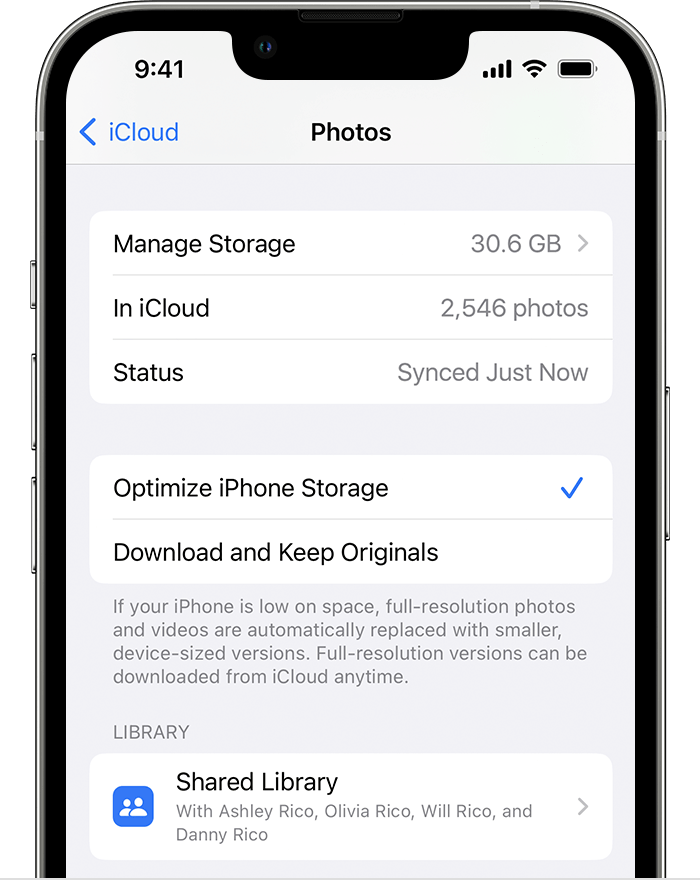
When Optimize Storage is turned on, full-resolution photos and videos are stored in iCloud, and, when needed, space-saving copies are stored on your device. And as long as you have enough space in iCloud, you can store as many photos and videos as you want."
You can also move photos from your device to save to a computer. If needed, find those steps here: Transfer photos and videos from your iPhone or iPad to your Mac or PC - Apple Support
If you continue to have an issue or need further assistance, reach out to Apple Support directly to help. Get connected using the link here: Get Support
Cheers.


