When I set up a Legacy Contact for my Apple ID, the contact never receive a message with the access key.

I set up my son as legacy contact but the access key was not created and sent in the imessage he got. how do i create / find the access key to send him?


[Re-Titled by Moderator]

Windows, Windows 10

Posted on Aug 28, 2023 9:37 AM

Reply
Question marked as Top-ranking reply

Posted on Aug 28, 2023 9:58 AM

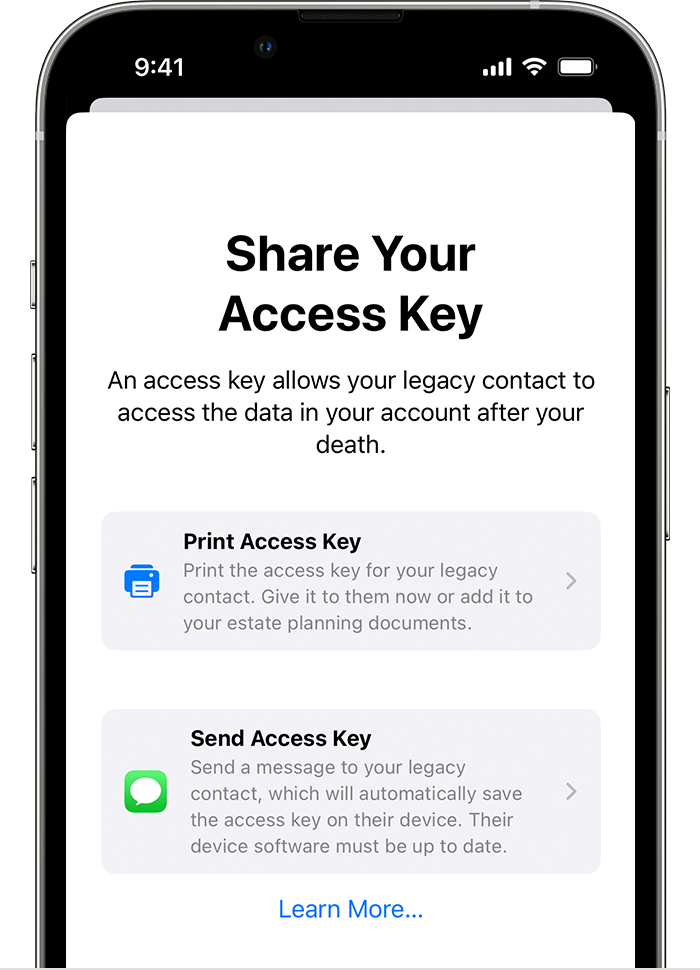
You should have selected a method of delivering the access key when setting them up as a Legacy contact. At that point the access key would have been created, and either sent to them via Message or displayed for you to write down and physically hand it to them.


If you did not send it, or print it, you will need to remove the contact and add them again to generate a new access key, make sure you print a copy for yourself.

click here ➜ How to add a Legacy Contact for your Apple ID - Apple Support


Similar questions

1 reply
Question marked as Top-ranking reply

Aug 28, 2023 9:58 AM in response to Abidsguysandgals

You should have selected a method of delivering the access key when setting them up as a Legacy contact. At that point the access key would have been created, and either sent to them via Message or displayed for you to write down and physically hand it to them.


If you did not send it, or print it, you will need to remove the contact and add them again to generate a new access key, make sure you print a copy for yourself.

click here ➜ How to add a Legacy Contact for your Apple ID - Apple Support


This thread has been closed by the system or the community team. You may vote for any posts you find helpful, or search the Community for additional answers.

When I set up a Legacy Contact for my Apple ID, the contact never receive a message with the access key.

Welcome to Apple Support Community
A forum where Apple customers help each other with their products. Get started with your Apple Account.