How do I block children from purchasing apps

Children purchased apps without our permission

iPad Pro, iPadOS 16

Posted on Sep 1, 2023 6:18 PM

Reply
Question marked as Top-ranking reply

Posted on Sep 2, 2023 1:32 PM

Greetings ParentNeedsHelp1955,


Thanks for posting in Apple Support Communities. We're happy to provide you with some guidance.


Prevent in-app purchases from the App Store

"You can use Screen Time to prevent unintentional or unauthorized purchases from the App Store and other Apple services. You can require a password for purchases, prevent certain types of purchases, or disable purchasing completely.


How to use Screen Time to disable in-app purchases
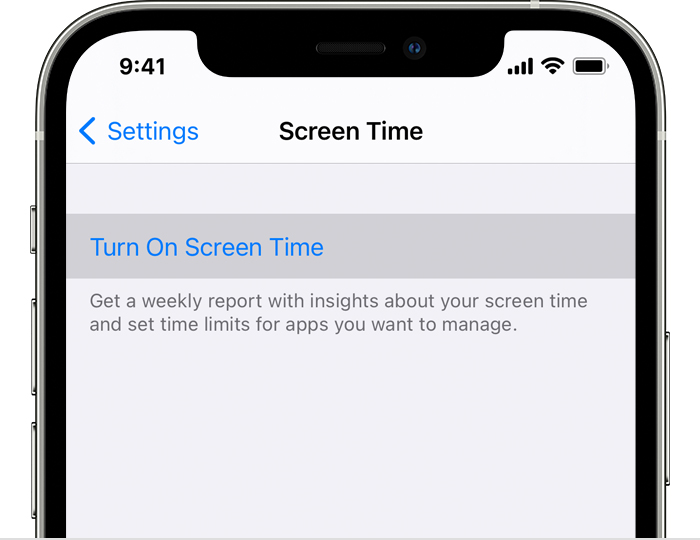
  1. To turn on Screen Time, go to Settings > Screen Time, then tap Turn on Screen Time. If you already use Screen Time, skip to step 3.

iPhone Settings with "Turn On Screen Time" selected


2. Tap Continue, then choose "This is My [device]" or "This is My Child's [device]."

  • If you're the parent or guardian of your device and want to prevent another family member from changing your settings, tap Use Screen Time Passcode to create a passcode, then re-enter the passcode to confirm. After you confirm your passcode, enter your Apple ID and password. This can be used to reset your Screen Time passcode if you forget it. 
  • If you're setting up Screen Time on your child's device, follow the prompts until you get to Parent Passcode and enter a passcode. Re-enter the passcode to confirm. After you confirm your passcode, enter your Apple ID and password. This can be used to reset your Screen Time passcode if you forget it. 

3. Tap Content & Privacy Restrictions. If asked, enter your passcode, then turn on Content & Privacy Restrictions. 

4. Tap iTunes & App Store Purchases.

5. Tap In-app Purchases and set to Don't Allow.
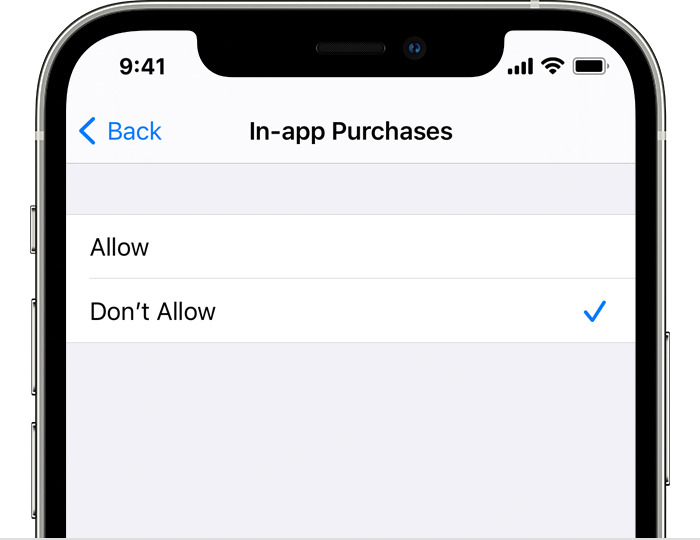
iPhone Settings screen with In-app Purchases set to "Don't Allow"


Other ways to control purchases on an Apple device

  • If children in your Family Sharing group have their own devices, use Ask to Buy to screen and approve their purchase requests.
  • If you let children use your device, you can require a password for every purchase.
  • To prevent iTunes Store and Books purchases, go to Settings > Screen Time > Content & Privacy Restrictions, then tap Allowed Apps. Deselect iTunes Store and Books."


All the best.


1 reply
Question marked as Top-ranking reply

Sep 2, 2023 1:32 PM in response to ParentNeedsHelp1955

Greetings ParentNeedsHelp1955,


Thanks for posting in Apple Support Communities. We're happy to provide you with some guidance.


Prevent in-app purchases from the App Store

"You can use Screen Time to prevent unintentional or unauthorized purchases from the App Store and other Apple services. You can require a password for purchases, prevent certain types of purchases, or disable purchasing completely.


How to use Screen Time to disable in-app purchases

  1. To turn on Screen Time, go to Settings > Screen Time, then tap Turn on Screen Time. If you already use Screen Time, skip to step 3.

iPhone Settings with "Turn On Screen Time" selected


2. Tap Continue, then choose "This is My [device]" or "This is My Child's [device]."

  • If you're the parent or guardian of your device and want to prevent another family member from changing your settings, tap Use Screen Time Passcode to create a passcode, then re-enter the passcode to confirm. After you confirm your passcode, enter your Apple ID and password. This can be used to reset your Screen Time passcode if you forget it. 
  • If you're setting up Screen Time on your child's device, follow the prompts until you get to Parent Passcode and enter a passcode. Re-enter the passcode to confirm. After you confirm your passcode, enter your Apple ID and password. This can be used to reset your Screen Time passcode if you forget it. 

3. Tap Content & Privacy Restrictions. If asked, enter your passcode, then turn on Content & Privacy Restrictions. 

4. Tap iTunes & App Store Purchases.

5. Tap In-app Purchases and set to Don't Allow.

iPhone Settings screen with In-app Purchases set to "Don't Allow"


Other ways to control purchases on an Apple device

  • If children in your Family Sharing group have their own devices, use Ask to Buy to screen and approve their purchase requests.
  • If you let children use your device, you can require a password for every purchase.
  • To prevent iTunes Store and Books purchases, go to Settings > Screen Time > Content & Privacy Restrictions, then tap Allowed Apps. Deselect iTunes Store and Books."


All the best.


This thread has been closed by the system or the community team. You may vote for any posts you find helpful, or search the Community for additional answers.

How do I block children from purchasing apps

Welcome to Apple Support Community
A forum where Apple customers help each other with their products. Get started with your Apple Account.