Deleting Bookmarks
I added bookmarks to my home screen but now can’t delete them - when I long press them the only options that come up are ‘edit home screen’ and ‘share bookmark’
I added bookmarks to my home screen but now can’t delete them - when I long press them the only options that come up are ‘edit home screen’ and ‘share bookmark’
Hello _jess___,
To remove a bookmark or app on your iPhone, use these steps for a solution: Delete apps on your iPhone, iPad, and iPod touch
Delete apps on your iPhone, iPad, and iPod touch
Learn how to delete apps on your iPhone, iPad, and iPod touch.
How to delete an app
1. Touch and hold the app.
2. Tap Remove App.
3. Tap Delete App, then tap Delete to confirm.
Keep in mind that some built-in Apple apps can't be deleted from your device, so you might not see the option to delete an app. Here’s a list of built-in Apple apps you can delete from your device. If you can't delete an app that's not made by Apple, disable parental controls, then try deleting the app again.
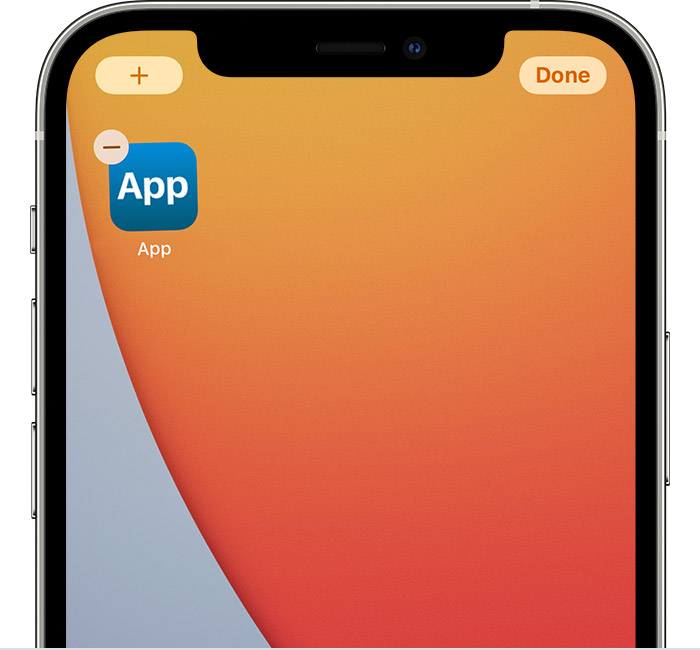
If you touch and hold an app from the Home Screen and the apps start to jiggle:
1. Tap the Remove iconin the upper-left corner of the app.
3. Tap Delete App, then tap Delete to confirm.
4. Tap Done.
Learn more
* With iOS 14, instead of deleting apps, you can remove apps from your Home Screen, so that they appear only in your App Library. Learn more about using the App Library.
* If you delete an app, it doesn’t cancel in-app subscriptions that you might have. While deleting an app, you might see a Cancel Subscriptions option. Learn how to cancel your subscriptions.
In summary, try to select 'Edit the Home Screen' to see if the bookmarks start to jiggle. If so, you can tap the (-) to remove the bookmark.
Following these steps should help you to remove the bookmarks on the Home Screen. In case these steps don't resolve this issue, is your device managed by a parent, school, or business? As that may be a reason you are unable to delete these bookmarks. Remember, the more we can understand about what's happening, the better we can assist.
Take care.
Hello _jess___,
To remove a bookmark or app on your iPhone, use these steps for a solution: Delete apps on your iPhone, iPad, and iPod touch
Delete apps on your iPhone, iPad, and iPod touch
Learn how to delete apps on your iPhone, iPad, and iPod touch.
How to delete an app
1. Touch and hold the app.
2. Tap Remove App
3. Tap Delete App, then tap Delete to confirm.
Keep in mind that some built-in Apple apps can't be deleted from your device, so you might not see the option to delete an app. Here’s a list of built-in Apple apps you can delete from your device. If you can't delete an app that's not made by Apple, disable parental controls, then try deleting the app again.
If you touch and hold an app from the Home Screen and the apps start to jiggle:
1. Tap the Remove icon
3. Tap Delete App, then tap Delete to confirm.
4. Tap Done.
Learn more
* With iOS 14, instead of deleting apps, you can remove apps from your Home Screen, so that they appear only in your App Library. Learn more about using the App Library.
* If you delete an app, it doesn’t cancel in-app subscriptions that you might have. While deleting an app, you might see a Cancel Subscriptions option. Learn how to cancel your subscriptions.
In summary, try to select 'Edit the Home Screen' to see if the bookmarks start to jiggle. If so, you can tap the (-) to remove the bookmark.
Following these steps should help you to remove the bookmarks on the Home Screen. In case these steps don't resolve this issue, is your device managed by a parent, school, or business? As that may be a reason you are unable to delete these bookmarks. Remember, the more we can understand about what's happening, the better we can assist.
Take care.
Deleting Bookmarks