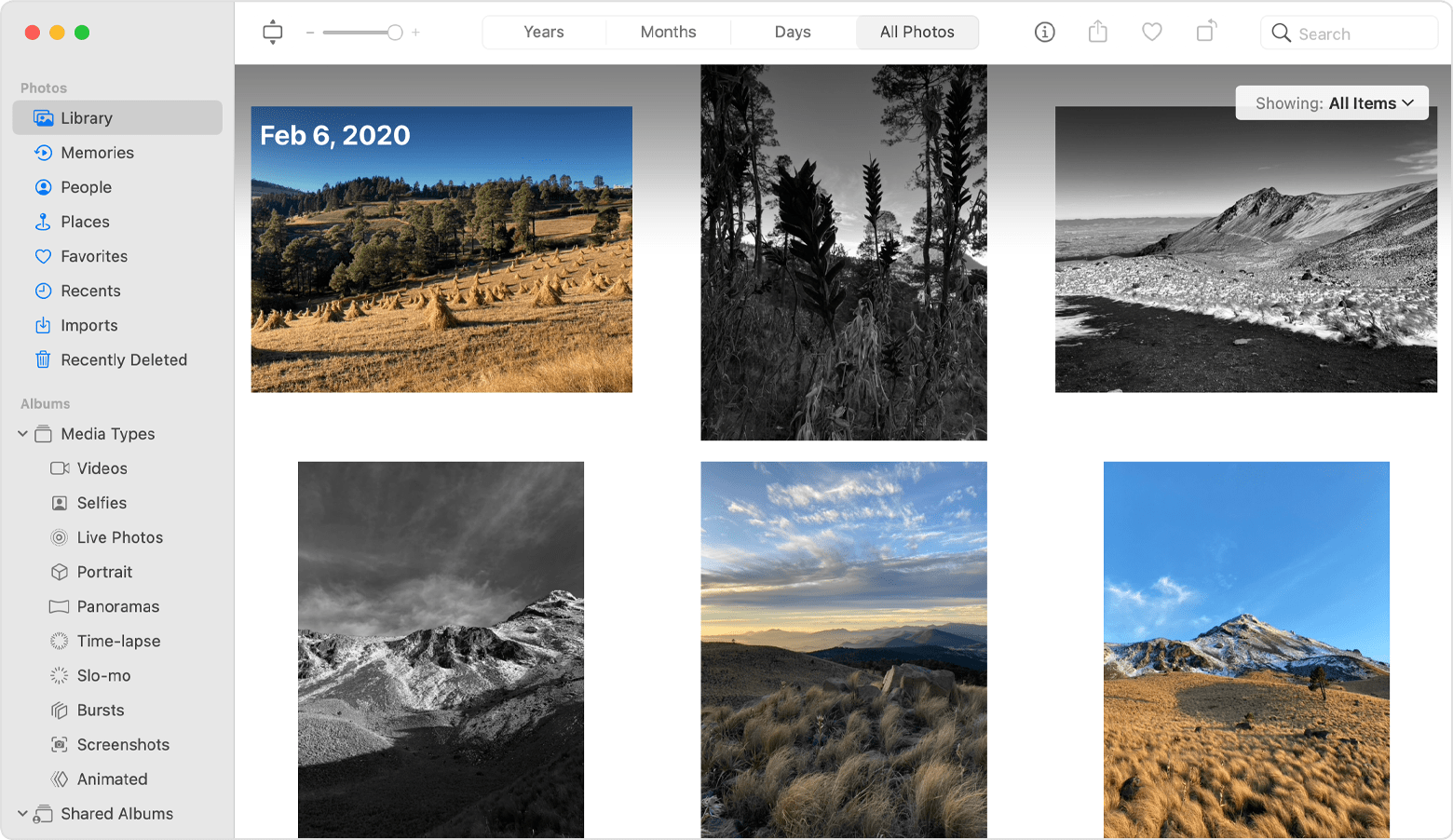
My toolbar in Photos is really messed up today! It has replaced my normal Toolbar with an itemized list of everything in my Photos, according to label. I can't seem to get it reorganized. HELP!

The normal toolbar I have had in Photos disappeared and was replaced by an itemized list of all my pictures in a strange alphabetical order that repeats itself according to type instead of having, for example: Places like States and Countries have been replaced by alphabetized sections that restart according to type of photo, like States are mixed up with Pictures I Like then starts over further down with another mixed up list, followed by yet another one of different photos further down, and so on. Nothing I can find actually lets me reset and reorganize, rather, get back to what I had yesterday.

MacBook Pro 16″, macOS 13.4

Posted on Sep 3, 2023 3:15 PM

Reply

Similar questions

3 replies

Sep 4, 2023 11:39 AM in response to sherryle

Hi sherryle,


Thanks for contacting Apple Support Communities!


We understand that you need some help to reorganize your photos.


The toolbar will change based on the options you have chosen to view in the left panel in Photos. This resource will guide you through the process of organizing your photos: Organize and find your photos on your Mac - Apple Support

"Library

In the Library tab, you can see a curated view of your best moments and browse by Years, Months, Days, or All Photos for your complete library. 

Photos window with Library selected

  • Years: View your entire library of photos and videos that you've taken each year.
  • Months: See groups of photos and videos taken during each month by memorable events and locations. Click the More button to show a map of where the photos were taken or play a Memory movie created from your favorite moments.
  • Days: Browse your best photos of the day and watch some of your videos automatically play as you scroll. Double-click a photo and scroll down to see its location on a map, and the people in it. 
  • All Photos: See your complete photo library including screenshots and duplicate photos in the order they were taken.

You can also use the Showing menu in the Photos library so that you see only what you want. For example, you can choose to show only photos or only videos. To filter what you see, go to the Photos tab, click the Showing pop-up menu, then choose an option. To undo the filter, click the Showing pop-up menu, then click All Items."


If you're still experiencing the same behavior, just let us know which views are selected on the left side of your Photos window and we'll take from there.


Cheers!

Sep 4, 2023 1:17 PM in response to sherryle

Hi sherryle,


So that we can get a better understanding of what you're seeing, could you upload a picture (making sure not to have anything personal showing, as we are on a public forum)?


Generally, the picture posted earlier in this thread is the only way Photos presents itself normally. So we're trying to figure out why you're seeing something different.


Cheers.

Sep 4, 2023 12:22 PM in response to Miche11e_P

Thanks, but the problem is that while this picture of the toolbar is what I've worked with for years, it doesn't look like that any more. It starts with "Media Types" then, under that is "Shared Albums" which has nothing in it, then "My Albums" which lists all my albums. Then at the bottom it has "My Projects." None of the rest of what it should, and did have is there anymore. Any suggestions on how to get my original toolbar back? I already know how to organize my photos.

This thread has been closed by the system or the community team. You may vote for any posts you find helpful, or search the Community for additional answers.

My toolbar in Photos is really messed up today! It has replaced my normal Toolbar with an itemized list of everything in my Photos, according to label. I can't seem to get it reorganized. HELP!

Welcome to Apple Support Community
A forum where Apple customers help each other with their products. Get started with your Apple Account.