it keeps saying bring iphone near apple watch, but my watch is already connected
it says pair it to my iPhone, but it already is paired
Apple Watch Series 7, watchOS 9
it says pair it to my iPhone, but it already is paired
Apple Watch Series 7, watchOS 9
Hey Nevaaeehh,
Have you had a chance to restart your Apple Watch and your iPhone to see if it helps? If your Apple Watch and iPhone are indeed already paired, a restart may help solidify their connection.
How to restart your iPhone X, 11, 12, 13, or later
1. Press and hold either volume button and the side button until the power-off slider appears.
2. Drag the slider, then wait 30 seconds for your device to turn off. If your device is frozen or unresponsive, force restart your device.
3. To turn your device back on, press and hold the side button (on the right side of your iPhone) until you see the Apple logo.
How to restart your Apple Watch if you have watchOS 9
1. If your Apple Watch is charging, take it off the charger.
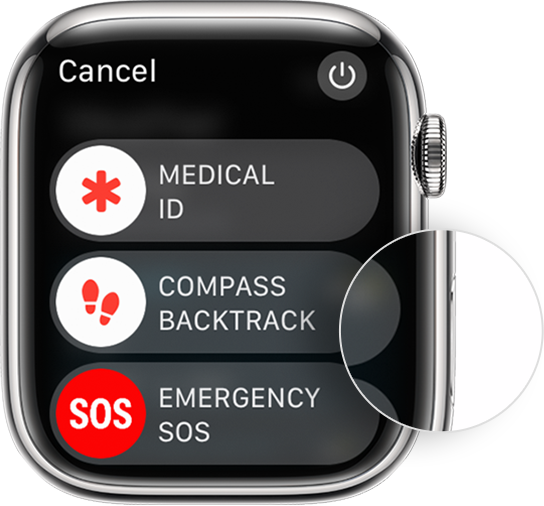
2. Press and hold the side button until you see the power buttonin the upper-right corner of the display.
3. Tap the power button.
4. Drag the Power Off slider.
5. After your watch turns off, press and hold the side button again until you see the Apple logo.
If you still receive the error to bring your devices closer together, try to delete the Watch app on your iPhone and reinstall it from the App Store. This will give you a fresh installation of the app and hopefully resolve any software issues.
---
Still not working? Please contact Apple Support for more advanced support options, or find the best phone number to call from your country here: Contact Apple for support and service
Kindest Regards.
Hey Nevaaeehh,
Have you had a chance to restart your Apple Watch and your iPhone to see if it helps? If your Apple Watch and iPhone are indeed already paired, a restart may help solidify their connection.
How to restart your iPhone X, 11, 12, 13, or later
1. Press and hold either volume button and the side button until the power-off slider appears.
2. Drag the slider, then wait 30 seconds for your device to turn off. If your device is frozen or unresponsive, force restart your device.
3. To turn your device back on, press and hold the side button (on the right side of your iPhone) until you see the Apple logo.
How to restart your Apple Watch if you have watchOS 9
1. If your Apple Watch is charging, take it off the charger.
2. Press and hold the side button until you see the power button
3. Tap the power button.
4. Drag the Power Off slider.
5. After your watch turns off, press and hold the side button again until you see the Apple logo.
If you still receive the error to bring your devices closer together, try to delete the Watch app on your iPhone and reinstall it from the App Store. This will give you a fresh installation of the app and hopefully resolve any software issues.
---
Still not working? Please contact Apple Support for more advanced support options, or find the best phone number to call from your country here: Contact Apple for support and service
Kindest Regards.
it keeps saying bring iphone near apple watch, but my watch is already connected