preventing songs from automatically playing on an apple playlist on iphone
I cannot find any way to prevent songs from automatically continuing on an apple playlist on iphone. Plese help!
I cannot find any way to prevent songs from automatically continuing on an apple playlist on iphone. Plese help!
Hi there Jjucovy,
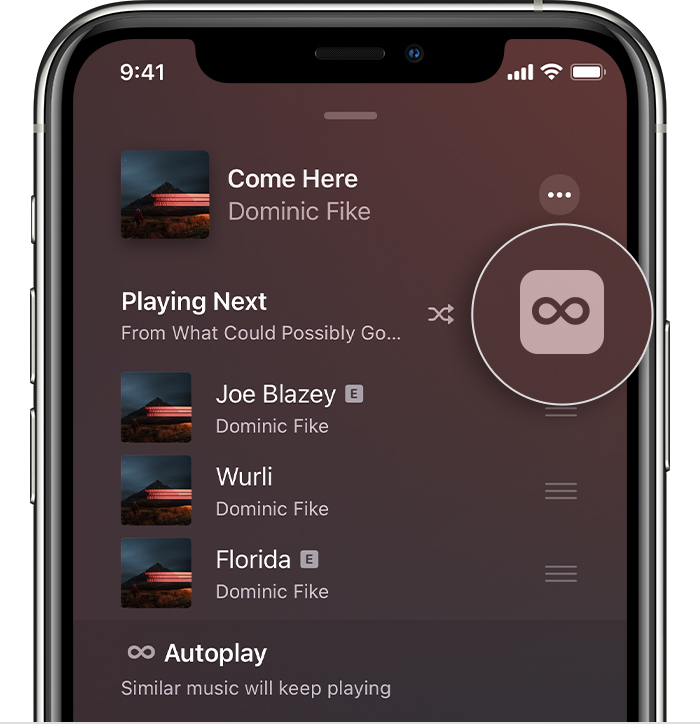
It sounds like you may want to turn off autoplay for Apple Music, where similar songs may play next in Apple Music. If that sounds right, the steps below show you how to turn that off:
Let Autoplay pick what plays next
Autoplay takes the work out of choosing what to play next. Just play a song, then Autoplay finds similar songs and plays them afterward.
To see your Autoplay queue:
1. Tap the song that's playing at the bottom of your screen.
2. In the lower-right corner of your screen, tap Playing Next.
3. Scroll down to Autoplay.
To turn Autoplay on or off, tap the Autoplay buttonin the upper-right corner of your screen. If you turn off Autoplay on one of your devices, then Autoplay is turned off on any device that's signed in with your Apple ID.
Autoplay is available only if you subscribe to Apple Music.
Those steps are from this article: Add music to your queue to play next on your iPhone, iPad, iPod touch, or Android device
If we've misunderstood your question or issue, please let us know any relevant details to help us determine possible next steps.
Take care.
Hi there Jjucovy,
It sounds like you may want to turn off autoplay for Apple Music, where similar songs may play next in Apple Music. If that sounds right, the steps below show you how to turn that off:
Let Autoplay pick what plays next
Autoplay takes the work out of choosing what to play next. Just play a song, then Autoplay finds similar songs and plays them afterward.
To see your Autoplay queue:
1. Tap the song that's playing at the bottom of your screen.
2. In the lower-right corner of your screen, tap Playing Next
3. Scroll down to Autoplay.
To turn Autoplay on or off, tap the Autoplay button
Autoplay is available only if you subscribe to Apple Music.
Those steps are from this article: Add music to your queue to play next on your iPhone, iPad, iPod touch, or Android device
If we've misunderstood your question or issue, please let us know any relevant details to help us determine possible next steps.
Take care.
Jjucovy,
To add clarity and make sure we're on the same page. If you have a playlist that we'll call "Playlist 1" and are trying to play a song or specific songs in that playlist, it will continue to the next song after the initial one plays. This is expected behavior from playlists.
Now if there is one specific, singular song that you want to play and then play nothing after; you can search for that song, and make sure Autoplay is turned off as claire504 mentioned. The song will play and then it will not continue.
However there is not an option at this time to automatically stop after a song in the middle of a playlist. If this is something you want to see, we can recommend leaving feedback here: Product Feedback - Apple
Cheers!
Hello Jjucovy,
It does sound like Autoplay is what you are referring to, as explained in the "Let Autoplay pick what plays next" section above. You can also tell Siri, once Autoplay is turned off, to play a specific song. Your device should then play that song and then stop.
We hope this helps. Let us know if we can assist with anything else at all. Take care.
Thank you for your response but I’m actually asking about playlists. I need music songs to play and then stop within a given playlist. I have a dance performance using songs in a playlist, but we need for the music to stop automatically before the next song. We would like to press play in order for the next song in the playlist to come on. I’m asking about this for iPhone 14. Thanks for any help with this.
So you are saying I shouldn't use a playlist, correct?
preventing songs from automatically playing on an apple playlist on iphone