Deleting songs from iPhone

Whether I “remove download” or “delete from library” or even go through manage storage, literally nothing happens. I can’t delete any music from my iPhone. Please help.


ta

Posted on Sep 7, 2023 8:48 AM

Reply
Question marked as Top-ranking reply

Posted on Sep 7, 2023 8:53 AM

The process given below is for Photos but it applies to Musics too.


Probably you have synced these Photos from your Mac/PC through iTunes. UN-sync then they would be gone from iPhone.


UN-Sync photos to your device

  1. Connect your device to your Mac.
  2. You can connect your device using a USB or USB-C cable or using a Wi-Fi connection. To turn on Wi-Fi syncing, see Sync content between your Mac and iPhone or iPad over Wi-Fi.
  3. In the Finder  on your Mac, select the device in the Finder sidebar.
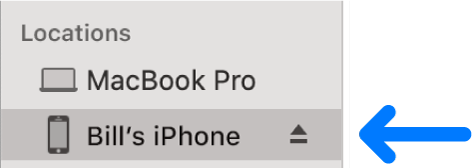

  4. Select Photos in the button bar.
  5. Note: When iCloud Photos is turned on, no photo syncing options appear when you select Photos in the button bar.
  6. Select “Sync Photos to your device from” tickbox, then choose Photos, Pictures or a folder from the pop-up menu.
  7. Uncheck Sync photos
  8. Click on Apply / Sync


1 reply
Question marked as Top-ranking reply

Sep 7, 2023 8:53 AM in response to kenadams88

The process given below is for Photos but it applies to Musics too.


Probably you have synced these Photos from your Mac/PC through iTunes. UN-sync then they would be gone from iPhone.


UN-Sync photos to your device

  1. Connect your device to your Mac.
  2. You can connect your device using a USB or USB-C cable or using a Wi-Fi connection. To turn on Wi-Fi syncing, see Sync content between your Mac and iPhone or iPad over Wi-Fi.
  3. In the Finder  on your Mac, select the device in the Finder sidebar.

  4. Select Photos in the button bar.
  5. Note: When iCloud Photos is turned on, no photo syncing options appear when you select Photos in the button bar.
  6. Select “Sync Photos to your device from” tickbox, then choose Photos, Pictures or a folder from the pop-up menu.
  7. Uncheck Sync photos
  8. Click on Apply / Sync


This thread has been closed by the system or the community team. You may vote for any posts you find helpful, or search the Community for additional answers.

Deleting songs from iPhone

Welcome to Apple Support Community
A forum where Apple customers help each other with their products. Get started with your Apple Account.
