
App selection pages after first disappeared
Normally four pages of apps to select. Without known change, all but first page disappeared. All the apps do, however, show in the App Library. IOS 16.6 iPhone 11 PM
iPhone 11 Pro Max, iOS 16
Normally four pages of apps to select. Without known change, all but first page disappeared. All the apps do, however, show in the App Library. IOS 16.6 iPhone 11 PM
iPhone 11 Pro Max, iOS 16
I had already performed all the suggestions with no good result. This suggested that I had a rogue setting and after much discovery I found I had presumably tested the Focus feature and when I turned it off, all the app selection pages reappeared. Problem solved and lesson learned.
Hello Michael Parker11
We'd like to assist you with your iPhone. The following steps may be able to restore your Home Screen:
-Restart your iPhone. This may seem like a simple step to take but can often resolve several issues.
"How to restart your iPhone X, 11, 12, 13, or later
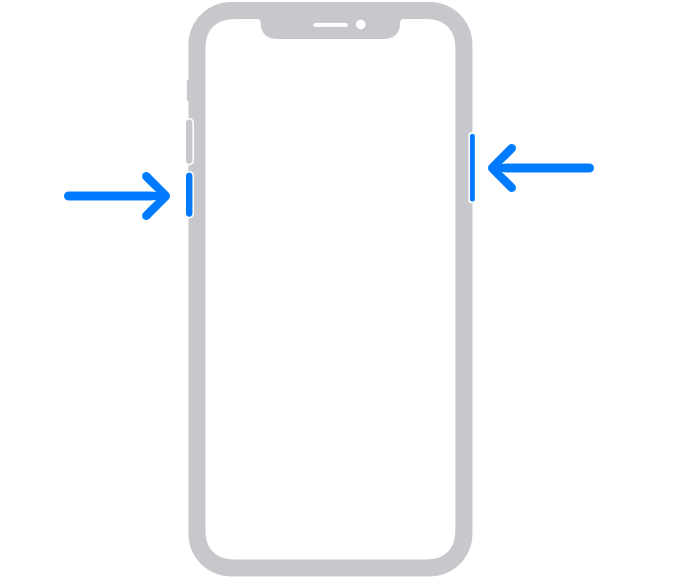
2. Drag the slider, then wait 30 seconds for your device to turn off. If your device is frozen or unresponsive, force restart your device.
3. To turn your device back on, press and hold the side button (on the right side of your iPhone) until you see the Apple logo."
-Update your iPhone. iOS 16.6.1 is latest software version. Completing this step ensures that your device has the latest fixes. (Secure your data with a backup)
Thanks for connecting with Apple Support Communities.
Have a wonderful day.
App selection pages after first disappeared

