iMessage

I previously received iMessage on my laptop, and now my phone number is no longer synched to my laptop or coming up as an option in imessage settings. My emails are still synched so I receive some messages but none to my phone number. Would love any suggestions. Thank you!

MacBook Air 13″

Posted on Sep 8, 2023 9:10 PM

Reply
Question marked as Top-ranking reply

Posted on Sep 10, 2023 11:15 AM

Hi BB__CC,


Thanks for posting in Apple Support Communities.


You need to setup your phone number and check that it is activated.


Set up your phone number
On your iPhone:
1. Go to Settings > Messages and make sure that iMessage is on. You might need to wait a moment for it to activate.
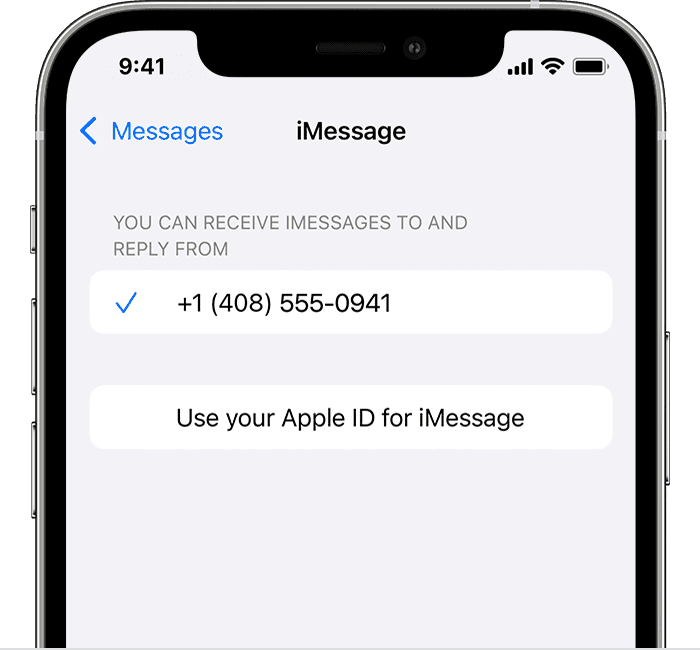
2. Tap Send & Receive. If you see “Use your Apple ID for iMessage,” tap it and sign in with the same Apple ID that you use on your Mac, iPad, and iPod touch.
3. iPhone showing how to select iMessage settings
4. In the "You can receive iMessages to and Reply From" section, make sure that your phone number and Apple ID are selected.
5. Go to Settings > FaceTime and make sure that your phone number and Apple ID are selected in the "You can be reached by FaceTime at" section.
On your other devices, you can now turn on the phone number that you just set up:
* Turn on your phone number for your Mac
* Turn on your phone number for your iPad or iPod touch

Add or remove your phone number in Messages or FaceTime - Apple Support


Regards.


3 replies
Question marked as Top-ranking reply

Sep 10, 2023 11:15 AM in response to BB__CC

Hi BB__CC,


Thanks for posting in Apple Support Communities.


You need to setup your phone number and check that it is activated.


Set up your phone number
On your iPhone:
1. Go to Settings > Messages and make sure that iMessage is on. You might need to wait a moment for it to activate.
2. Tap Send & Receive. If you see “Use your Apple ID for iMessage,” tap it and sign in with the same Apple ID that you use on your Mac, iPad, and iPod touch.
3. iPhone showing how to select iMessage settings
4. In the "You can receive iMessages to and Reply From" section, make sure that your phone number and Apple ID are selected.
5. Go to Settings > FaceTime and make sure that your phone number and Apple ID are selected in the "You can be reached by FaceTime at" section.
On your other devices, you can now turn on the phone number that you just set up:
* Turn on your phone number for your Mac
* Turn on your phone number for your iPad or iPod touch

Add or remove your phone number in Messages or FaceTime - Apple Support


Regards.


This thread has been closed by the system or the community team. You may vote for any posts you find helpful, or search the Community for additional answers.

iMessage

Welcome to Apple Support Community
A forum where Apple customers help each other with their products. Get started with your Apple Account.