Hi williamm95,
Have you checked to ensure Cap Locks is not enabled on your Magic Keyboard?
Have you tried entering your password using the on-screen keyboard to see if you're still experiencing the same issue?
If not, we recommend that you give those steps a try.
Set up and use Magic Keyboard for iPad - Apple Support
To perform the recommended troubleshooting steps via the link above, complete the steps in the section titled "Switch to the onscreen keyboard."
You might need to use your onscreen keyboard instead of the Magic Keyboard to do things like type accented characters or use dictation.
To show the onscreen keyboard, tap a text field, then touch and hold  on the lower-right corner of your iPad screen until the onscreen keyboard appears. To hide the keyboard again, tap
  on your iPad screen.
We recommend the steps above because they will show you how to switch to the onscreen keyboard on your iPad.
If you’re still experiencing the same issue, then we suggest trying the steps in the link below follow by retesting.
Restart your iPad - Apple Support
How to restart an iPad without a Home button
1. Press and hold either volume button and the top button until the power off slider appears.
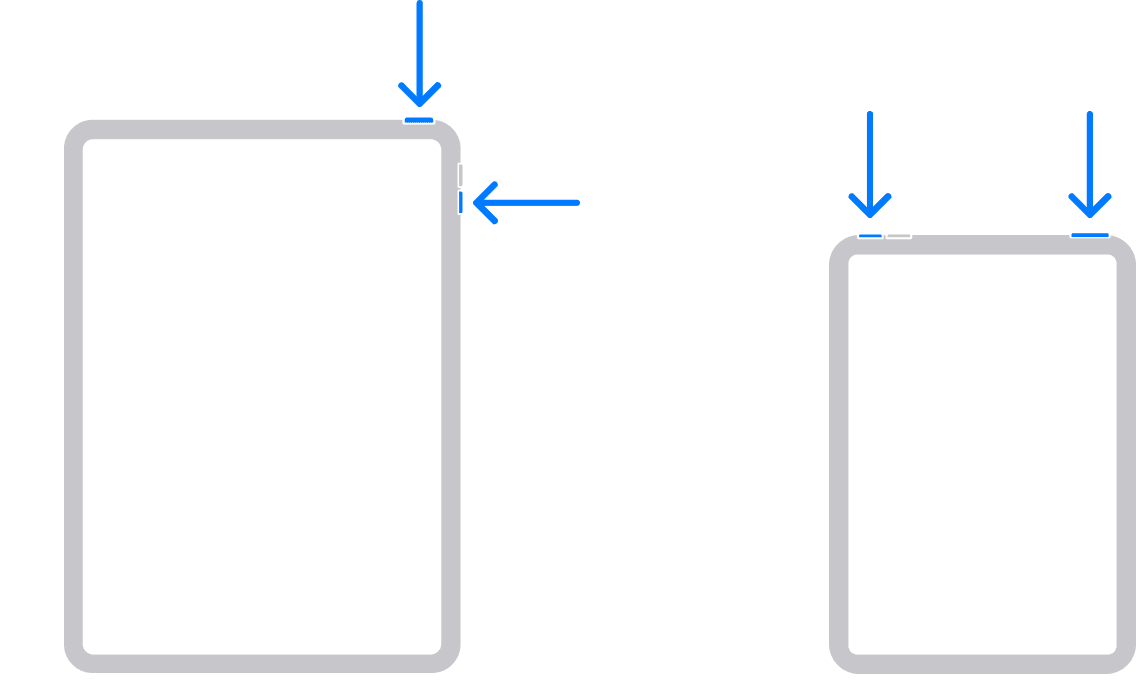
2. Drag the slider, then wait 30 seconds for your device to turn off. If your device is frozen or unresponsive, force restart your device.
3. To turn your device back on, press and hold the top button until you see the Apple logo.
Please let us know the outcome after giving the above steps a try.
Thanks for using the Apple Support Communities.
Cheers!


