Hey there usernotfound_4L,
We'd like to help!
Try changing the wallpaper from your Lock Screen if changing from Settings is not working. The steps here will show you how:
1. Make sure that you previously set up Face ID on your iPhone. To change your wallpaper from the Lock Screen, Face ID must clearly see your eyes and the areas around them.
2. On the Lock Screen, touch and hold your Lock Screen to open your wallpaper gallery.
3. To select a wallpaper you already created, swipe left and right. To add a new wallpaper, tap the Add button  .
.
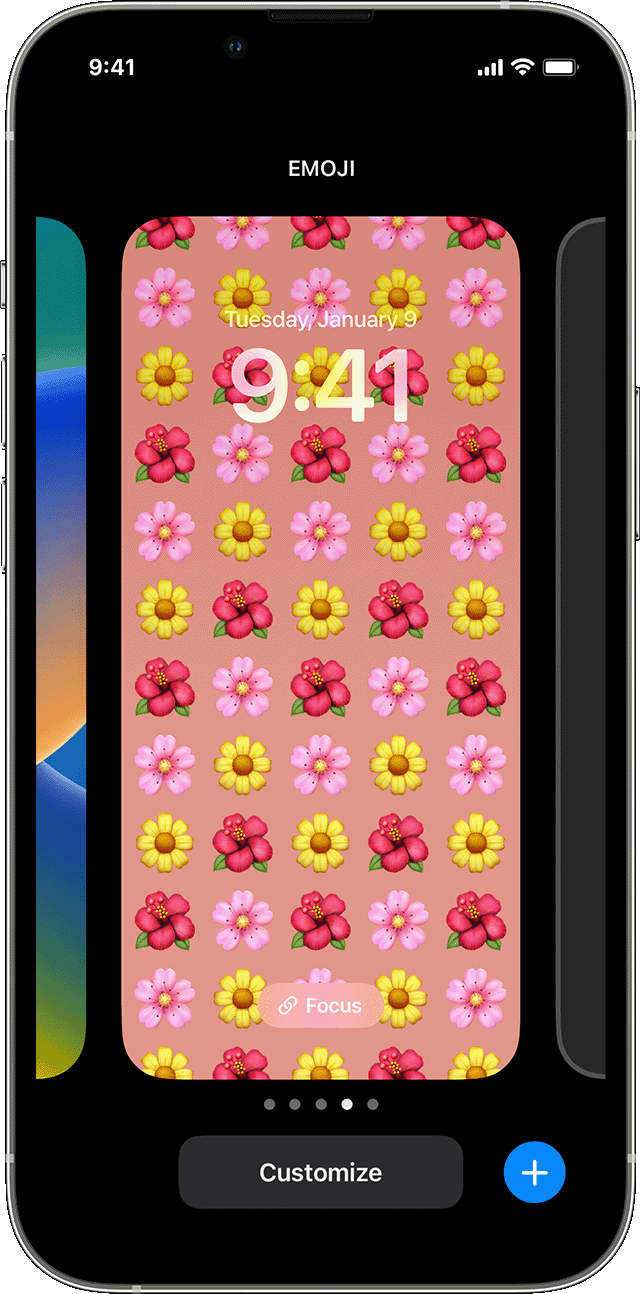
From the Lock Screen wallpaper options, you can also tap the Focus button to link a Focus to a specific wallpaper, customize existing wallpapers, or swipe up on a wallpaper and tap to delete it.
If you can't use Face ID to change your Lock Screen, touch and hold your Lock Screen until the Customize button appears. If the Customize button doesn’t appear, touch and hold the Lock Screen again, then enter your passcode.
If the Lock Screen option doesn't work, try the additional options here: Change the wallpaper on your iPhone - Apple Support
Take care!


