Time zone issue

I live on the border of eastern and central time zones. I have my phone set to stay eastern and my watch mirrors time zone, when they are close. I’ve noticed several times that if for example, my phone is inside and I’m in the yard, my watch reverts to central time zone. How do I set my watch to also stay on eastern time zone?

Posted on Sep 16, 2023 5:26 PM

Reply
Question marked as Top-ranking reply

Posted on Sep 17, 2023 12:59 PM

Hello Candy1221,


Once the Apple Watch is in range of the paired iPhone again it should help to correct the time zone/time again. However, if it doesn't try restarting both devices at that time:


Restart your Apple Watch - Apple Support


Restart your iPhone - Apple Support


When the Apple Watch is outside of the range of the iPhone it will automatically use the local time.


As an option, you may also set your Apple Watch's watch face ahead of the actual time: Change the time settings on your Apple Watch - Apple Support


You can set the time shown on your watch face to appear ahead of the actual time. Your alarms, notifications, World Clock, and other times will still match the actual time. 
1. Open the Settings app on your watch, then tap Clock. 
2. Tap +0 min. 
3. Turn the Digital Crown and choose how many minutes ahead to set your watch. 
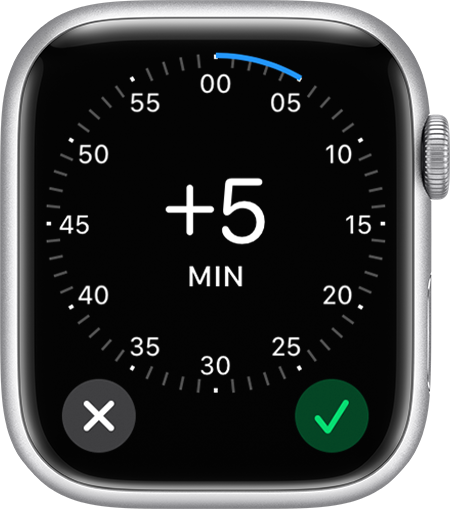
Apple Watch showing a dial up to 59 minutes for setting the time ahead
4. Tap the Done button .


Cheers.

1 reply
Question marked as Top-ranking reply

Sep 17, 2023 12:59 PM in response to Candy1221

Hello Candy1221,


Once the Apple Watch is in range of the paired iPhone again it should help to correct the time zone/time again. However, if it doesn't try restarting both devices at that time:


Restart your Apple Watch - Apple Support


Restart your iPhone - Apple Support


When the Apple Watch is outside of the range of the iPhone it will automatically use the local time.


As an option, you may also set your Apple Watch's watch face ahead of the actual time: Change the time settings on your Apple Watch - Apple Support


You can set the time shown on your watch face to appear ahead of the actual time. Your alarms, notifications, World Clock, and other times will still match the actual time. 
1. Open the Settings app on your watch, then tap Clock. 
2. Tap +0 min. 
3. Turn the Digital Crown and choose how many minutes ahead to set your watch. 
Apple Watch showing a dial up to 59 minutes for setting the time ahead
4. Tap the Done button .


Cheers.

This thread has been closed by the system or the community team. You may vote for any posts you find helpful, or search the Community for additional answers.

Time zone issue

Welcome to Apple Support Community
A forum where Apple customers help each other with their products. Get started with your Apple Account.
