
Share Contact not working after iOS 17 update
When I use contact share in IOS 17 it won’t let me share my contact and will only let me receive contact info. How do I fix this so I can share my contact?
[Re-Titled by Moderator]
iPhone 11, iOS 17
When I use contact share in IOS 17 it won’t let me share my contact and will only let me receive contact info. How do I fix this so I can share my contact?
[Re-Titled by Moderator]
iPhone 11, iOS 17
Hello hudsonwinn_,
Thanks for posting in the Apple Support Communities. We're happy to look into this with you.
To make sure we've understood, you're having issues using the new NameDrop feature, right? If so, are you following Use NameDrop on iPhone to share your contact info - Apple Support (MY) to share your information?
"Use NameDrop on iPhone to share your contact info
Use NameDrop on iPhone to share your contact information with new people
You can use NameDrop to quickly share contact information with a nearby iPhone. To use NameDrop:
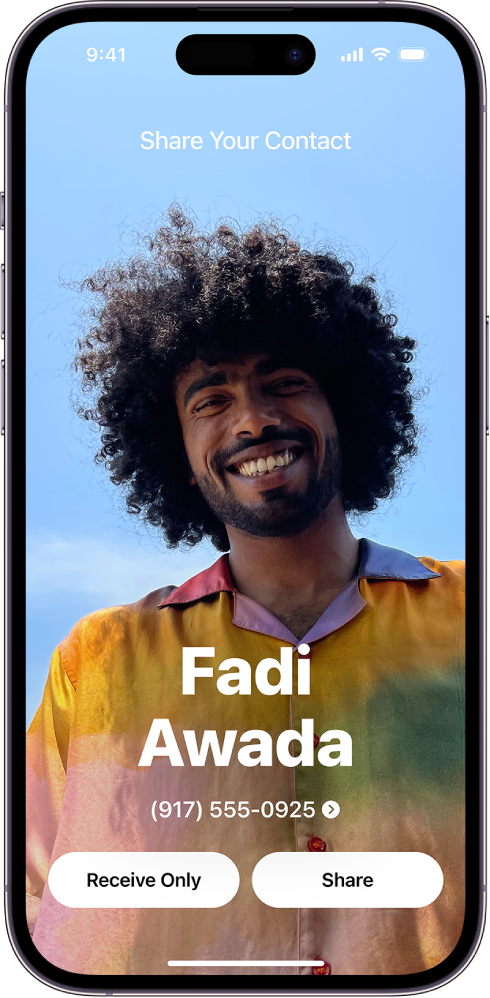
Note: NameDrop only works for sending new contact information, not updating an existing contact.
Use Contacts on iPhone to share a contact
You can use the Contacts app to share your or another person’s contact information to someone else using Messages, Mail, or another option.
 .
.Best regards.
Hello hudsonwinn_,
Thanks for posting in the Apple Support Communities. We're happy to look into this with you.
To make sure we've understood, you're having issues using the new NameDrop feature, right? If so, are you following Use NameDrop on iPhone to share your contact info - Apple Support (MY) to share your information?
"Use NameDrop on iPhone to share your contact info
Use NameDrop on iPhone to share your contact information with new people
You can use NameDrop to quickly share contact information with a nearby iPhone. To use NameDrop:
Note: NameDrop only works for sending new contact information, not updating an existing contact.
Use Contacts on iPhone to share a contact
You can use the Contacts app to share your or another person’s contact information to someone else using Messages, Mail, or another option.
.Best regards.
Just to let you know there is now a switch to turn this on. Under air drop it’s called “bringing Devices together”
under the airdrop options in general.
Fine. Bit sharing a contact seems to work between me and my wife, but the. The contact shared by me does not appear in her contact list. We’re using Airdrop. She is notified and accepts. But the “shared” contact does not appear in her contacts. We’ve both selected “All contacts”. This used to work. We’re both on IOS 17.1.2
After many years of using all apple devices, I am very upset by the fact everytime there is a software update the phone does not work the same way.
This newest change in ios 17, not being able to share contacts is a step back to the rotary phone days.
This used to work, but when I get to send, none of the suggested contacts pop up or allow me to chose any icons after upload button. Like frozen…I tuned off phone and started no difference
Contact not working
This no longer works
Same issue here. When sharing contact I only see the info and name, no number
Why my iphone 12 mini can’t share contacts with other. Even though I updated to ios 17
Share contact not working. How to fix it???
I do not have the option to share in Facebook messenger
Having the same issue. Not able to share a contact from my address book/contacts list to another person via text message. This is extremely frustrating since I use this feature a lot.
We know how to share contacts by using the app…It’s just NOT working after latest update.
“Share Contact” is no longer an option.
SO frustrating!
“Share Contact” is not even available to choose!
Share Contact not working after iOS 17 update




