Why does my Apple Watch not turn on unless connected to power when it has over 50% battery

I have recently bought an Apple Watch Series 3 and when the battery falls to around 55% it will turn off and not turn back on until plugged into power. When I try to turn it back on it displays the apple logo for 10-20 seconds and then turns back off. This also happens when the Apple Watch is not paired to any phone and is asking to bring it near an Iphone.


My Iphone is fully up to date.

I have tried unpairing and repairing the Apple Watch and setting it up as a new watch.

I have tried restarting both of the devices and turning on the Iphone first.


Any help would be greatly appreciated.


Many thanks,

Hamish

Posted on Sep 22, 2023 4:20 AM

Reply
Question marked as Top-ranking reply

Posted on Sep 26, 2023 11:48 AM

Hi hamisha2003,


You've completed some great steps to help try and get to the root cause of the issue. You can find additional helpful information here: If your Apple Watch won't charge or it won't turn on - Apple Support


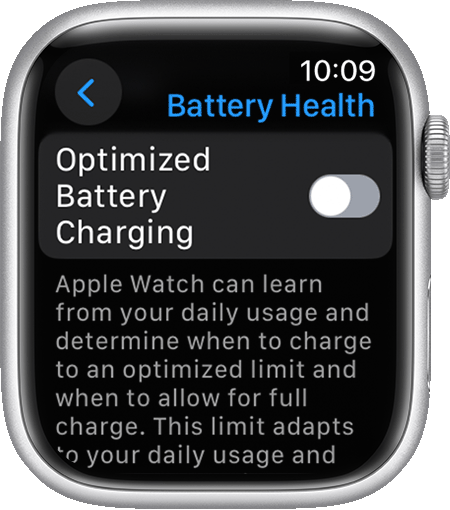
However, as you've already updated and paired the Apple Watch you can check the battery health and optimized charging settings with the steps below found here: About Optimized Battery Charging on your Apple Watch - Apple Support


"If you want to turn off Optimized Battery Charging:

  1. Open the Settings app on your Apple Watch.
  2. Scroll down, then tap Battery.
  3. Tap Battery Health.
  4. Turn off Optimized Battery Charging.

Optimized battery charging in the Settings app on Apple Watch.5. Choose Turn Off Until Tomorrow or Turn Off."


On this same page you can check the Maximum Capacity of your Apple Watch battery health. Take note of any recommendations on this page. If your battery required service, find your options here: Apple Watch Service & Repair - Apple Support


If you find no issue, or need assistance with your options, reach out to Apple directly to further assist. Get Support


Cheers.

1 reply
Question marked as Top-ranking reply

Sep 26, 2023 11:48 AM in response to hamisha2003

Hi hamisha2003,


You've completed some great steps to help try and get to the root cause of the issue. You can find additional helpful information here: If your Apple Watch won't charge or it won't turn on - Apple Support


However, as you've already updated and paired the Apple Watch you can check the battery health and optimized charging settings with the steps below found here: About Optimized Battery Charging on your Apple Watch - Apple Support


"If you want to turn off Optimized Battery Charging:

  1. Open the Settings app on your Apple Watch.
  2. Scroll down, then tap Battery.
  3. Tap Battery Health.
  4. Turn off Optimized Battery Charging.

Optimized battery charging in the Settings app on Apple Watch.5. Choose Turn Off Until Tomorrow or Turn Off."


On this same page you can check the Maximum Capacity of your Apple Watch battery health. Take note of any recommendations on this page. If your battery required service, find your options here: Apple Watch Service & Repair - Apple Support


If you find no issue, or need assistance with your options, reach out to Apple directly to further assist. Get Support


Cheers.

This thread has been closed by the system or the community team. You may vote for any posts you find helpful, or search the Community for additional answers.

Why does my Apple Watch not turn on unless connected to power when it has over 50% battery

Welcome to Apple Support Community
A forum where Apple customers help each other with their products. Get started with your Apple Account.