How do I change the sound on my alarm?
I’m looking to change the sound on my alarm from the only one that seems to be available on the iPhone
iPhone 14 Pro Max, iOS 16
I’m looking to change the sound on my alarm from the only one that seems to be available on the iPhone
iPhone 14 Pro Max, iOS 16
Hello Dd1225,
You came from the best resource to change your sound for alarms on the iPhone: How to set and change alarms on your iPhone
How to set and change alarms on your iPhone
Learn how to set, edit, or delete an alarm.
With the Clock app, you can turn your iPhone into an alarm clock. You can also ask Siri to set an alarm for you.
How to set an alarm
1. Open the Clock app, then tap the Alarm tab.
2. Tap the Add button.
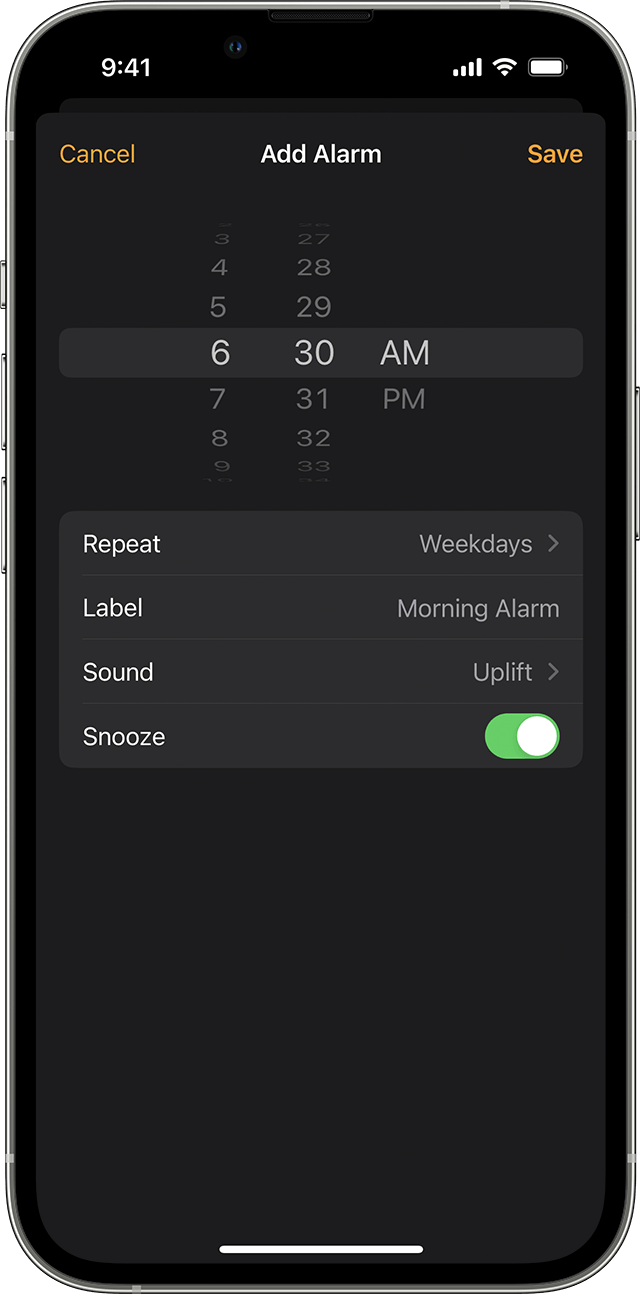
3. Set a time for the alarm. You can also choose one of these options:
* Repeat: Tap to set up a recurring alarm.
* Label: Tap to name your alarm.
* Sound: Tap to pick a sound that plays when the alarm sounds.
* Snooze: Turn on to see a Snooze option when the alarm sounds.
8. Tap Save.

If these steps don't change the sound of the alarm, then what happens exactly when you attempt to take them? Are you receiving any errors? Does the sound not work when the alarm is going off? The more we can understand about what's going on, the better we can assist.
Take care.
Hello Dd1225,
You came from the best resource to change your sound for alarms on the iPhone: How to set and change alarms on your iPhone
How to set and change alarms on your iPhone
Learn how to set, edit, or delete an alarm.
With the Clock app, you can turn your iPhone into an alarm clock. You can also ask Siri to set an alarm for you.
How to set an alarm
1. Open the Clock app, then tap the Alarm tab.
2. Tap the Add button
3. Set a time for the alarm. You can also choose one of these options:
* Repeat: Tap to set up a recurring alarm.
* Label: Tap to name your alarm.
* Sound: Tap to pick a sound that plays when the alarm sounds.
* Snooze: Turn on to see a Snooze option when the alarm sounds.
8. Tap Save.
If these steps don't change the sound of the alarm, then what happens exactly when you attempt to take them? Are you receiving any errors? Does the sound not work when the alarm is going off? The more we can understand about what's going on, the better we can assist.
Take care.
How do I change the sound on my alarm?