Photo settings on iPhone's Safari stuck on “Private Access” with iOS 17

In Settings>Privacy and Security>Photos, Safari shows Private Access as the only option and states "This app can show your photo library but can only access the items you select." I cannot find anywhere to select/deselect photos. All other apps show None, Limited Access or Full Access. I am missing something.

Can anyone shed some light?


[Re-Titled by Moderator]


iPhone 14 Pro, iOS 17

Posted on Sep 22, 2023 5:04 AM

Reply
Question marked as Top-ranking reply

Posted on Nov 14, 2023 11:02 PM

The setting “Private Access” is perfectly fine. If you have trouble selecting photos from your Photo Library to upload to websites there might be another problem (like e.g. not seeing videos in the selector because the site would only take stills).


As the text for this “unchangeable setting” explains, it means that Safari and therefore websites by default have No Access to your Photo Library, it remains “Private”.


When you want to upload photos to a website from your Photo Library, you get a photo picker like the one for „Limited Access“ to select which photos the upload process will see at all. The only difference to „Limited Access“ is, that it does not remember your last choices but defaults to no photos selected for access every time. Hence the different naming „Private Access“.


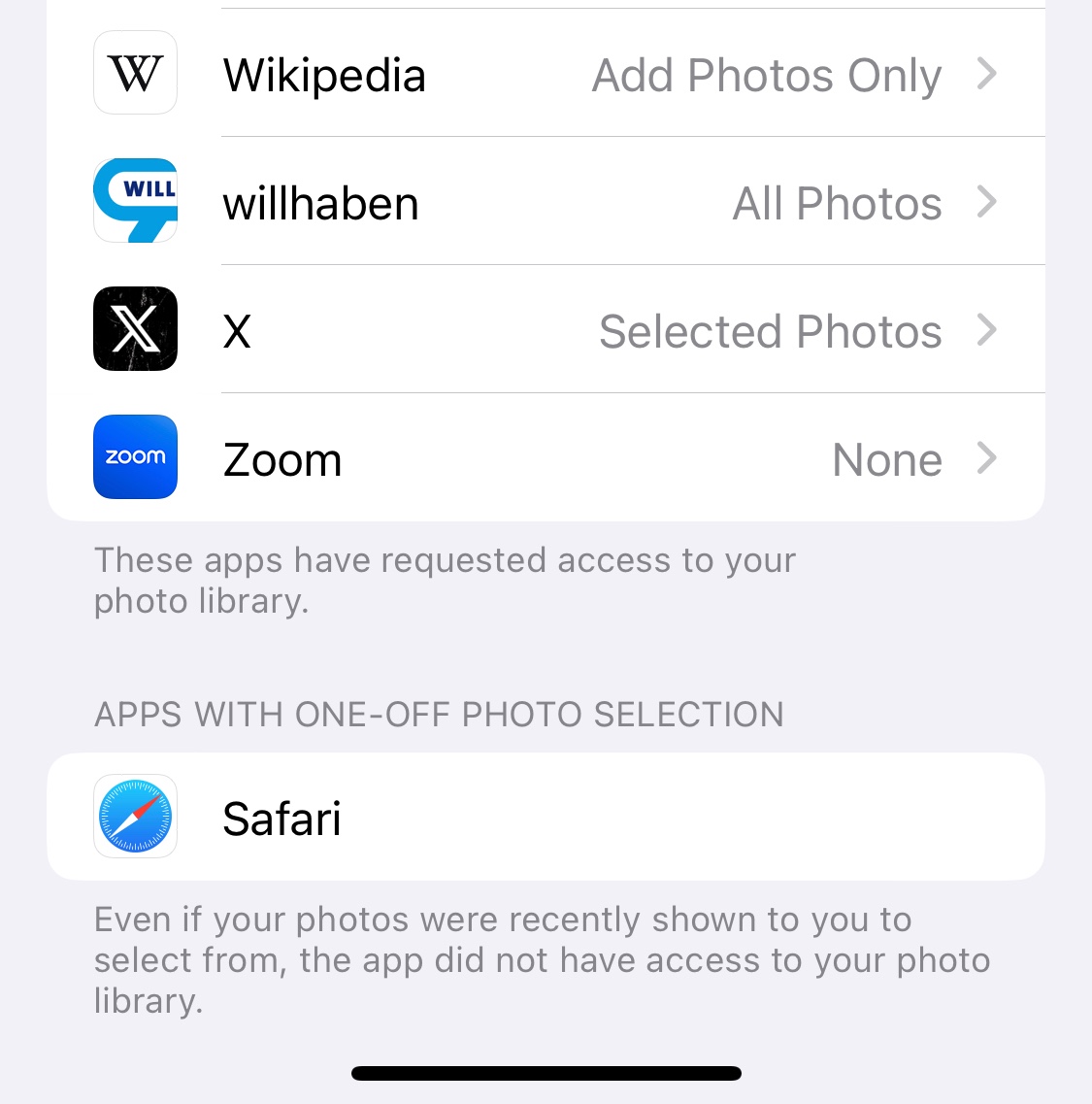
This is by the way not new and exactly the way photo selection for certain apps like Browsers worked before (I assume since iOS 14). With iOS 17 only the presentation and wording of this function changed. Up to iOS 16 “Limited Access” showed as “Selected Photos” and Apps like Safari would be listed separately under the heading “Apps with One-Off Photo Selection”, see screenshot.

Similar questions

108 replies

Oct 26, 2023 1:00 AM in response to Saltie Dawg

I started seeing this problem when apple introduced custom photos/posters in ios17. That time it was contact app which got private access to my photo. Now that is gone but it resurfaced for safari. Even resetting the location and privacy settings does not help.


i have my icloud access disabled overall and so icloud photo sharing but still i have it enabled and i have no means to disable it.


This is very critical security issue as I dont know what caused it enabled in first place and why Safari( which is the window to the internet) has unchallenged private access to it?


It is very frustrated and concerning.


Is anyone from Apple listening?


Nov 29, 2023 10:15 PM in response to Saltie Dawg

I have been developing a generic web application and I was disappointed some months ago to learn that ios (and other platforms) had elected to remove the ability to save lat long and certain other metadata by default in forms. Although this has totally broken aspects of the website, it is exciting because it does look like it now permits, at least in 17.1.1, gps coordinates included in the uploaded photo, but I have only gotten it working through the "Take a Photo" mode. This whole thing makes a lot of sense, and I have to believe is a bug or a fix they are working on because you now get a notice in blue at the bottom, warning users about the metadata / exif / geotagging included and you can elect to do so anyways (which is wonderful in my case and I am sure thousands of other developers). But right now, selecting any screenshot, or text message image that you saved to your photo roll, at least in my tests on 17.1.1 does not seem to quite work...which makes me think the lack of that same meta data may be the cause. Anyways, IDK if that helps but for me, it seems like you get an option to radio select each photo, which means, then and only then on confirm, can the safari, or other web application see the photos in accordance with this "private access" Although its bugged at the moment, I am very excited to see this being added!

Nov 30, 2023 5:29 PM in response to hastegag

I adjusted a couple things on my app that were totally unrelated to ios (of course, embarrassingly) anyways, here is a video of how to manipulate private photos as selected, which may be helpful for some folks: https://youtube.com/shorts/rXfuuQUBV6M?feature=share This is a great feature because people can now share (only if they want to, and under advisement, their metadata with photos to third party apps). This is a huge usability and feature win for ios in my opinion.

Dec 1, 2023 1:58 AM in response to Saltie Dawg

ATTENTION🚨Since I updated the ios to 17.1.1, my photos album has private access and it has no access when I want to do something online. If you want to do something to your photos and videos on photos album, but that's it can't, so you can select the photos/videos you want, then SAVE TO FILES. Then voila, you can do anything to those photos/videos that have been copied to the FILES app.

Jan 21, 2024 6:46 AM in response to vb_

In reply to the question about the new section at the top of the Privacy / Photos settings page in iOS:


This is just an informative illustration to let the user better grasp what Photo Library Access settings are about.


Like most of the changes to Photo Access in iOS 17 (especially the “Private Access” listing for Safari and others) this is not a change, but only the attempt to communicate the topic more clearly.

This thread has been closed by the system or the community team. You may vote for any posts you find helpful, or search the Community for additional answers.

Photo settings on iPhone's Safari stuck on “Private Access” with iOS 17

Welcome to Apple Support Community
A forum where Apple customers help each other with their products. Get started with your Apple Account.

