My IPad is up to date but I don’t see cross fade in the settings for apple music
I see the audio settings on my android device where I can choose cross fade but I don’t see settings on my Ipad
iPad Pro, iPadOS 16
I see the audio settings on my android device where I can choose cross fade but I don’t see settings on my Ipad
iPad Pro, iPadOS 16
Hi Cookielady24,
iPadOS 17 is needed for crossfade. Check out how to enable crossfade here: How to turn on crossfade in the Apple Music app - Apple Support
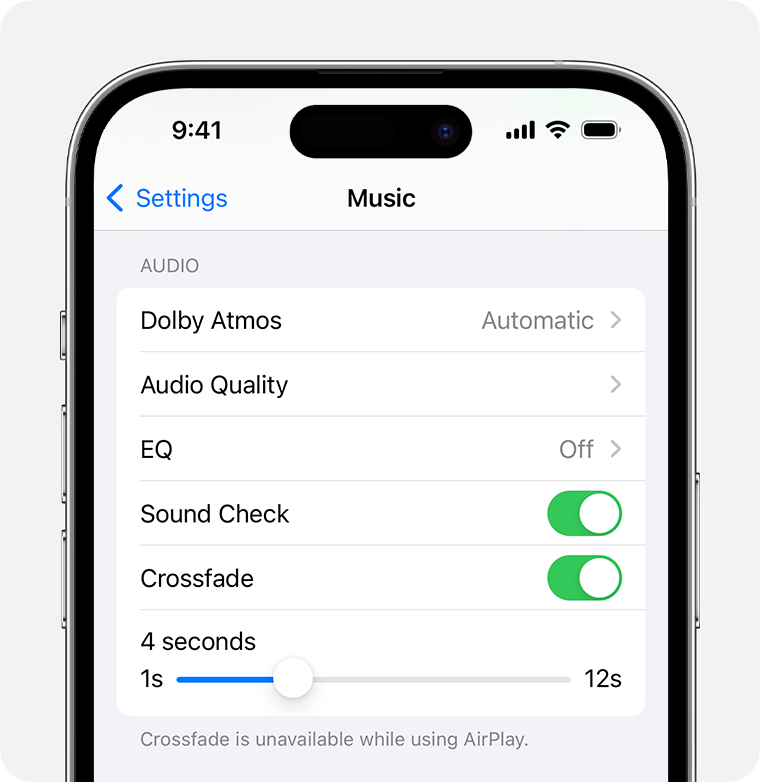
How to turn on crossfade on your iPhone or iPad
1. Open Settings.
2. Tap Apple Music.
3. Turn on Crossfade. If you don't see Crossfade, update your iPhone or iPad to the latest version of iOS or iPadOS.
From here, you can drag the slider to set the amount of time it takes for the current song to fade out and the new song to fade in.
If you're using iPadOS 17 and not seeing the feature, then reach to Apple Support to help investigate the behavior: Apple Support
Kind regards.
Hi Cookielady24,
iPadOS 17 is needed for crossfade. Check out how to enable crossfade here: How to turn on crossfade in the Apple Music app - Apple Support
How to turn on crossfade on your iPhone or iPad
1. Open Settings.
2. Tap Apple Music.
3. Turn on Crossfade. If you don't see Crossfade, update your iPhone or iPad to the latest version of iOS or iPadOS.
From here, you can drag the slider to set the amount of time it takes for the current song to fade out and the new song to fade in.
If you're using iPadOS 17 and not seeing the feature, then reach to Apple Support to help investigate the behavior: Apple Support
Kind regards.
My IPad is up to date but I don’t see cross fade in the settings for apple music