How do I stop so much SPAM??

I'm getting tons of junk mail, or SPAM, which I can't stop and so wondering if anyone has any bright ideas as to some method I might be able to try.


They all seem to be junk financial advice and every time I choose to unsubscribe I just get more from different new sources. Getting probably a dozen or more every day, but blocking them means I just get more and more. Are there any better techniques to stop them? Pictured below, some examples of the kind of junk.


Any ideas would be much appreciated.


[Edited by Moderator]

Mac Studio (2022)

Posted on Sep 22, 2023 2:49 PM

Reply
Question marked as Top-ranking reply

Posted on Sep 22, 2023 3:14 PM

Cartoonguy wrote:

I'm getting tons of junk mail, or SPAM, which I can't stop and so wondering if anyone has any bright ideas as to some method I might be able to try.

They all seem to be junk financial advice and every time I choose to unsubscribe I just get more from different new sources. Getting probably a dozen or more every day, but blocking them means I just get more and more. Are there any better techniques to stop them? Pictured below, some examples of the kind of junk.

Any ideas would be much appreciated.


you should never unsubscribe to spam email— it just registers that your email is valid & active, and sold to the next spam factor.


I have used a third party software with great success since 2010...recommended to me by the Woz.


If Junk mail is not working for you as expected you can turn it off in Mail>Settings.

You have the option of installing a third party spam filter. ex.

https://c-command.com/spamsieve/


I will say it is the best one time software purchase I ever made.
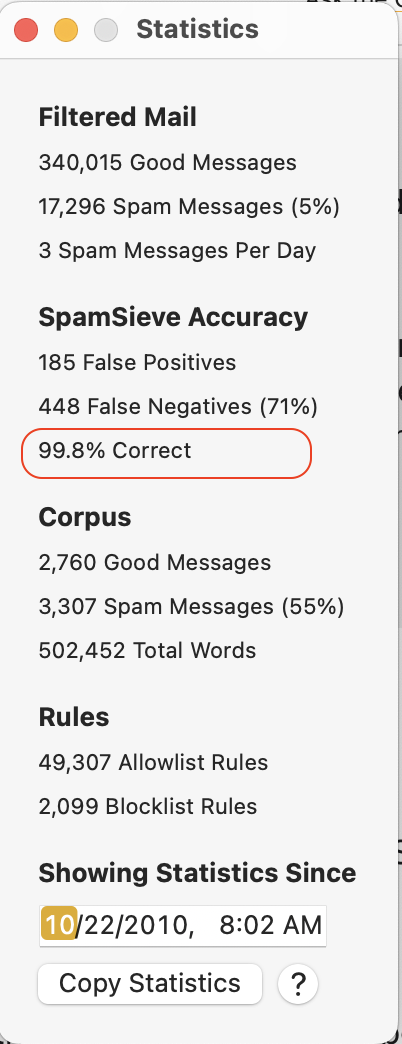


It was a one time purchase, until most recently there is an upgrade because of the new macOS

Sonoma is deprecating Mail plug-ins, therefor the new SpamSieve incorporates the Mail extensions:

https://forum.c-command.com/t/spamsieve-public-beta-and-macos-14-sonoma/15077


there are others of course:

https://www.spamhero.com/


10 replies
Question marked as Top-ranking reply

Sep 22, 2023 3:14 PM in response to Cartoonguy

Cartoonguy wrote:

I'm getting tons of junk mail, or SPAM, which I can't stop and so wondering if anyone has any bright ideas as to some method I might be able to try.

They all seem to be junk financial advice and every time I choose to unsubscribe I just get more from different new sources. Getting probably a dozen or more every day, but blocking them means I just get more and more. Are there any better techniques to stop them? Pictured below, some examples of the kind of junk.

Any ideas would be much appreciated.


you should never unsubscribe to spam email— it just registers that your email is valid & active, and sold to the next spam factor.


I have used a third party software with great success since 2010...recommended to me by the Woz.


If Junk mail is not working for you as expected you can turn it off in Mail>Settings.

You have the option of installing a third party spam filter. ex.

https://c-command.com/spamsieve/


I will say it is the best one time software purchase I ever made.


It was a one time purchase, until most recently there is an upgrade because of the new macOS

Sonoma is deprecating Mail plug-ins, therefor the new SpamSieve incorporates the Mail extensions:

https://forum.c-command.com/t/spamsieve-public-beta-and-macos-14-sonoma/15077


there are others of course:

https://www.spamhero.com/


Sep 23, 2023 7:12 AM in response to Cartoonguy

Because spammers can infinitely alter the content of the To: and Subject email headers, there will be no rule to stop SPAM unless you focus on the Return-Path header item. Apple does not include this by default in the menu of options for the From selection in a rule, so you need to add a custom header item for Return-Path.


The Return-Path is the relay server that spammers use to forward their spam campaign from other sources. The Return-Path address is not something that a spammer can change unless they own the relay server, and force a <> address for it. Otherwise, spammers pay for accounts on these relay servers and embedded in the Return-Path header is a domain name. That is what I have used in my single rule set for Apple Mail.


I select the specific spam email before I visit Mail : Settings : Rules. Then when I add a new Return-Path entry, as soon as I select contains, the entire Return-Path address is populated in the text field. Using arrow keys and backspace, I trim that Return-Path string to some constant and then click OK. This will remove that particular selected email immediately and all future visits.


Every few months, I review what is being thrown into the Trash mailboxes and trim back the rule entries when they are no longer needed.

Sep 22, 2023 3:09 PM in response to Cartoonguy

For each spam email I get that isn't assigned to the Junk mailbox I add it to one of my Spam Rules. I try to see if there's any unique text in the email that I can use for the rule. Otherwise I try using some of the from address, usually every thing from the @. on.


I have 6 Spam rules


each with about 30 entries:


I haven't had to add any to the last rule for quite some time now. I would get quite a few from Russia, .ru, so I went online to the iCloud Mail and created a rule there that delete all .ru emails.


I was getting about 75 spams/day. Now it's only about 7.


There are add-on apps like Spam Sieve, which can do more in filtering out spam.


Sep 24, 2023 7:29 AM in response to Cartoonguy

When you click that default [ From ] button, it will present a long list of items and at the bottom is the Edit Header List menu item. Select it. When you open that panel, click + and enter Return-path exactly as spelled, then OK to accept it.


When you click that [ From ] button again, you will see the new Mail header menu entry:


Spammers may use the same, multiple, or change Return-path servers at any time in the future, so one Return-path entry may work for awhile, and then you may have to revise or add to an existing Return-path setting when the spammers change things.


I review what spam I receive periodically and occasionally some spammers just go away and the Mail rule can have some entries removed.


Sep 24, 2023 7:09 AM in response to VikingOSX

VikingOSX wrote:

Apple does not include this by default in the menu of options for the From selection in a rule, so you need to add a custom header item for Return-Path.

Thanks for this. I have been using my server based Spam configuration so that it affects all devices and it does not allow for that option, only "from". On the Mac, how do you create that custom header item? Do you just edit the list and type "return-path"

This thread has been closed by the system or the community team. You may vote for any posts you find helpful, or search the Community for additional answers.

How do I stop so much SPAM??

Welcome to Apple Support Community
A forum where Apple customers help each other with their products. Get started with your Apple Account.

