Since update watch won't show weather or steps without lots of tapping

I have my watch set up so I can see the temp in the upper right hand corner, but it's is frequently blank unless I do lots of tapping. I just want to see the temp when I glance at it. When I go through the new hassle of changing to my next screen, it is supposed to show me steps, but they aren't right, I have to tap again if I want to see my real step count. I am beyond frustrated with this update. Any suggestions?

Apple Watch Series 8, watchOS 10

Posted on Sep 23, 2023 7:50 AM

Reply
19 replies

Sep 27, 2023 9:39 AM in response to Lalimc

The weather issue is a bug. My solution was simply to use complications from a different weather app, in my case Carrot Weather. They work fine.


Steps, something Apple has never placed much emphasis on have been moved. I'm pretty sure that was intentional. You can certainly let Apple know your thoughts on the matter:


Product Feedback - Apple


But, as I noted above, Apple has shown little interest in step tracking. Again, the solution here is another app. An app like StepsApp will allow you to place a complication with your steps directly on your watch face.


Sep 27, 2023 9:40 AM in response to Lalimc

I believe it’s a bug in the new v10 software. Sometimes it shows the temperature, but most of the times just dashes.


Apple posted a kind of a workaround here in a Support document. The second step seems to help others in getting the weather displayed correctly.

If the Apple Watch Weather complication isn't working - Apple Support


Be aware this resets all privacy settings in every app. You have to grant permission to each app again for your Bluetooth, microphone, and location data, etcetera.


Sep 27, 2023 9:22 AM in response to Lalimc

Hey Lalimc,


We'd recommend reviewing this article as it provides steps to help customize your Apple Watch face: Customize the watch face - Apple Support


"Add complications to the watch face

You can add special features—called complications—to some watch faces, so you can instantly check things like stock prices, the weather report, or information from other apps you installed.

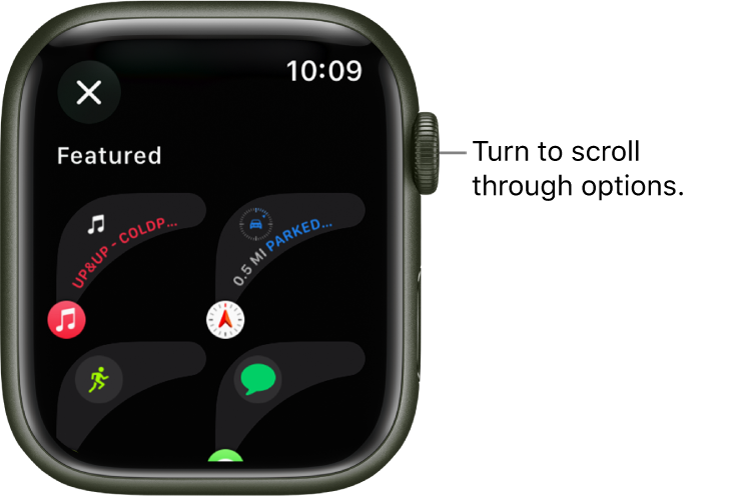
  1. With the watch face showing, touch and hold the display, then tap Edit.
  2. Swipe left all the way to the end.
  3. If a face offers complications, they’re shown on the last screen.
  4. Tap a complication to select it, then turn the Digital Crown to choose a new one—Activity or Heart Rate, for example.
  5. When you’re finished, press the Digital Crown to save your changes, then tap the face to switch to it.
  6. The customize screen for a watch face showing featured complications. Turn the Digital Crown to browse complications.

Some apps you get from the App Store also include complications."


Thanks!


Oct 18, 2023 8:00 AM in response to McCarthy Forester

McCarthy Forester wrote:

They need to give us the old format so we don’t need a magnifying glass.

You should let Apple know what you'd like to see here:


Product Feedback - Apple


Meanwhile, there are hundreds, if not thousands of other weather apps in the App Store. Many of them have Watch modules. Perhaps one of them would suit you better. Most of them are free to try.

Oct 17, 2023 5:27 PM in response to Lalimc

The old weather complication brought up a weather wheel that showed the upcoming temperature in the next 12 hours, in white on black. With fiddling you can get a similar Watch OS but it shows the temperature in beige inside the wheel, in a smaller font. And on a background that seems to match the temperatures, like pale yellow. So it is also at impossible to see the temperature in beige on pale yellow in a smaller font.

They need to give us the old format so we don’t need a magnifying glass.

Sep 27, 2023 10:22 AM in response to WinsC1

Hey WinsC1 I am fully aware how to customize my faces, the issue is it is no longer seamless to go from one to the next, especially with mobility issues. Not to mention some of my customizations don’t work correctly. The temp rarely shows up and my steps still aren’t correct on the second face. IOS 10 has made me strongly dislike my watch. Turning the little scroll button can be very difficult for me depending on my arthritis pain level. I miss how easy it used to be to use, which was the point to switching to Apple

Sep 28, 2023 8:39 AM in response to Lalimc

Lalimc wrote:

We aren't talking about the same thing. The thing I am talking about is a known bug.

It sure sounds like you're both talking about the same thing. It's also the same thing I've experienced and that I've read articles about. Do you try the suggestions in the article CaptianFS linked to? Or did you try what I suggested?


Yes, it's a bug but there are still things you can do.

This thread has been closed by the system or the community team. You may vote for any posts you find helpful, or search the Community for additional answers.

Since update watch won't show weather or steps without lots of tapping

Welcome to Apple Support Community
A forum where Apple customers help each other with their products. Get started with your Apple Account.