iPhone 15 Pro Battery Drain Issue

I have bought iPhone 15 pro recently. The expectation is battery should be efficient, but is performing poor than iPhone 11. Especially Findmy app is used all night. The battery went down from 55% to 32%. Please help me to fix this?


-SK


[Re-Titled by Moderator]

iPhone 15 Pro, iOS 17

Posted on Sep 24, 2023 9:15 PM

Reply
Question marked as Top-ranking reply

Posted on Oct 4, 2023 3:59 PM

Well, I just updated to iOS 17.0.3 and my iPhone 15 Pro 512gb natural titanium is still as warm as ever and the battery has still dropped 15% in one hour …


I talked to someone who works for Apple and they said it’s not gonna get any better that they had better venting and heat dissipation for the 14 pro with the stainless steel and that the A17Pro Chip gets too hot …and titanium doesn’t allow it to disperse. I don’t think any software update is going to make this work. and when you have a hot chip, you’ll have a battery that drains extra fast.


i’m going to further test it tomorrow on Thursday and see how it goes — and then I’m taking it back Friday (within the first 14 days) and getting all my money back. I’m glad I kept my 11 Pro. I would suggest everybody to do this as Friday is your last day to get your money back since it was the first day you could pick it up in the store


this is by all means a massive hardware design defect and there’s no remedying it. I don’t know what Apple‘s gonna do with this one. The only way they can stop it from getting hot is the throttle that A17 chip and the expert I talk to said that’s not even gonna help much. Some units are fine some aren’t. I’m not gonna gamble my $1500 on it again.

481 replies
Question marked as Top-ranking reply

Oct 4, 2023 3:59 PM in response to saravanan81

Well, I just updated to iOS 17.0.3 and my iPhone 15 Pro 512gb natural titanium is still as warm as ever and the battery has still dropped 15% in one hour …


I talked to someone who works for Apple and they said it’s not gonna get any better that they had better venting and heat dissipation for the 14 pro with the stainless steel and that the A17Pro Chip gets too hot …and titanium doesn’t allow it to disperse. I don’t think any software update is going to make this work. and when you have a hot chip, you’ll have a battery that drains extra fast.


i’m going to further test it tomorrow on Thursday and see how it goes — and then I’m taking it back Friday (within the first 14 days) and getting all my money back. I’m glad I kept my 11 Pro. I would suggest everybody to do this as Friday is your last day to get your money back since it was the first day you could pick it up in the store


this is by all means a massive hardware design defect and there’s no remedying it. I don’t know what Apple‘s gonna do with this one. The only way they can stop it from getting hot is the throttle that A17 chip and the expert I talk to said that’s not even gonna help much. Some units are fine some aren’t. I’m not gonna gamble my $1500 on it again.

Oct 11, 2023 8:40 AM in response to JimiGGuitar

Hi, make an appointment at the Genius Bar and have them look at your battery drain. The bar will then submit the problem as an EFFA (Early Field Failure Analysis). Back up your data as they will need to set your iPhone 15 Pro / Pro Max as “NEW” and continue to test it. If the battery problem persists during set up as New, they will give you a new iPhone 15 Pro / Pro Max that they have on-hand at the store. It will come in a “no frills” box, but they are brand new, not refurbished. I hope this helps!

Oct 13, 2023 7:22 AM in response to claudiofromtaranto

I've finally found a solution to the battery draining issue that many of us have faced after transitioning to the 15 Pro. Here's what you can do to overcome it. My phone used to drain so rapidly that I had to charge it twice a day.


The root cause of this problem seems to be related to how the backup from the previous model is transferred to the new one. It appears that some apps aren't fully compatible with the 15 Pro.


Here's a step-by-step guide to resolving this:


1- Take your phone to an Apple Store or Genius Bar and explain the issue.

2- They will perform a hard reset on your phone.

3- Only photos and contacts will be restored initially.

4- They might guide you on how to download your apps, but you can also do this through the App Store. Click on your profile (top left) and navigate to 'Purchased Apps' to reinstall them.

5- Allow your phone to charge until it reaches 100%. Please note that the first charge might take longer than usual.


I managed to fix my phone yesterday around 6 pm and charged it to 100%. Twelve hours later, the battery level had dropped to 88%.


P.S. It's advisable not to attempt the reset on your own. The Apple Store has specific software for this purpose and it's not recommended to perform a factory reset through the phone for the iPhone 15 Pro.

Oct 13, 2023 7:23 AM in response to saravanan81

I've finally found a solution to the battery draining issue that many of us have faced after transitioning to the 15 Pro. Here's what you can do to overcome it. My phone used to drain so rapidly that I had to charge it twice a day.


The root cause of this problem seems to be related to how the backup from the previous model is transferred to the new one. It appears that some apps aren't fully compatible with the 15 Pro.


Here's a step-by-step guide to resolving this:


1- Take your phone to an Apple Store or Genius Bar and explain the issue.

2- They will perform a hard reset on your phone.

3- Only photos and contacts will be restored initially.

4- They might guide you on how to download your apps, but you can also do this through the App Store. Click on your profile (top left) and navigate to 'Purchased Apps' to reinstall them.

5- Allow your phone to charge until it reaches 100%. Please note that the first charge might take longer than usual.


I managed to fix my phone yesterday around 6 pm and charged it to 100%. Twelve hours later, the battery level had dropped to 88%.


P.S. It's advisable not to attempt the reset on your own. The Apple Store has specific software for this purpose and it's not recommended to perform a factory reset through the phone for the iPhone 15 Pro.

Nov 2, 2023 9:37 PM in response to lukewjf02

My battery life has improved noticeably since I updated to 17.1. If you haven't done that I suggest you do and see if things improve. A qualification, the update has only been out a few days and my battery problems were erratic so I am waiting a week or two to see if the update fixed the camera app bug - see below.


If not, check your battery usage in Settings. My battery showed my camera using as much as 40% of my battery even though I hadn't used it in over 24 hours. Since the update I no longer see the camera app devouring the battery and usage seems normal. If after the you update and you still have problems I suggest you look at which apps are using the battery and call Apple Care and immediately ask for 2nd level support. The first line folks are all pleasant but not as knowledgeable as the second level. Also, I have had four (4!) second level support techs and only the fourth one was really good. So I wouldn't hesitate to politely say thanks and move on. FYI, the second tier techs have to download analytics and forward the data to engineering. It will take a day or two for them to get back to you and then they may ask for more data.


I

Sep 27, 2023 11:39 PM in response to saravanan81

I have also the iPhone 15 Pro but no battery issues. Currently with average usage mine lasts for 1.5 days.


However to keep in mind / some recommendations:


  • after setting up a new iPhone always requires a few days to synchronize and install everything. So that could cause higher battery drain than usually. For example the first few days may consume a lot of battery to sync photos.
  • in the battery app check which apps need most battery: if there is one specific app that seems to drain the battery, one recommendation is to delete the app (after data backup / or data saved in iCloud) and install it again to ensure you have the very last version.
  • ensure you have the latest iOS update installed.


See also some of Apple's official tips to optimize your battery and avoid unintentional battery drain:


Sep 30, 2023 10:42 AM in response to Alexandre Lollini

My wife has a severe battery collapse problem : iOS 17 iPhone 15 pro max. She gave me her 14 pro max, we leave at the same time with 100%. Two hours later 15 is at 31% and 14 is at 96%. Battery health says 100% peak performance. This is catastrophic.[…].

———-


Return this iPhone or Get this iPhone Serviced:

It is catastrophic, and is nothing of new. Battery power and overheating are commonly reported on these forums for both of these models. So, see about getting this returned or serviced.


A. Take to an Appel store:

You'd setup a Genius Bar Appointment at your local Apple Store, taking it in for service. There, it will be diagnosed, and you'll be provided with your options.


Or...


B. Take this to an AASP:

See an AASP (Apple Authorized Service Provider) in your local area...

Contacting an AASP: 

  1. Go Here: Find Locations - Apple Authorized Reseller
  2. Click: Service & Support
  3. Enter: your location information
  4. See: if there is an AASP nearby
  5. Contact: an AASP that shows up, and find out more about the services that they offer to fix the battery

Oct 19, 2023 3:14 AM in response to Dbriguenti

Here is what I did to improve slightly the power consumption :

  • avoid météo (that uses localisation services) widget on lock screen
  • turn off always on display
  • shut off background actualisation off apps
  • limit localisation services to the minimum
  • instagram closed after use (app is not optimized for iOS 17)

i have noticed an improvement here it is noon and still have 93% usually with the above on I had about 70%

Feb 23, 2024 4:01 AM in response to saravanan81

@saravanan81

I wanted to share with you guys how I seem to fix the issue with battery drain on my 15 Pro. I was loosing 3% per hour. First I made automation from 10PM to 8AM to turn ON Airplane mode with WiFi and BT left ON so I’m available on FaceTime/iMessage and that Apple Watch battery is not depleted faster due to missing BT connection with the phone. It didn’t improve at all and this was result of over night battery drain:


15% batt / 5h -> 1 batt cycle used per day


with:


FindMy ON

Airplane Mode ON

GPS OFF

BT ON

WIFI ON

Location services ON
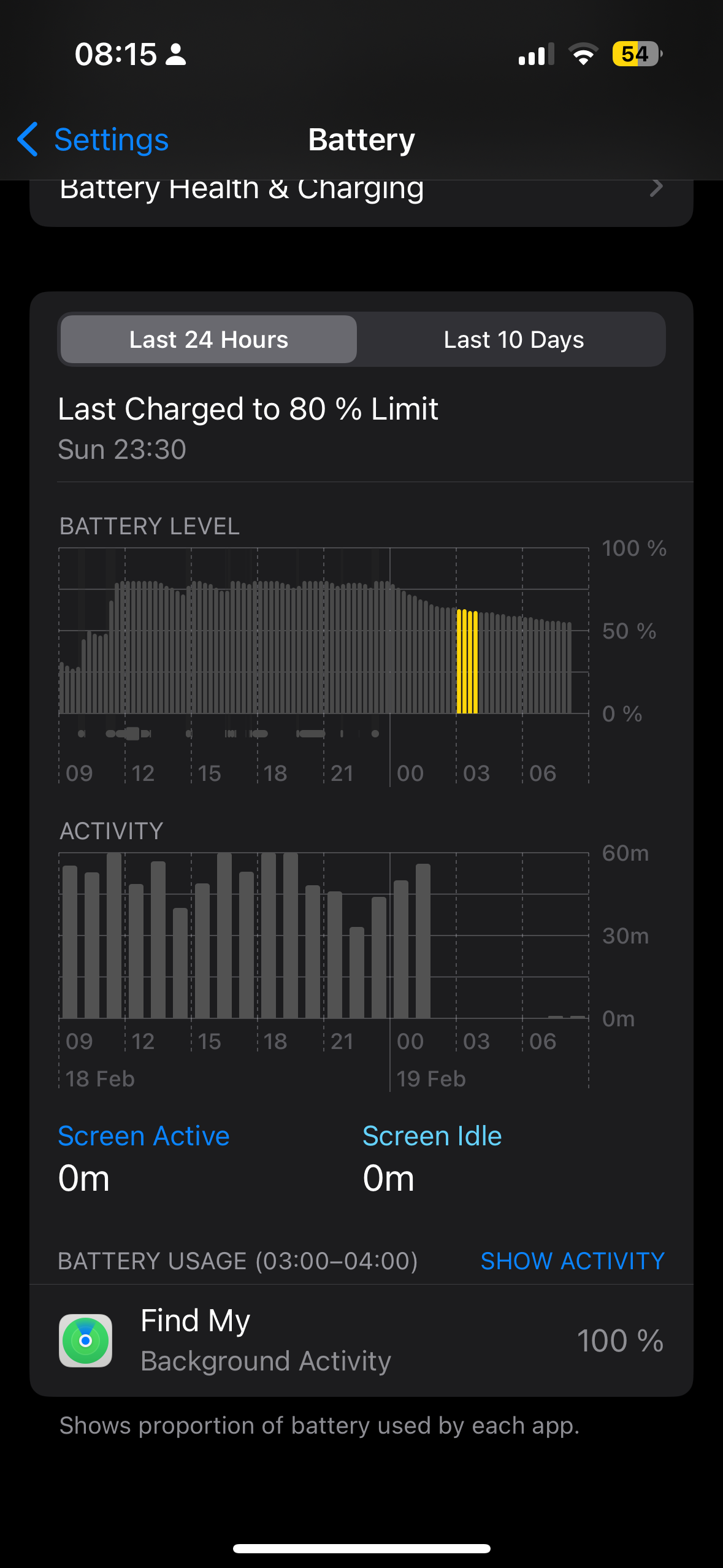

Next I tried disable all Location services. Which didn’t help either.


After 2 days I disabled also FindMy and restarted the phone. 1st day, no change, 2nd no change


….but on the 3rd day suddenly battery drain stopped and I got satisfactory result over night:


4% batt / 8h -> 0.5% per hour

and I managed to get only 0.5 batt cycle used per 1 day


with:


FindMy OFF

Airplane Mode ON

GPS OFF

BT ON

WIFI ON

Location services OFF


I thought it was worth to try turn only location services ON. After another night, batt. drain was also low. So I enabled also FindMy and I’ve got really relieved, as it is now already 3rd day since I did this and it still is only 0.5% per hour and only 0.5 batt cycle used per 1 day. I measured the drain solely over night only as that is the only way to keep the same test conditions not influenced by different way of iPhone use.
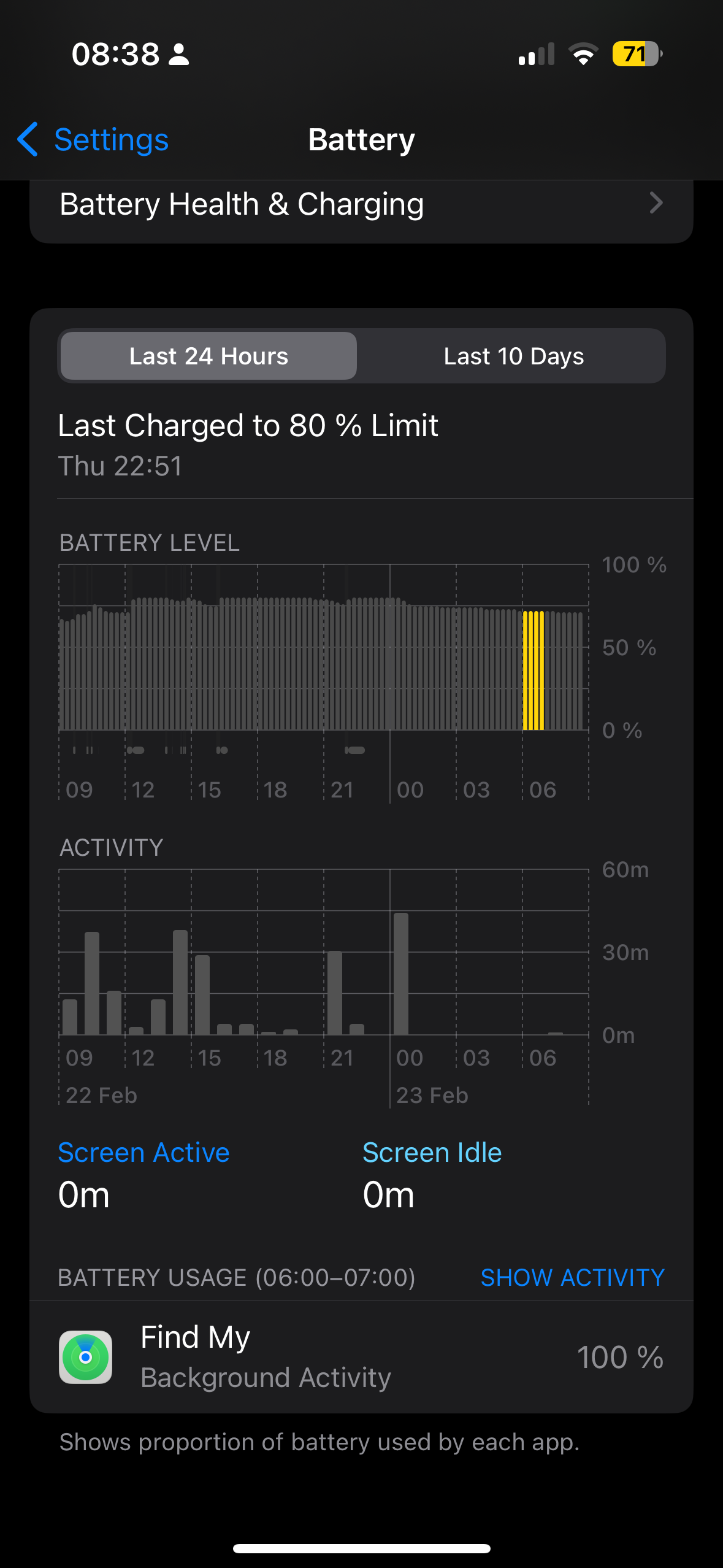


So after all, it was important in my case to keep FindMy and location services disabled for at least 3 days.


I’m not sure whether this is a permanent fix (I hope) but at least it works now as it should. Also remember that you will always see FindMy process under battery statistics, even if it is entirely disabled. Also it will show always 100% if any other background process is running in parallel. Let me know whether it helped to get this fixed for you too.

Oct 17, 2023 2:12 AM in response to saravanan81

For me I switched to 4G and now everything seem normal and battery lasts much longer than 14 pro max.

It's 5G fault / issue.

Now I can run the 15 pro max all at full tilt : gps, screen bright, background apps, motion sensors, camera, full of apps, wifi, bluetooth, all ON.


The 5G option made it both hot and battery drain.

even "battery save" mode was doing nothing.


No probem in 4G.


Also I notice that when any smartphone is in an area with very poor cell network it drains the battery faster (all brands/models)

Oct 29, 2023 12:42 PM in response to laina288

I had an appointment today with Genius bar. They reset my iPhone 15 pro from their Macbook as a completely new phone not from a previous phone backup. Also took off the new feature of screen always on myself and was suggested to turn off app backup refresh for Facebook and social media as they take a lot of battery. If not working next is changing the phone under warranty or change the battery. No replacement available, all out pf stock... nobody knows till when. If bought on finance they cannot even change as I was told, what I don't understand. I will find out how to write an official complaint to Apple about the whole process, the fact that no replacement available and that they ruined everything that made this brand special. I am curious how my battery will last now with the changes.

Oct 31, 2023 11:54 AM in response to gokhan259

I had. Genius bar appt on Sunday. They re-set my phone with their Mac in store, set up as a new iPhone. Turned off background app refresh for all social media. Turned of the always on function for the screen. And battery life is quite ok i have to admit. I suggest trying all these steps, even if it is super annoying having to install apps again and logins. They made noted on my case, if any further issues they would service the battery or exchange.

This thread has been closed by the system or the community team. You may vote for any posts you find helpful, or search the Community for additional answers.

iPhone 15 Pro Battery Drain Issue

Welcome to Apple Support Community
A forum where Apple customers help each other with their products. Get started with your Apple Account.
