How can my kid browse websites with safari when screen time is active?

Our child's iPad and Mac are locked during screen time, with some apps set to 'always allowed'.


We want her to be able to browse some 'selected' websites during downtime.


How can we do this?

iPad, iOS 12

Posted on Sep 27, 2023 9:58 AM

Reply
Question marked as Top-ranking reply

Posted on Sep 30, 2023 12:59 PM

Welcome xavve,


This is something we can definitely assist you with, thanks for posting here.


We want to recommend that you check out the steps in this article, as they will show you exactly where you can allow certain websites and block others. This gives you the freedom to customize this feature as you see fit, based on the needs of your child. Here's where to start: Use parental controls on your child's iPhone, iPad, and iPod touch - Apple Support


From that article:


Prevent web content

iOS and iPadOS can automatically filter website content to limit access to adult content in Safari and other apps on your device. You can also add specific websites to an approved or blocked list, or you can limit access to only approved websites. Follow these steps:

1. Go to Settings and tap Screen Time.
2. Tap Content & Privacy Restrictions and enter your Screen Time passcode. 
3. Tap Content Restrictions, then tap Web Content.
4. Choose Unrestricted Access, Limit Adult Websites, or Allowed Websites.
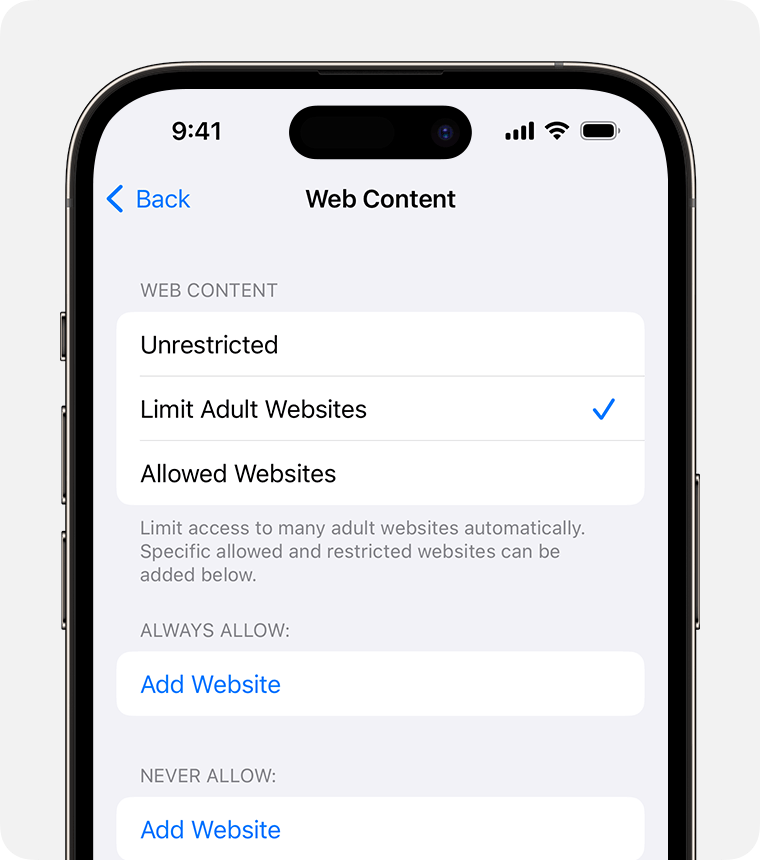
Depending on the access you allow, you might need to add information, like the website that you want to restrict.


We hope this does the trick for you!


Cheers.

1 reply
Question marked as Top-ranking reply

Sep 30, 2023 12:59 PM in response to xavve

Welcome xavve,


This is something we can definitely assist you with, thanks for posting here.


We want to recommend that you check out the steps in this article, as they will show you exactly where you can allow certain websites and block others. This gives you the freedom to customize this feature as you see fit, based on the needs of your child. Here's where to start: Use parental controls on your child's iPhone, iPad, and iPod touch - Apple Support


From that article:


Prevent web content

iOS and iPadOS can automatically filter website content to limit access to adult content in Safari and other apps on your device. You can also add specific websites to an approved or blocked list, or you can limit access to only approved websites. Follow these steps:

1. Go to Settings and tap Screen Time.
2. Tap Content & Privacy Restrictions and enter your Screen Time passcode. 
3. Tap Content Restrictions, then tap Web Content.
4. Choose Unrestricted Access, Limit Adult Websites, or Allowed Websites.

Depending on the access you allow, you might need to add information, like the website that you want to restrict.


We hope this does the trick for you!


Cheers.

This thread has been closed by the system or the community team. You may vote for any posts you find helpful, or search the Community for additional answers.

How can my kid browse websites with safari when screen time is active?

Welcome to Apple Support Community
A forum where Apple customers help each other with their products. Get started with your Apple Account.