I need to change family subscription to monthly

I need to change subscription to monthly when trial expires


Posted on Sep 27, 2023 11:11 AM

Reply
Question marked as Top-ranking reply

Posted on Sep 30, 2023 1:26 PM

Hello Sonya1973,


We'd like to provide you with the steps to change your plan:


"Switch your subscription plan

Change your subscription plan

Switch your subscription plan on your iPhone or iPad

  1. Open the Settings app. 
  2. Tap your name, then tap Subscriptions.
  3. Tap the name of the subscription that you want to change.
  4. Tap See All Plans, then follow the onscreen instructions to complete your purchase.
  5. If you chose a subscription that you can share with family, turn on Share with Family. (Don't see Share with Family? Set up Family Sharing or join a family, then return to your list of subscriptions and turn on Share with Family.) If you don't want to share the subscription with your family, turn off Share with Family.


Switch your subscription plan on your Mac

  1. Open the App Store app.
  2. Click the sign-in button  or your name at the bottom of the sidebar.
  3. Click Account Settings at the top of the window. You might be asked to sign in.
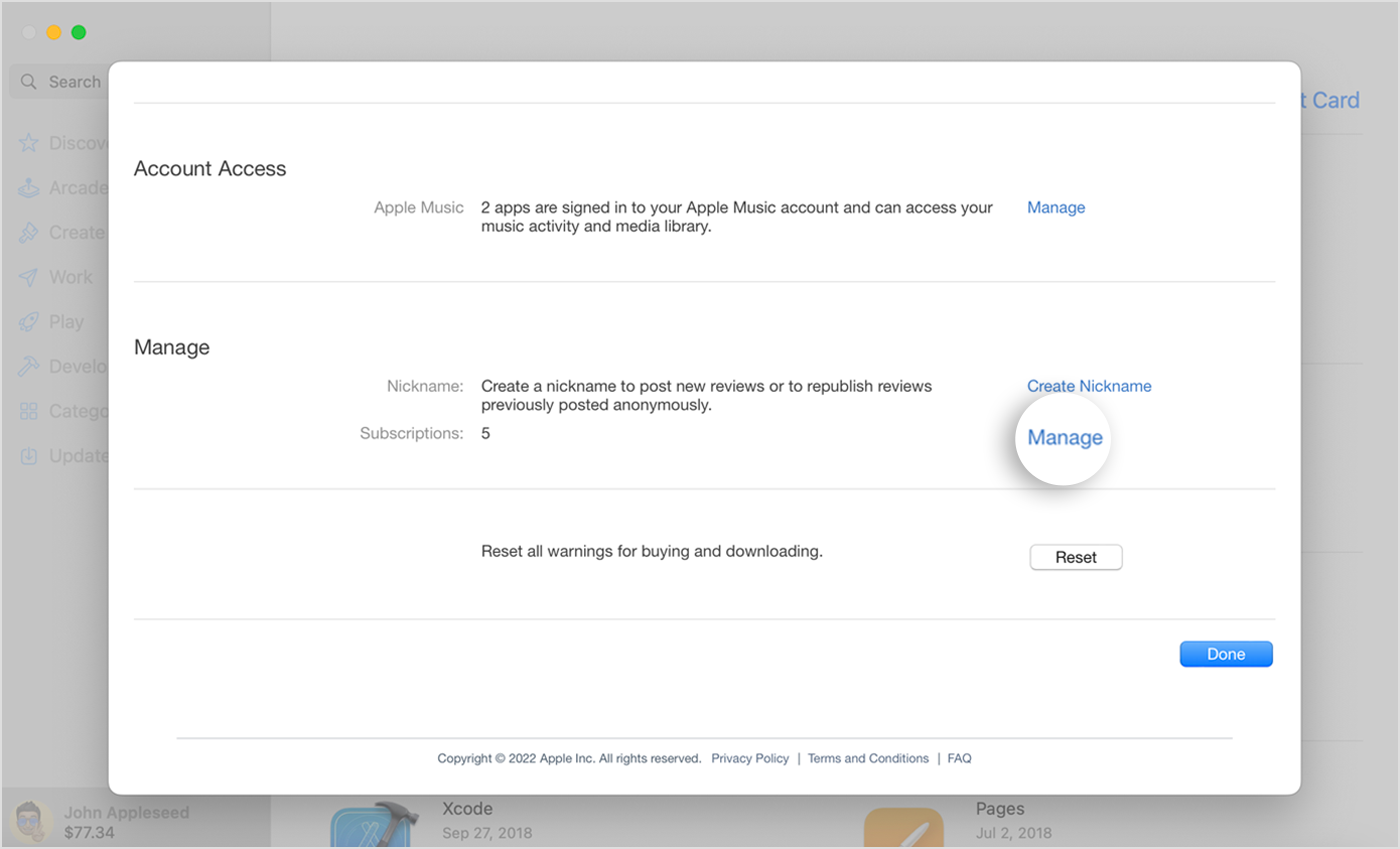
  4. On the page that appears, scroll to Subscriptions, then click Manage.


Mac showing the Manage button next to Subscriptions on the Account Settings page in the App Store.


5. Click Edit next to the subscription that you want to change.

6. Choose a different subscription option. 

7. If you chose a subscription that you can share with family, select Share New Subscriptions. (Don't see Share New Subscriptions? Set up Family Sharing or join a family, then return to this page and turn on Share New Subscriptions.) If you don't want to share the subscription with your family, turn off Share New Subscriptions.


Switch your subscription plan on a Windows PC

  1. On your PC, open iTunes.
  2. From the menu bar at the top of the iTunes window, choose Account, then choose View My Account.
  3. Scroll to the Settings section. Next to Subscriptions, click Manage.
  4. Click Edit next to the subscription that you want to change. 
  5. Choose a different subscription option.


Switch your subscription plan on your Apple TV

  1. Open Settings.
  2. Select Users & Accounts, then select your account.
  3. Select Subscriptions.
  4. Choose the subscription that you want to change.
  5. Choose a different subscription option. 
  6. If you choose a subscription that you can share with family members, make sure that you have set up Family Sharing or joined an existing family group."


More details here: How to switch to a different subscription plan


Take care.


1 reply
Question marked as Top-ranking reply

Sep 30, 2023 1:26 PM in response to sonya1973

Hello Sonya1973,


We'd like to provide you with the steps to change your plan:


"Switch your subscription plan

Change your subscription plan

Switch your subscription plan on your iPhone or iPad

  1. Open the Settings app. 
  2. Tap your name, then tap Subscriptions.
  3. Tap the name of the subscription that you want to change.
  4. Tap See All Plans, then follow the onscreen instructions to complete your purchase.
  5. If you chose a subscription that you can share with family, turn on Share with Family. (Don't see Share with Family? Set up Family Sharing or join a family, then return to your list of subscriptions and turn on Share with Family.) If you don't want to share the subscription with your family, turn off Share with Family.


Switch your subscription plan on your Mac

  1. Open the App Store app.
  2. Click the sign-in button  or your name at the bottom of the sidebar.
  3. Click Account Settings at the top of the window. You might be asked to sign in.
  4. On the page that appears, scroll to Subscriptions, then click Manage.


Mac showing the Manage button next to Subscriptions on the Account Settings page in the App Store.


5. Click Edit next to the subscription that you want to change.

6. Choose a different subscription option. 

7. If you chose a subscription that you can share with family, select Share New Subscriptions. (Don't see Share New Subscriptions? Set up Family Sharing or join a family, then return to this page and turn on Share New Subscriptions.) If you don't want to share the subscription with your family, turn off Share New Subscriptions.


Switch your subscription plan on a Windows PC

  1. On your PC, open iTunes.
  2. From the menu bar at the top of the iTunes window, choose Account, then choose View My Account.
  3. Scroll to the Settings section. Next to Subscriptions, click Manage.
  4. Click Edit next to the subscription that you want to change. 
  5. Choose a different subscription option.


Switch your subscription plan on your Apple TV

  1. Open Settings.
  2. Select Users & Accounts, then select your account.
  3. Select Subscriptions.
  4. Choose the subscription that you want to change.
  5. Choose a different subscription option. 
  6. If you choose a subscription that you can share with family members, make sure that you have set up Family Sharing or joined an existing family group."


More details here: How to switch to a different subscription plan


Take care.


This thread has been closed by the system or the community team. You may vote for any posts you find helpful, or search the Community for additional answers.

I need to change family subscription to monthly

Welcome to Apple Support Community
A forum where Apple customers help each other with their products. Get started with your Apple Account.