HOW TO TURN OFF APPLE WATCH RINGER

HOW TO TURN OFF APPLE WATCH RINGER ON APPLE WATCH SERIES 8 WITH 10.0 SOFTWARE

Apple Watch, watchOS 4

Posted on Sep 30, 2023 7:34 AM

Reply
Question marked as Top-ranking reply

Posted on Sep 30, 2023 7:49 AM

Here's how you can enable Silent Mode on your Apple Watch.



  1. Open Control Center by pressing the side button.
  2. If you are on an older version of watchOS, you can open Control Center by swiping up from the bottom of the screen.
  3. Tap the Silent Mode button. You may need to scroll a bit with the Digital Crown or your finger to find it. This turns on Silent Mode. You can still receive haptic notifications. 


1 reply
Question marked as Top-ranking reply

Sep 30, 2023 7:49 AM in response to mercilasun

Here's how you can enable Silent Mode on your Apple Watch.
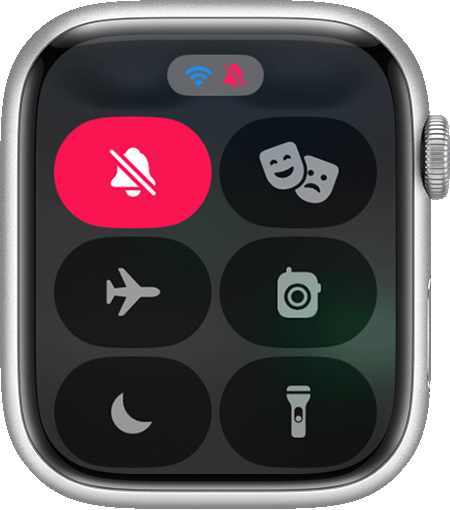


  1. Open Control Center by pressing the side button.
  2. If you are on an older version of watchOS, you can open Control Center by swiping up from the bottom of the screen.
  3. Tap the Silent Mode button. You may need to scroll a bit with the Digital Crown or your finger to find it. This turns on Silent Mode. You can still receive haptic notifications. 


This thread has been closed by the system or the community team. You may vote for any posts you find helpful, or search the Community for additional answers.

HOW TO TURN OFF APPLE WATCH RINGER

Welcome to Apple Support Community
A forum where Apple customers help each other with their products. Get started with your Apple Account.