Sleep Alarm

I have the new Apple Watch. I am not able to turn off the sleep alarm on my phone with my watch or on my watch with my phone. I end up having to turn them off separately even though I have push notifications activated. I didn’t have this issue with my 8 model watch. What’s different?

Apple Watch Series 9, watchOS 10

Posted on Oct 2, 2023 6:53 PM

Reply
Question marked as Top-ranking reply

Posted on Oct 5, 2023 6:40 AM

Hi DCDooley,


After the unpairing to pair again and test you can double check the push settings to be sure they're enabled. The information below from the guide page here can assist: Add an alarm on Apple Watch - Apple Support


"See the same alarms on both iPhone and Apple Watch

  1. Set the alarm on your iPhone.
  2. Open the Apple Watch app on your iPhone.
  3. Tap My Watch, tap Clock, then turn on Push Alerts from iPhone.

Your Apple Watch alerts you when an alarm goes off so you can snooze or dismiss the alarm. (You aren’t alerted on your iPhone when your Apple Watch alarms go off.)"


If the settings are correct and the issue remains, reach out to Apple directly to report the issue and further assist. You can get connected using the link here: Get Support


Best.

Similar questions

6 replies
Question marked as Top-ranking reply

Oct 5, 2023 6:40 AM in response to DCDooley

Hi DCDooley,


After the unpairing to pair again and test you can double check the push settings to be sure they're enabled. The information below from the guide page here can assist: Add an alarm on Apple Watch - Apple Support


"See the same alarms on both iPhone and Apple Watch

  1. Set the alarm on your iPhone.
  2. Open the Apple Watch app on your iPhone.
  3. Tap My Watch, tap Clock, then turn on Push Alerts from iPhone.

Your Apple Watch alerts you when an alarm goes off so you can snooze or dismiss the alarm. (You aren’t alerted on your iPhone when your Apple Watch alarms go off.)"


If the settings are correct and the issue remains, reach out to Apple directly to report the issue and further assist. You can get connected using the link here: Get Support


Best.

Oct 5, 2023 5:42 AM in response to DCDooley

Hi DCDooley,


Thanks for the update. Next we suggest you unpair your Apple Watch and then set it up again, as this can often resolve issues like the one you're experiencing.


When you unpair your Apple Watch, a backup is automatically created that you'll be able to restore from upon setting your watch up again.


To unpair your Apple Watch, follow these steps: Unpair and erase your Apple Watch - Apple Support


To set your Apple Watch up again, use this guide: Set up your Apple Watch - Apple Support


Should the issue persist, contact Apple Support so that they can look into this with you further: Apple Support

Take care.

Oct 4, 2023 6:55 PM in response to DCDooley

Thanks for posting in the Apple Support Communities DCDooley,


Check to make sure that your Apple Watch is connected.


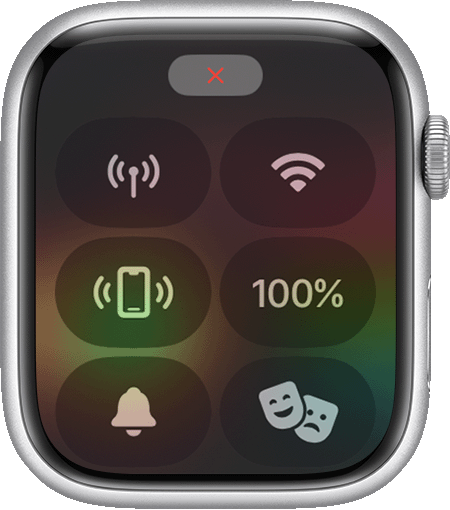
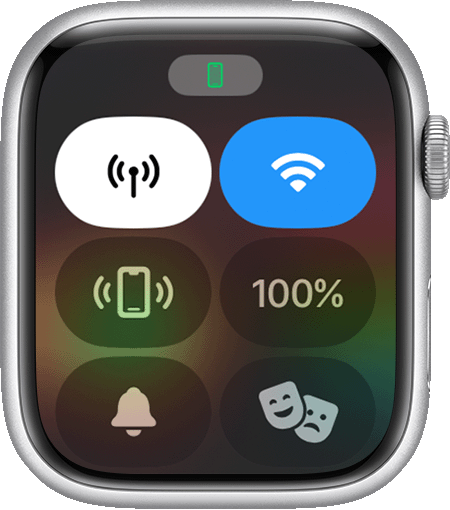
 When your devices disconnect, the red iPhone icon  or the red X icon  appears on your watch face. You can also check your connection in Control Center. When your Apple Watch connects again, the green iPhone icon  appears.
First, bring your Apple Watch and paired iPhone close together. If you still see that the devices are disconnected and need help, try the steps below. After each step, see if your devices can connect.
Disconnected status on Apple Watch Screen. 
 
Connection status on Apple Watch screen. 

If your Apple Watch isn't connected or paired with your iPhone


We hope this helps!

This thread has been closed by the system or the community team. You may vote for any posts you find helpful, or search the Community for additional answers.

Sleep Alarm

Welcome to Apple Support Community
A forum where Apple customers help each other with their products. Get started with your Apple Account.