
Theater mode is no longer on my Watch
I used to be able to swipe up on my Iwatch to find theater mode but it is no longer there. How can I find it?
[Re-Titled by Moderator]
I used to be able to swipe up on my Iwatch to find theater mode but it is no longer there. How can I find it?
[Re-Titled by Moderator]
watchOS 10 changed the procedure to access the Control Center. Please refer to Use the buttons and screen on your Apple Watch.
Press the side button
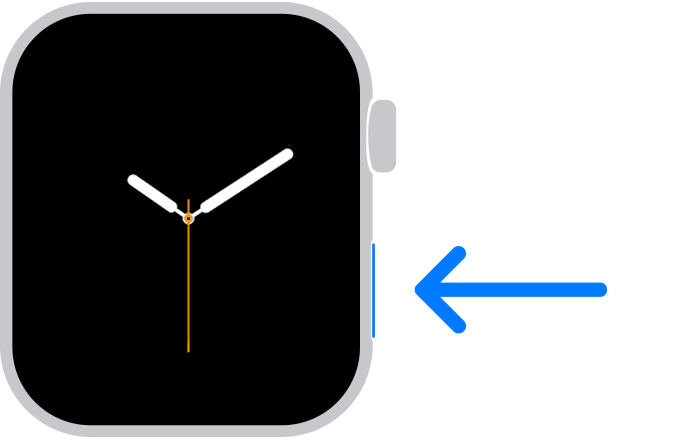
If you have Apple Watch Ultra or later, you can customize the Action button to access your favorite features quickly.
If you haven't updated watchOS, learn how to use the side button.
If the Theater icon is not visible, please refer to Use Control Center on Apple Watch.
Rearrange Control Center
You can rearrange the buttons in Control Center by following these steps:
Remove Control Center buttons
You can remove the buttons in Control Center by following these steps:
 in the corner of the button you want to remove.
To restore a button you’ve removed, open Control Center, tap Edit, then tap  in the corner of the button you want to restore. Tap Done when you’re finished.
watchOS 10 changed the procedure to access the Control Center. Please refer to Use the buttons and screen on your Apple Watch.
Press the side button
If you have Apple Watch Ultra or later, you can customize the Action button to access your favorite features quickly.
If you haven't updated watchOS, learn how to use the side button.
If the Theater icon is not visible, please refer to Use Control Center on Apple Watch.
Rearrange Control Center
You can rearrange the buttons in Control Center by following these steps:
Remove Control Center buttons
You can remove the buttons in Control Center by following these steps:
in the corner of the button you want to remove.To restore a button you’ve removed, open Control Center, tap Edit, then tap in the corner of the button you want to restore. Tap Done when you’re finished.
Barbmob wrote:
What happened to the icons when you swipe up the watch face. It had theater, flashlight etc. That was so easy and you can not find it now. You can go to the settings (which is very inconvenient) but some of the options are no longer there. Help. I can’t wear the watch to bed because it is so bright.
They were moved to the flat oval side button (see picture)
https://support.apple.com/guide/watch/control-center-apd06bc15da1/watchos
Tap once. DO NOT hold the button as that brings up the Emergency call screen. Just tap and release.
If you do not find Theatre mode ID the Control Center, scroll to the end and tap “Edit” where you can add Theatre mode back into the Control Center list.
Dm2pilot wrote:
I want to retrieve the control buttons when I swipe up
The previous Control Center swipe-up has moved to a quick press and release of the flat oval side button
Use Control Center on Apple Watch - Apple Support
DO NOT hold the button, as that brings up Emergency services and the power off icon.
Control Center should then show you the iPhone ping icon (find my iPhone), Battery percentage, Flashlight, Water Lock, Airplane mode, Alarm silence, Theater mode, and all the other Control Center services.
An alternate way to get some of the Control Center services is:
“Hey Siri, find my iPhone”
“Hey Siri, Flashlight”
“Hey Siri, Battery”
“Hey Siri, Airplane mode”
Getting the press and release timing just right can be an issue. You can make it more reliable by changing:
Settings -> Accessibility -> Side Button Click Speed
“Side Button Click Speed” can adjust the press and release timing, so you get the Control Center display every time. Adjusting The “Side Button Click Speed” is also useful for Apple Pay’s double press and release. There is “Default” (sub second timing of needed), “Slow” (up to a second between press and release), and “Slowest” (up to 2 seconds between press and release). I like the “Slow” setting.
NOTE: Slow and Slowest settings do not mean you have to wait a full second or 2 seconds between press and release. It just means you do not need to be super fast.
Control Center moved to the flat oval side button (see Picture)
Use Control Center on Apple Watch - Apple Support
A quick press and Release will bring up the Control Center display, where Theater mode icon should be found.
DO NOT hold the button, as that will bring up the Emergency services display.
makowalski wrote:
your does not work. All the functions I used are gone. Who’s brilliant idea was this?
You should also Tell Apple via
SOMegisti wrote:
I miss swiping up to find my icons. Whose brilliant idea was this to change it. I regret doing the update in my watch.. Arggggg.
You get exactly the same features by tapping on the side button (the one next to the digital crown).
use button below crown.
Press side bottom button and once and there it is.
They moved it. quickly click the button on the right side under the crown.
rhodesyde wrote:
Swiping up to see theater mode, silent, ping the phone, etc. has disappeared from my Apple Watch. All these suggestions that I press the side button quickly do not fix this. Please someone help.
How does it not help?
Have you played with the Side Button Click Speed?
Getting the press and release timing just right can be an issue. You can make it more reliable by changing:
Settings -> Accessibility -> Side Button Click Speed
“Side Button Click Speed” can adjust the press and release timing, so you get the Control Center display every time. Adjusting The “Side Button Click Speed” is also useful for Apple Pay’s double press and release. There is “Default” (sub second timing of needed), “Slow” (up to a second between press and release), and “Slowest” (up to 2 seconds between press and release). I like the “Slow” setting.
NOTE: Slow and Slowest settings do not mean you have to wait a full second or 2 seconds between press and release. It just means you do not need to be super fast.
Wonder why someone thought moving it to the button on the side was a better position 🤷🏻♀️
SOMegisti wrote:
I miss swiping up to find my icons. Whose brilliant idea was this to change it. I regret doing the update in my watch.. Arggggg.
Apple does not read this user-to-user technical support forum for feedback.
But you can send Apple feedback via:
If enough users send feedback, it is more likely a decision maker will see it, and maybe take action.
I did my update and no longer have my theater mode on my I watch where is it
What happened to the icons when you swipe up the watch face. It had theater, flashlight etc. That was so easy and you can not find it now. You can go to the settings (which is very inconvenient) but some of the options are no longer there. Help. I can’t wear the watch to bed because it is so bright.
Aquavit13 wrote:
Wonder why someone thought moving it to the button on the side was a better position 🤷🏻♀️
We are just users like you. We would not know the thinking that happens in Apple development.
You can send your feedback to
Aquavit13 wrote:
Thanks Bob, I thought I was replying to Apple support --- sorry.
These forums are user-to-user technical support forums. Except for some light moderation, Apple does not participate here, and does not use these forms for feedback. It is just fellow Apple users trying to help each other.
Apple Support would be found at: Support
Theater mode is no longer on my Watch



