
Display message
Is it possible to have a changed IPhone 13 pro screen with iOS version 16.0.2 and not see the unknown part message in the part and service history?
iPhone 13 Pro
Is it possible to have a changed IPhone 13 pro screen with iOS version 16.0.2 and not see the unknown part message in the part and service history?
iPhone 13 Pro
Hey there Meek_01,
It looks like you have some questions about an alert on your iPhone regarding unknown parts. We'd be happy to help shed some light on this!
We have a great article that goes over why you may be seeing this message. We'll place the most pertinent part to your issue below: iPhone parts and service history - Apple Support
"An Unknown Part message appears if the part installation is incomplete or if the part:
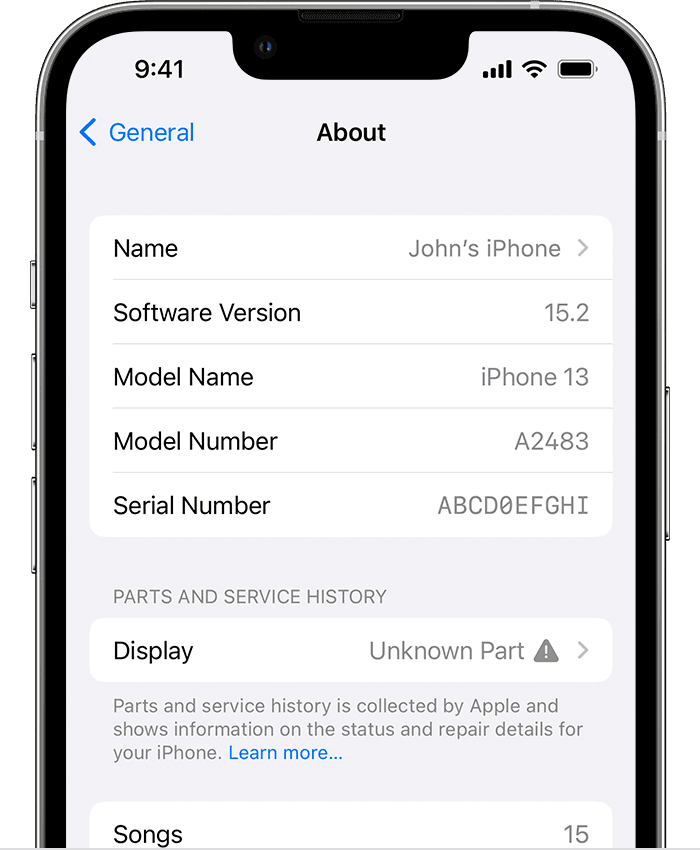

For display and battery, you might find an additional message that says "Apple has updated the device information for this iPhone." This means that Apple has updated the device information maintained for this iPhone for service needs, safety analysis, and to improve future products.
These messages don't affect your ability to use your iPhone, its battery, display, or camera.
One of these messages might appear in the Parts and Service History section: Face ID Issue Detected, Cellular Issue Detected, Ultra Wideband Issue Detected, or Apple Pay Issue Detected.
Learn more about the Face ID Issue Detected message
Learn more about the Cellular, Ultra Wideband, and Apple Pay Issue Detected messages
With iOS versions earlier than iOS 15.2, you can check only if a replacement part is identified as an Unknown Part.
Information about parts and service history is collected by Apple and stored as part of the device information maintained for your iPhone. This information is used for service needs, safety analysis, and to improve future products.
Parts and service history is shown only if your iPhone has had a part replaced or if a part isn't functioning as expected. If a part has been serviced more than once, only the most recent service will appear.
iPhone parts and service history is linked to the serial number of your iPhone. If your iPhone has been repaired in a way that generates a new serial number, you'll find only the parts and service history that's associated with the new serial number."
For more information on why you may be seeing this alert, we'd suggest reaching out to an Apple Store or Apple Authorized Service Provider for inspection. You can locate one near you using: Find Locations
You can also reach out to Apple to look into your options using: Get Support
Have a lovely day!
Hey there Meek_01,
It looks like you have some questions about an alert on your iPhone regarding unknown parts. We'd be happy to help shed some light on this!
We have a great article that goes over why you may be seeing this message. We'll place the most pertinent part to your issue below: iPhone parts and service history - Apple Support
"An Unknown Part message appears if the part installation is incomplete or if the part:
For display and battery, you might find an additional message that says "Apple has updated the device information for this iPhone." This means that Apple has updated the device information maintained for this iPhone for service needs, safety analysis, and to improve future products.
These messages don't affect your ability to use your iPhone, its battery, display, or camera.
One of these messages might appear in the Parts and Service History section: Face ID Issue Detected, Cellular Issue Detected, Ultra Wideband Issue Detected, or Apple Pay Issue Detected.
Learn more about the Face ID Issue Detected message
Learn more about the Cellular, Ultra Wideband, and Apple Pay Issue Detected messages
With iOS versions earlier than iOS 15.2, you can check only if a replacement part is identified as an Unknown Part.
Information about parts and service history is collected by Apple and stored as part of the device information maintained for your iPhone. This information is used for service needs, safety analysis, and to improve future products.
Parts and service history is shown only if your iPhone has had a part replaced or if a part isn't functioning as expected. If a part has been serviced more than once, only the most recent service will appear.
iPhone parts and service history is linked to the serial number of your iPhone. If your iPhone has been repaired in a way that generates a new serial number, you'll find only the parts and service history that's associated with the new serial number."
For more information on why you may be seeing this alert, we'd suggest reaching out to an Apple Store or Apple Authorized Service Provider for inspection. You can locate one near you using: Find Locations
You can also reach out to Apple to look into your options using: Get Support
Have a lovely day!
Thanks Manjor. I wanted to know if it’s possible to be using a damaged screen on an iPhone 13 pro with iOS version 16.0.2 without it showing a display message in settings. Thanks once again for reaching out
Greetings Meek_01,
We can understand. Generally the iPhone will only detect actual service history and parts changed on the device. This does not include damage to the screen. If you believe that there is damage to your screen/device, you'll want to contact Apple Support directly. You can reach out to them by clicking here: Get Support or over the phone by calling the number that is most local to your region: Contact Apple for support and service - Apple Support.
Kind regards!
Display message


