Crossfade doesn’t work with back to back album tracks

I’ve been using crossfade and loved it, but I’ve noticed some issues.


Back to back album tracks will not cross fade into one another, even when added to a playlist or using play next. I’ve attempted this with multiple albums and the back to back tracks never cross fade.


Is anyone else having this issue? How can it be fixed?

iPhone 12 Pro, iOS 17

Posted on Oct 8, 2023 4:02 AM

Reply
3 replies

Oct 9, 2023 12:21 PM in response to steviet_

Hi steviet_,


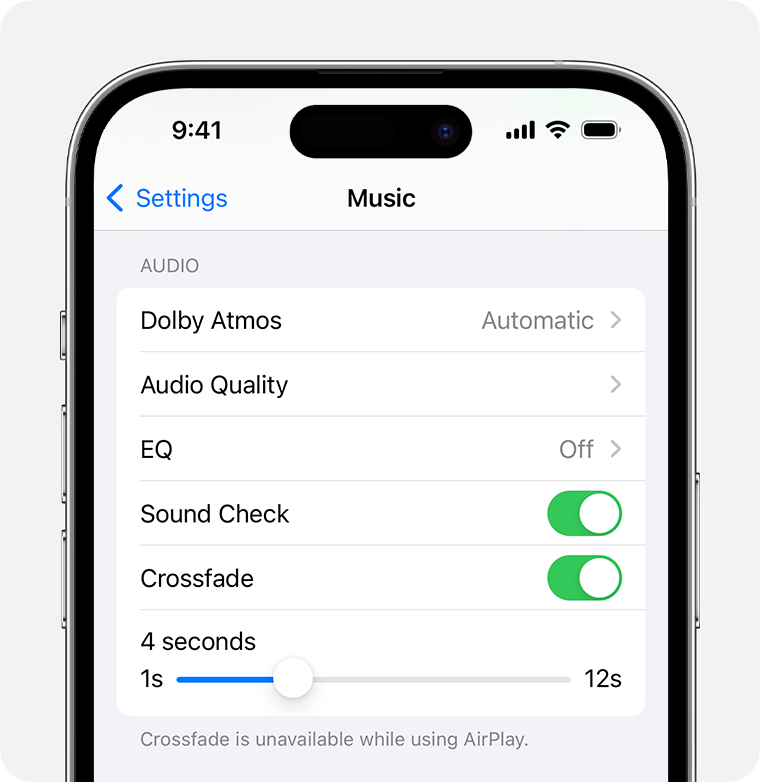
Regarding using crossfade on iOS, if using this with AirPlay the feature will be unavailable. View the information below found in the article here: How to turn on crossfade in the Apple Music app - Apple Support


"How to turn on crossfade on your iPhone or iPad

  1. Open Settings.
  2. Tap Apple Music.
  3. Turn on Crossfade. If you don't see Crossfade, update your iPhone or iPad to the latest version of iOS or iPadOS.

iPhone showing crossfade turned on in Music settings

From here, you can drag the slider to set the amount of time it takes for the current song to fade out and the new song to fade in."


If you continue to have an issue, reach out to Apple Support directly to further assist. Get Support


Cheers.

Oct 11, 2023 7:15 PM in response to OrigamiFan1

Hi OrigamiFan1,


I know how to turn crossfade on, it has been turned on and I was not using airplay.


My question was: why doesn’t crossfade work for tracks that are back to back on a given album? I’ve tried putting the songs back to back in a playlist, using play next, and cross fade still won’t work for back to back album tracks. This happens regardless of how long I’ve made the crossfade.

This thread has been closed by the system or the community team. You may vote for any posts you find helpful, or search the Community for additional answers.

Crossfade doesn’t work with back to back album tracks

Welcome to Apple Support Community
A forum where Apple customers help each other with their products. Get started with your Apple Account.