Apple Music app shuffle not working

Everytime I try listening to one of my playlists or even the entire library on shuffle it reverts to alphabetical playing after about 3 songs. Has this ever been addressed?

Posted on Oct 8, 2023 8:23 PM

Reply
Question marked as Top-ranking reply

Posted on Oct 9, 2023 5:04 PM

Hi TheRickestRick,


To shuffle songs via Apple Music on your device, we recommend that you try the steps here: How to shuffle music on your iPhone - Apple Support


To perform the recommended troubleshooting steps via the link above, complete the steps in the section titled "How to turn off shuffle."


HOW TO TURN OFF SHUFFLE
1. Tap the song that's playing at the bottom of your screen.
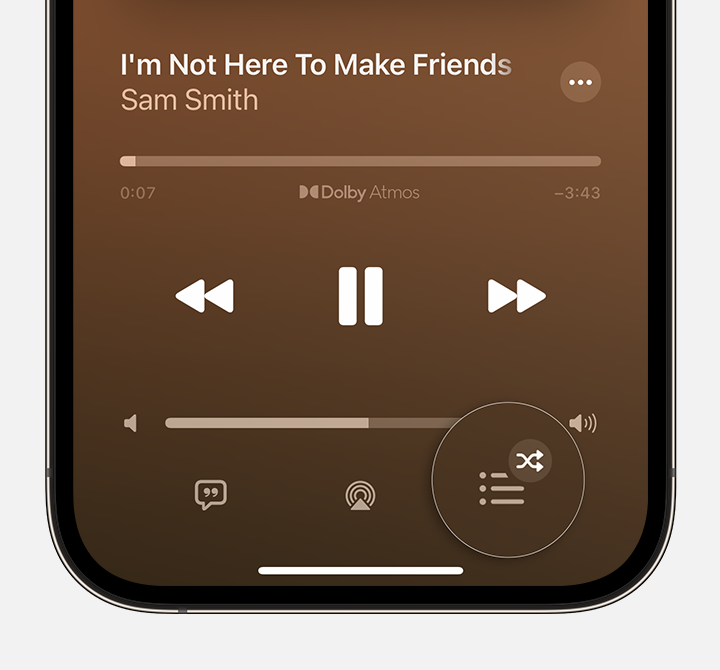
2. Tap the Playing Next button Playing Next button showing shuffle is on in the lower-right corner.
iPhone showing the Playing Next button in the Apple Music app
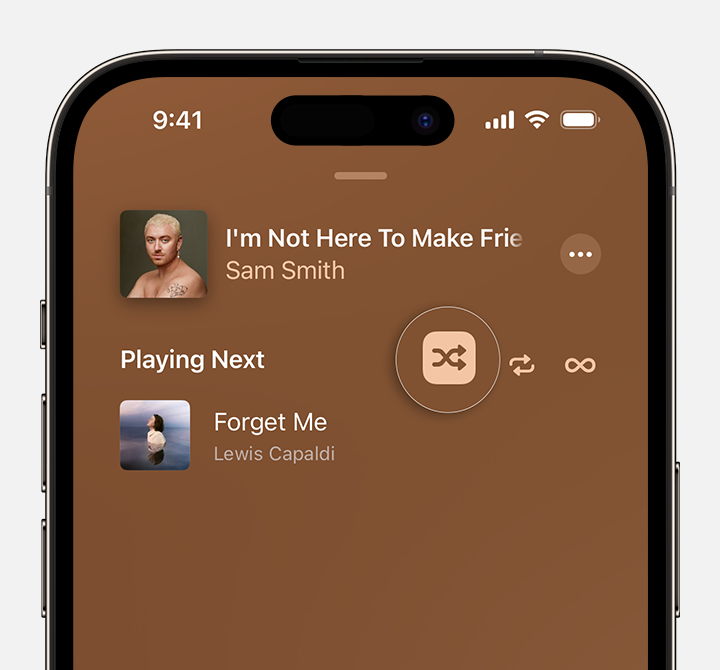
3. Tap the Shuffle button Shuffle On button to turn Shuffle Off.
iPhone showing the Shuffle button at the top of Playing Next in the Apple Music app

When the Shuffle button isn't highlighted, shuffle is turned off.


HOW TO SHUFFLE ALL SONGS OR ALBUMS IN YOUR LIBRARY 1. Open the Apple Music app.
2. At the bottom of your screen, tap Library.
3. Tap Songs or Albums.
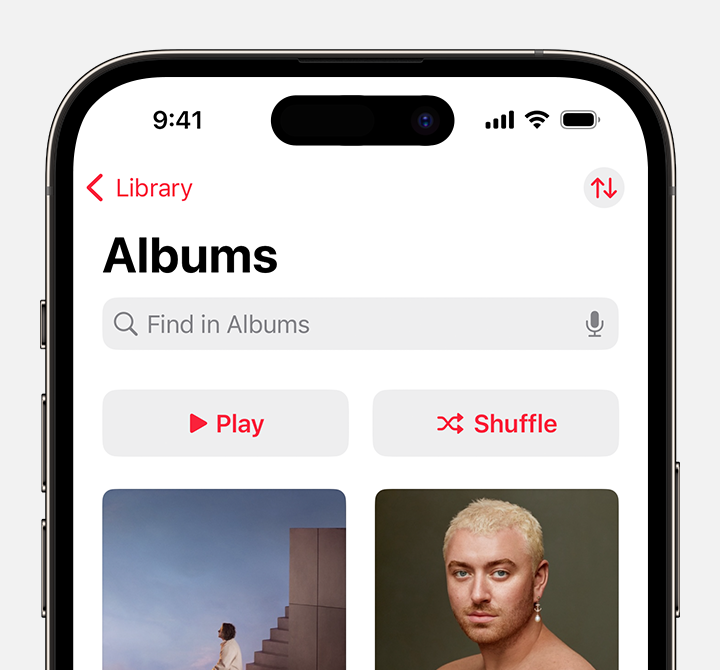
4. At the top of Songs or Albums, tap the Shuffle button.
iPhone showing the Shuffle button at the top of Albums in the Library tab of the Apple Music app
You can't turn off shuffle from here. Learn how to turn off shuffle.


We recommend the steps above because they will show you how to shuffle song via Apple Music.


If you’re still experiencing the same issue, follow the steps in the section below.


If you don't see the Shuffle button
* Update your iPhone to the latest version of iOS.
* You can't shuffle music in your Autoplay queue. If you're autoplaying music, the Shuffle button disappears. Learn more about Autoplay.
* Shuffle isn't available in the Apple Music Classical app.
Learn how to shuffle music on more devices
* Shuffle music on your Mac or PC.


Please let us know the outcome after giving the above steps a try.


Thanks for using the Apple Support Communities.


Cheers!

Similar questions

1 reply
Question marked as Top-ranking reply

Oct 9, 2023 5:04 PM in response to TheRickestRick

Hi TheRickestRick,


To shuffle songs via Apple Music on your device, we recommend that you try the steps here: How to shuffle music on your iPhone - Apple Support


To perform the recommended troubleshooting steps via the link above, complete the steps in the section titled "How to turn off shuffle."


HOW TO TURN OFF SHUFFLE
1. Tap the song that's playing at the bottom of your screen.
2. Tap the Playing Next button Playing Next button showing shuffle is on in the lower-right corner.
iPhone showing the Playing Next button in the Apple Music app
3. Tap the Shuffle button Shuffle On button to turn Shuffle Off.
iPhone showing the Shuffle button at the top of Playing Next in the Apple Music app

When the Shuffle button isn't highlighted, shuffle is turned off.


HOW TO SHUFFLE ALL SONGS OR ALBUMS IN YOUR LIBRARY 1. Open the Apple Music app.
2. At the bottom of your screen, tap Library.
3. Tap Songs or Albums.
4. At the top of Songs or Albums, tap the Shuffle button.
iPhone showing the Shuffle button at the top of Albums in the Library tab of the Apple Music app
You can't turn off shuffle from here. Learn how to turn off shuffle.


We recommend the steps above because they will show you how to shuffle song via Apple Music.


If you’re still experiencing the same issue, follow the steps in the section below.


If you don't see the Shuffle button
* Update your iPhone to the latest version of iOS.
* You can't shuffle music in your Autoplay queue. If you're autoplaying music, the Shuffle button disappears. Learn more about Autoplay.
* Shuffle isn't available in the Apple Music Classical app.
Learn how to shuffle music on more devices
* Shuffle music on your Mac or PC.


Please let us know the outcome after giving the above steps a try.


Thanks for using the Apple Support Communities.


Cheers!

This thread has been closed by the system or the community team. You may vote for any posts you find helpful, or search the Community for additional answers.

Apple Music app shuffle not working
Welcome to Apple Support Community
A forum where Apple customers help each other with their products. Get started with your Apple Account.