iPhone 15 Pro Max
How do I switch between Megapixel
iPhone 15 Pro Max, iOS 17
How do I switch between Megapixel
iPhone 15 Pro Max, iOS 17
Hello Sblau,
We can understand wanting to know the best way to edit the photos your camera takes in order to get the best resolution. Check out this page to learn more: About Apple ProRAW - Apple Support.
Choose a resolution for your ProRAW images
On iPhone 14 Pro models, you can capture Apple ProRAW images at two resolutions: 12 megapixels or 48 megapixels. 48 MP images retain more detail in your image file. This lets you zoom in and have more creative control when cropping. 12 MP images result in a smaller file size.
1. In the Settings app, tap Camera.
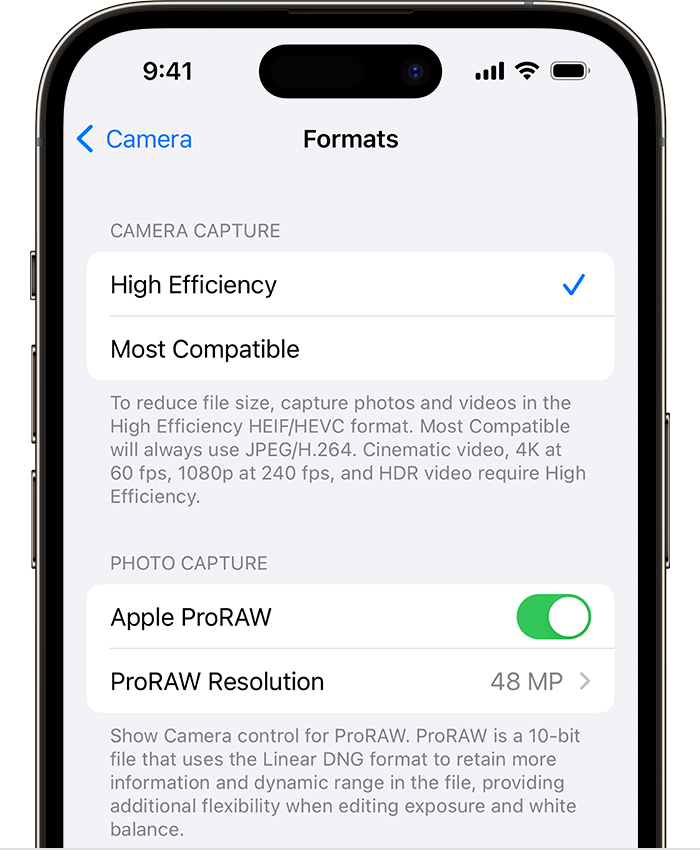
2. Tap Formats.
3. Turn on Apple ProRAW to reveal the resolution options.
4. Tap ProRAW Resolution and select either 12 MP or 48 MP.
The file size of a ProRAW image at 12 MP resolution is approximately 25 MB and approximately 75 MB at 48 MP. Only photos that you take with the main camera at 1x can be saved 48 MP. Ultra Wide, Telephoto, Night mode, flash, and macro photos can only be saved at 12 MP.
We hope this information helps you out.
Kind regards!
Hello Sblau,
We can understand wanting to know the best way to edit the photos your camera takes in order to get the best resolution. Check out this page to learn more: About Apple ProRAW - Apple Support.
Choose a resolution for your ProRAW images
On iPhone 14 Pro models, you can capture Apple ProRAW images at two resolutions: 12 megapixels or 48 megapixels. 48 MP images retain more detail in your image file. This lets you zoom in and have more creative control when cropping. 12 MP images result in a smaller file size.
1. In the Settings app, tap Camera.
2. Tap Formats.
3. Turn on Apple ProRAW to reveal the resolution options.
4. Tap ProRAW Resolution and select either 12 MP or 48 MP.
The file size of a ProRAW image at 12 MP resolution is approximately 25 MB and approximately 75 MB at 48 MP. Only photos that you take with the main camera at 1x can be saved 48 MP. Ultra Wide, Telephoto, Night mode, flash, and macro photos can only be saved at 12 MP.
We hope this information helps you out.
Kind regards!
iPhone 15 Pro Max