iPhone screen

I just bought my iphone 13 mini few days ago. It seems fine at the beginning, the screens and everything. Until i woke up yesterday morning realizing that my phone screen was slightly different from before. All The pictures that i took in my gallery’s getting darker and my screen colour contrast are also getting weird. I did everything, fixing it from the setting, restarted and reset my phone, and nothing is changing. Is there any way to fix this problem?

iPhone 13 mini, iOS 16

Posted on Oct 8, 2023 9:58 PM

Reply
Question marked as Top-ranking reply

Posted on Oct 9, 2023 5:46 PM

Thanks for posting in the Apple Support Communities haziqah292,


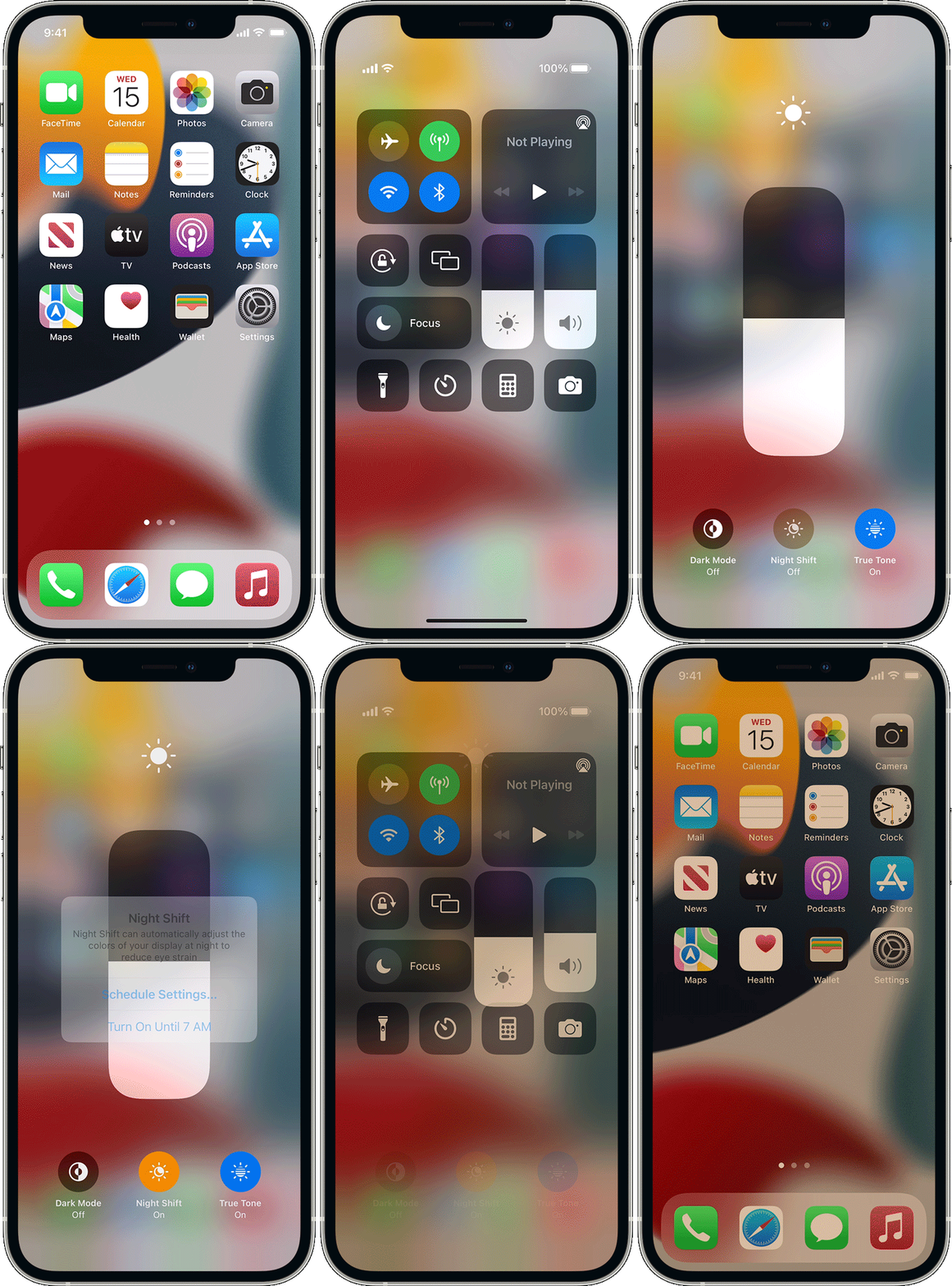
Check to see whether Night Shift is enabled,, you can also make customizations, or schedule a time for it to activate.


Night Shift uses the clock and geolocation of your device to determine when it’s sunset in your location. Then it automatically shifts the colors of your display to warmer colors. In the morning, it returns the display to its regular settings.
 
Turn on Night Shift
There are two ways to turn Night Shift on and off:
* Open Control Center. Firmly press the Brightness control icon, then tap brightness icon to turn Night Shift on or off.
* Go to Settings > Display & Brightness > Night Shift.2 On the same screen, you can schedule a time for Night Shift to turn on automatically and adjust color temperature.
By default, Night Shift turns on from sunset to sunrise.

Use Night Shift on your iPhone, iPad, and iPod touch


Cheers!


1 reply
Question marked as Top-ranking reply

Oct 9, 2023 5:46 PM in response to haziqah292

Thanks for posting in the Apple Support Communities haziqah292,


Check to see whether Night Shift is enabled,, you can also make customizations, or schedule a time for it to activate.


Night Shift uses the clock and geolocation of your device to determine when it’s sunset in your location. Then it automatically shifts the colors of your display to warmer colors. In the morning, it returns the display to its regular settings.
 
Turn on Night Shift
There are two ways to turn Night Shift on and off:
* Open Control Center. Firmly press the Brightness control icon, then tap brightness icon to turn Night Shift on or off.
* Go to Settings > Display & Brightness > Night Shift.2 On the same screen, you can schedule a time for Night Shift to turn on automatically and adjust color temperature.
By default, Night Shift turns on from sunset to sunrise.

Use Night Shift on your iPhone, iPad, and iPod touch


Cheers!


This thread has been closed by the system or the community team. You may vote for any posts you find helpful, or search the Community for additional answers.

iPhone screen

Welcome to Apple Support Community
A forum where Apple customers help each other with their products. Get started with your Apple Account.