Need help to the unusual case of requesting refund

My young daughter has accidently subscribed in the app Duolingo in Aug 2023, we only found it when looking through the bank record a few days ago. And then we have found the Apple invoice about this purchase in the email inbox, unfortunately, we have also overlooked it. The cost is 699DKK.


Then I have followed the instruction to request the refund on Apple website,

I have followed step by step in the workflow of "Request a refund for apps or content that you bought from Apple." However, this purchase can't been found in the purchase history so it's not possible for me to complete the refund request. Yes I know I should choose "All" in Apple id field to see the purchase of all family members. I have tried many times but this purchase can't found.


I have also tried the work flow of "I want to report a problem". It ends up with the same.


Then I have checked my daughter's iPhone. I can see that this app is listed in the purchase history and marked "unsubscribed". However, the app is still a free version in her phone despite this year's subscription has been paid. So I guess she has accidently subscribed and then unsubscribed, the money has been deducted, but the app version remain as unpaid free version.


I can't find other way to report the problem and request refund, hopefully the community will shed some lights on the case.


Thanks.


br

kuhuang

Posted on Oct 9, 2023 5:51 AM

Reply
Question marked as Top-ranking reply

Posted on Oct 10, 2023 7:59 AM

Hello kuhuang,


We can understand wanting to locate that charge in order to get that refund started. It looks like you joined the Apple Support Communities from an excellent starting point; Get a refund for purchases made with credit or debit cards using Apple Pay - Apple Support.


However, the information on this page may help a bit more with locating that charge: If you see 'apple.com/bill' on your billing statement - Apple Support.


If you still can't identify the charge
Can't find a matching charge at reportaproblem.apple.com? Find out if you used another account to make a purchase.

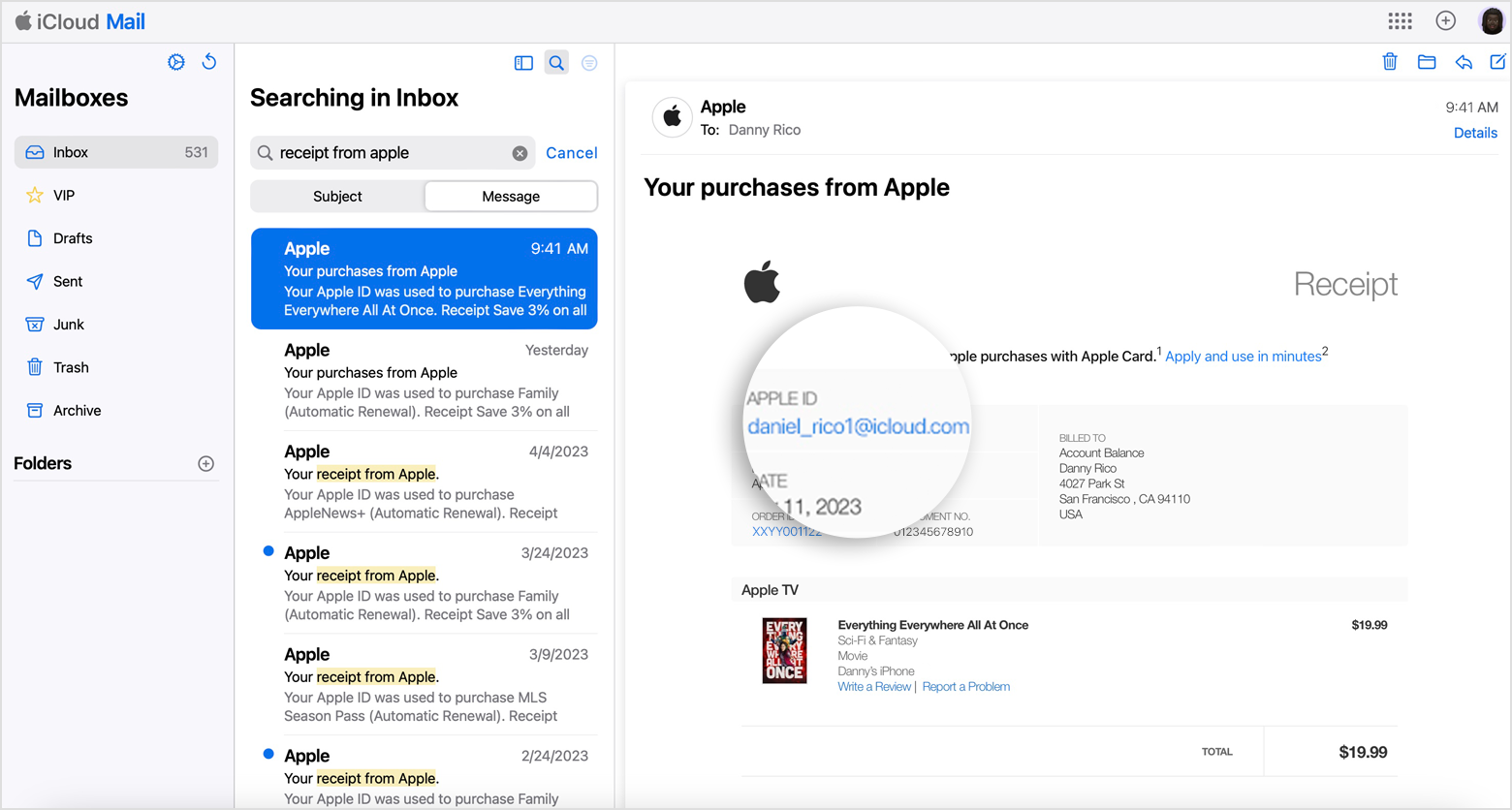
1. Search your email for the words "receipt from Apple" or "invoice from Apple".
2. Look for a receipt that matches the amount that you see on your billing statement. 
3. On the receipt, see what was purchased and which Apple ID was used.
4. Check if the Apple ID in the email is different than what you used to sign in to reportaproblem.apple.com. If it's different, use this Apple ID to sign in to reportaproblem.apple.com and review your purchase history.


Also, look over the information on this page as well: View your purchase history for the App Store, iTunes Store, and other Apple media services - Apple Support.


If you can't find an item in your purchase history

Can’t find the item that you’re looking for? If you have more than one Apple ID, you might have been signed in with a different Apple ID when you bought the item. Sign in with the other Apple ID and check your purchase history again.

If you received a suspicious email notification about a purchase, the email might not be from Apple or reflect actual charges to your account. Learn how to identify legitimate App Store or iTunes Store emails.


If you still can't find the charge, you may want to contact Apple Support directly. You can reach out to them by clicking here: Get Support or over the phone by calling the number that is most local to your region: Contact Apple for support and service - Apple Support.


Kind regards!

Similar questions

2 replies
Question marked as Top-ranking reply

Oct 10, 2023 7:59 AM in response to kuhuang

Hello kuhuang,


We can understand wanting to locate that charge in order to get that refund started. It looks like you joined the Apple Support Communities from an excellent starting point; Get a refund for purchases made with credit or debit cards using Apple Pay - Apple Support.


However, the information on this page may help a bit more with locating that charge: If you see 'apple.com/bill' on your billing statement - Apple Support.


If you still can't identify the charge
Can't find a matching charge at reportaproblem.apple.com? Find out if you used another account to make a purchase.

1. Search your email for the words "receipt from Apple" or "invoice from Apple".
2. Look for a receipt that matches the amount that you see on your billing statement. 
3. On the receipt, see what was purchased and which Apple ID was used.
4. Check if the Apple ID in the email is different than what you used to sign in to reportaproblem.apple.com. If it's different, use this Apple ID to sign in to reportaproblem.apple.com and review your purchase history.


Also, look over the information on this page as well: View your purchase history for the App Store, iTunes Store, and other Apple media services - Apple Support.


If you can't find an item in your purchase history

Can’t find the item that you’re looking for? If you have more than one Apple ID, you might have been signed in with a different Apple ID when you bought the item. Sign in with the other Apple ID and check your purchase history again.

If you received a suspicious email notification about a purchase, the email might not be from Apple or reflect actual charges to your account. Learn how to identify legitimate App Store or iTunes Store emails.


If you still can't find the charge, you may want to contact Apple Support directly. You can reach out to them by clicking here: Get Support or over the phone by calling the number that is most local to your region: Contact Apple for support and service - Apple Support.


Kind regards!

This thread has been closed by the system or the community team. You may vote for any posts you find helpful, or search the Community for additional answers.

Need help to the unusual case of requesting refund

Welcome to Apple Support Community
A forum where Apple customers help each other with their products. Get started with your Apple Account.